Category: Social Media Growth

  • Boost Your Apple Music Likes Easily with Nexar

    Making good music is one thing. Getting people to discover it, listen to it and become invested in it is another. For independent artists, this can be one of the most challenging parts of building a music career. You can spend months working on a song, get it distributed across streaming platforms and still struggle to get the attention you hoped for.

    That’s where music promotion comes in.

    Beyond getting streams, artists want people to save their songs, add them to their libraries, share them with friends and show that they genuinely enjoy their work. These interactions can help artists build an audience and create more visibility around their releases.

    If you’re an independent artist, record label manager or music marketer, you may have wondered how to Boost Apple Music Likes and get more people engaging with your releases. Should you focus on organic promotion? Are there tools that can help? And is buying Apple Music likes a good idea?

    In this guide, we’ll explain how Apple Music likes work, explore eight practical ways to increase them, discuss the promotional channels worth investing in and show you how Nexar’s social media boosting tool can support your music promotion efforts.

    Quick Answer: How Can You Get More Apple Music Likes?

    Getting more likes on Apple Music starts with making your music easy to discover and giving listeners a reason to engage with it. You can achieve this through consistent promotion, direct links, social media campaigns and music promotion tools.

    Here are some things to prioritise:

    • Create music people want to revisit: Give listeners a reason to save your songs and return to them.
    • Make discovery easier: Share direct links to your releases instead of making people search for them.
    • Use social media: Promote your music on platforms where your target audience spends time.
    • Explore boosting services: Use promotional tools to support your visibility and engagement goals.
    • Monitor your performance: Use Apple Music for Artists to understand how your music is performing.

    The important thing is to have a promotion strategy that extends beyond release day.

    What Are Apple Music Likes, and Do They Matter?

    Before exploring how to increase your likes, it’s worth understanding what they represent.

    Apple Music allows listeners to express their preference for songs, albums and playlists through its Love and Favorite features. When someone interacts with music this way, they are telling Apple Music what they enjoy, which can help personalise their listening experience and recommendations.

    Unlike Instagram or TikTok, Apple Music doesn’t display a conventional public like counter beneath every song. This means artists may not be able to measure their popularity through visible likes in the same way they would on social media.

    However, that doesn’t make likes irrelevant.

    For artists, getting more people to engage with their releases is part of building a stronger presence on a streaming platform. It can also complement other promotional efforts, particularly when combined with streams, playlist placements, Shazam activity and audience growth.

    Ultimately, the goal is to make your music discoverable and give people more reasons to interact with it.

    How to Boost Apple Music Likes the Right Way

    Getting more likes requires more than simply uploading a song and waiting for people to find it. You need to create opportunities for people to discover your music and make it easy for them to engage.

    Think of the process in three stages:

    1. Discovery: Someone comes across your music through social media, a playlist, a recommendation or another promotional channel.
    2. Engagement: They become interested enough to visit your Apple Music profile, listen to your song or explore your other releases.
    3. Action: They favorite the song, add it to their library, share it or return to listen again.

    Each stage contributes to your overall music promotion strategy. If people aren’t discovering your music, they have little opportunity to engage with it.

    This is why artists should pay attention to both the quality of their releases and the strategies they use to promote them.

    8 Ways to Increase Apple Music Likes Organically
    How to Boost Apple Music Like Organically

    You don’t always need a large marketing budget to get people interested in your music. Sometimes, a few consistent promotional activities can help you reach listeners who would genuinely enjoy your sound.

    Here are eight strategies worth incorporating into your next release campaign.

    1. Make the First 30 Seconds Count

    The opening of your song can influence whether someone decides to keep listening or move on to something else. While there’s no universal formula for a successful song, a compelling introduction gives listeners a reason to stay.

    Pay attention to your song structure, production and overall listening experience. If your strongest hook comes much later in the track, consider how you can introduce it in your promotional clips to capture attention.

    2. Run a Pre-Add Campaign

    Don’t wait until release day to start talking about your music. A pre-add campaign allows interested listeners to add an upcoming release to their Apple Music libraries before it becomes available.

    Work with your distributor to create a pre-add link and share it across your social media platforms, email list and fan communities.

    You can also build anticipation by sharing snippets, artwork, behind-the-scenes footage and stories about the upcoming release.

    3. Claim Your Apple Music Artist Profile

    Your artist profile is an important part of your presence on Apple Music. It gives listeners a place to explore your music, discover your releases and learn more about you.

    Claiming your profile through Apple Music for Artists also gives you access to analytics that can help you understand your audience.

    You can explore listener trends, identify locations where your music is gaining attention and monitor your performance over time. These insights can help you make more informed decisions about where to focus your promotional efforts.

    4. Share Direct Links to Your Music

    Imagine someone discovers your song on Instagram but has to search through Apple Music to find it. There’s a chance they might lose interest before getting to the actual track.

    Direct links eliminate this unnecessary step.

    Whenever you promote a new release, include a link that takes listeners straight to the song or album. You can share it in your social media bio, captions, WhatsApp status, newsletters and other communication channels.

    Make your call to action clear. Rather than simply saying “My new song is out”, encourage people to listen, favorite the track and add it to their libraries.

    5. Use Short-Form Videos to Promote Your Songs

    Short-form video has become an important discovery channel for music. Platforms like TikTok, Instagram Reels and YouTube Shorts allow artists to introduce their songs to people who may not have come across them otherwise.

    You don’t need an elaborate music video for every release. A short performance clip, lyric video, behind-the-scenes recording session or video explaining the inspiration behind a song can create interest.

    Experiment with different formats and pay attention to the clips that generate the most meaningful responses. When people connect with a particular part of your song, make it easy for them to find the full version on Apple Music.

    6. Collaborate With Other Artists and Creators

    You don’t have to promote your music alone. Collaborating with other artists, producers, influencers and content creators can introduce your work to audiences beyond your existing fan base.

    For example, you could feature another artist on a song, participate in a music challenge, create content together or exchange promotional opportunities.

    The key is to find people whose audiences are likely to enjoy your music. A collaboration with the right creator can introduce your release to listeners who may eventually become regular fans.

    7. Build a Community Around Your Music

    People are more likely to support artists they feel connected to. Beyond posting promotional content, create opportunities for listeners to interact with you and become part of your music journey.

    You can share the stories behind your songs, respond to comments, host live sessions and create WhatsApp or Telegram communities for your most engaged listeners.

    Don’t make every interaction about asking people to stream or favorite your music. Give them something interesting to connect with, too.

    Over time, these relationships can turn casual listeners into people who actively look forward to your next release.

    8. Release Music Consistently

    Consistency gives listeners more opportunities to discover your work. It also helps you maintain an active presence across streaming and social media platforms.

    This doesn’t mean releasing a new song every week. Instead, develop a realistic release schedule that gives you enough time to create quality music and promote each project properly.

    You can also revisit older releases by creating new content around them, sharing audience reactions or introducing them to people who may have missed them the first time.

    A good release strategy considers what happens after launch day, not just the excitement surrounding the initial release.

    Apple Music Promotion: Where to Spend Your Time and Budget

    Knowing how to promote your music is just as important as knowing where to promote it. Different platforms serve different purposes, and the best approach is to combine channels that help you reach new listeners, engage existing fans and direct people to your Apple Music releases.

    Here are some promotional options to consider.

    1. Short-Form Video Platforms

    TikTok, Instagram Reels and YouTube Shorts are useful for introducing your music to new audiences. You can share song snippets, lyric videos, performance clips and other creative content that encourages people to discover your work.

    Focus on creating content that fits the platform rather than simply uploading the same promotional poster everywhere.

    2. Playlists and Music Curators

    Playlists can introduce your music to people who already enjoy your genre. Research independent curators, explore submission opportunities and connect with artists who create playlists around similar sounds.

    Prioritise relevant playlists and legitimate placements instead of services promising guaranteed streams or artificial engagement.

    3. Email and Messaging Communities

    Your existing audience can be a valuable source of support whenever you release new music. Use your email list, WhatsApp groups and Telegram communities to share release announcements, direct links and updates.

    Personalised messages often work better than repeatedly sending generic promotional content. Give people a reason to care about the release and make it easy for them to listen.

    4. Collaborations and Features

    Working with other musicians and content creators can help you reach audiences that may not know your music yet.

    Look for opportunities to collaborate on songs, promotional videos, interviews and other creative projects. Choose partnerships that make sense for your genre and target audience.

    5. Paid Social Media Advertising

    If you have a marketing budget, paid advertising can help you reach people based on their interests, location and other targeting options.

    You can run campaigns on Instagram, TikTok and Facebook using engaging clips from your songs. Direct interested viewers to your Apple Music release and monitor the results to understand which creatives and audiences perform best.

    6. Social Media Boosting Tools

    Sometimes, you need more than content and consistent posting to support your promotional goals. Social media boosting tools provide another option for artists who want to improve their visibility and engagement across digital platforms.

    For instance, Nexar’s social media boosting tool can be used to Boost Apple Music Like numbers and support your efforts to promote your releases. Instead of relying entirely on organic discovery, you can explore available boosting services to complement your wider music marketing strategy.

    Whether you’re an independent musician preparing for a new release or a record label managing multiple artists, Nexar provides a convenient way to access social media boosting services from one platform.

    Explore the available options on Nexar’s Buy & Boost Social Media page and find a service that aligns with your promotional needs.

    Should You Buy Apple Music Likes?

    If you’ve searched for ways to grow your Apple Music presence, you’ve probably come across services that offer to sell likes. These services can be tempting, especially when you’re trying to create momentum around a new release.

    But before spending money, it’s important to understand what you’re paying for and how the service works.

    Artificial streaming and fraudulent engagement are serious concerns for music streaming platforms. Apple Music has taken action against manipulated streaming activity, including removing fraudulent stream counts and chart positions. Such practices can also affect royalties and the distribution of revenue to legitimate artists.

    However, not every paid promotional service works in the same way. There is a difference between investing in promotional tools and participating in fraudulent streaming schemes.

    Before using a service, consider the following:

    • Understand the service: Know exactly what you’re purchasing and how the provider delivers it.
    • Check platform support: Make sure the service supports the specific platform and engagement type you’re targeting.
    • Protect your account: Never share your Apple ID password or sensitive account information with a third party.
    • Set realistic expectations: Paid promotion should complement your wider marketing efforts, not replace quality music and audience development.

    If you’re considering a boosting service, you can explore the available options on Nexar’s Buy & Boost Social Media page to see how its services fit into your promotional strategy.

    Common Mistakes to Avoid When Promoting Your Music

    Even with a good song and a reasonable marketing budget, certain mistakes can limit the results of your promotional efforts.

    Chasing numbers instead of building an audience: Getting more likes and streams is great, but these numbers should support a larger goal. You want people who enjoy your music enough to follow your journey and listen to future releases.

    Releasing music without a promotion strategy: Don’t make release day the first time people hear about your song. Build anticipation before launch and continue promoting after the initial excitement fades.

    Using generic promotional content: Posting the same artwork and release announcement repeatedly can make your campaign feel predictable. Experiment with different content formats to give people fresh reasons to engage.

    Making it difficult to find your music: Always include direct links when promoting your releases. Don’t assume that someone who sees your content will automatically search for your song.

    Ignoring your analytics: Your promotional strategy should evolve based on what works. Use Apple Music for Artists and your social media insights to understand your audience and identify opportunities for improvement.

    Relying entirely on one promotional channel: Don’t limit your music promotion to a single platform. Combine social media, playlists, collaborations, direct communication and other relevant channels to expand your reach.

    Frequently Asked Questions

    Does Apple Music show likes publicly?

    Apple Music doesn’t display a public like counter under songs in the same way social media platforms do. Its Love and Favorite features primarily help personalise each listener’s music experience and recommendations.

    How can I get more Apple Music likes?

    You can attract more engagement through pre-add campaigns, direct links, short-form videos, playlist promotion, collaborations and consistent communication with your audience. You can also explore boosting services that support your promotional goals.

    Is it safe to pay for Apple Music likes?

    The safety depends on the service and how it delivers results. Artificial streaming and fraudulent engagement can violate platform rules and carry risks. Always understand what a provider offers, avoid sharing your account credentials and stay away from services that rely on manipulated streams.

    What is the best promotion strategy for Apple Music?

    A combination of promotional channels usually works best. Use short-form videos for discovery, playlists for exposure, fan communities for engagement and Apple Music for Artists to monitor your results. You can also explore social media boosting tools to complement your campaigns.

    How long does it take to see results?

    There is no fixed timeline. Results depend on your music, existing audience, promotional budget, release strategy and consistency. Some artists may notice changes within a few weeks, while others need more time to build momentum.

    Can social media boosting tools help my music promotion?

    Yes. Social media boosting tools can support your promotional efforts by helping you increase visibility and engagement. Nexar offers boosting services, including options for Apple Music likes, alongside services for other social platforms. You can explore the available options on its Buy & Boost Social Media page.

    Final Thoughts

    Getting people to listen to your music is important, but building an audience that continues to support your work is what makes the difference in the long run.

    From creating engaging promotional content to collaborating with other artists and exploring social media boosting tools, there are several ways to improve your music’s visibility and encourage more people to interact with your releases.

    If you’re looking for ways to Boost Apple Music Likes, start by understanding your audience, choosing the right promotional channels and making it easy for people to find your music. You can also explore Nexar’s boosting services as part of your wider promotion strategy.

    Your next release deserves more than an upload and a waiting game. Give it the promotion it needs to reach the people who will enjoy it.

    For more practical guides on growing your online presence, explore the Nexar blog.
  • How to Download Videos from Instagram to Phone for Free Using Nexar

    Instagram is full of videos worth keeping. You might want to save your own Reel for backup, keep a video you created for later editing, or download approved content for a campaign or content folder.

    The problem is that Instagram does not always make it easy to save every video directly to your phone gallery.

    That is where an online downloader can help.

    If you are looking for a simple way to download Instagram videos to phone, Nexar has a free Instagram Video Downloader that lets you save supported public Instagram Reels and video posts without installing another app.

    In this guide, we will show you how to use it, how to download Instagram videos to gallery, and what you should know before saving or reusing Instagram content.

    Can You Download Instagram Videos to Your Phone for Free?

    Yes. You can use Nexar’s free Instagram Video Downloader to save supported public Instagram videos to your phone.

    The tool works by using the public Instagram post link. You copy the link from Instagram, paste it into Nexar’s downloader, and download the available video.

    The important limitation is that the tool is designed for public content. Private, restricted, or unsupported Instagram URLs are not processed.

    You can access the Nexar Instagram Video Downloader directly.

    What You Need Before Downloading an Instagram Video

    You only need three things:

    1. A smartphone or computer with internet access
    2. The Instagram video or Reel you want to save
    3. The public link to the Instagram post

    You do not need a physical cable, screen recorder, or separate video-downloading application.

    Nexar’s tool provides the video in MP4 format and is designed for public Instagram Reels and video posts.

    How to Download Instagram Videos to Phone

    Follow these steps if you want to download Instagram videos to phone.

    Step 1: Open Instagram

    Open Instagram on your iPhone or Android phone.

    Find the Reel or video post you want to save.

    Make sure it is a public post and that you have the right to save or use the content.

    Step 2: Copy the Instagram Video Link

    Open the Reel or video.

    Tap the Share button and select Copy Link.

    The Instagram URL will now be copied to your phone’s clipboard.

    Step 3: Open the Nexar Instagram Video Downloader

    Download Instagram Videos to Your Phone with Nexar

    Go to the Nexar Instagram Video Downloader.

    You will see a field asking you to paste an Instagram video URL.

    Paste the link you copied from Instagram.

    Step 4: Process the Video

    Tap Download Video.

    Nexar checks the public link and prepares the available video.

    The tool supports MP4 downloads and HD-ready quality where available. 

    Step 5: Save the Video to Your Phone

    Once the video is ready, follow your phone’s download prompt.

    On many Android phones, the downloaded video will appear in your Downloads folder and may also appear in your gallery.

    On iPhone, the browser may first save the file to the Files app. From there, you can move the video to your Photos library.

    How to Download Instagram Videos to Gallery

    If your main goal is to download Instagram videos to gallery, the process is almost the same.

    Copy the Instagram video link, open Nexar’s downloader, paste the link, and download the MP4 file.

    On Android:

    1. Download the video.
    2. Open your Downloads folder.
    3. Find the MP4 file.
    4. If it does not appear in your gallery automatically, move or save it to your Videos or Movies folder.

    On iPhone:

    1. Download the video through your browser.
    2. Open the Files app.
    3. Locate the downloaded MP4.
    4. Tap Share.
    5. Choose Save Video if available.

    The exact menu can vary depending on your phone model and iOS or Android version.

    Can You Save Instagram Videos to Your Phone Without an App?

    Yes.

    One advantage of using an online tool such as Nexar is that you can access the downloader through your browser rather than installing a dedicated video-downloader application.

    This can be useful if you only need to save Instagram videos to phone occasionally and do not want another app taking up storage space.

    What Instagram Videos Can Nexar Download?

    Nexar’s downloader is intended for public Instagram media.

    It supports:

    • Public Instagram Reels
    • Public video posts
    • Public links that the downloader can process
    • MP4 video downloads

    The tool does not bypass private Instagram accounts or restricted content. (Nexar)

    Can You Download Private Instagram Videos?

    No.

    You should not use a downloader to bypass privacy restrictions on Instagram.

    If an account or video is private, the appropriate approach is to access the content through Instagram with permission rather than attempting to circumvent the restriction.

    Nexar specifically states that private, restricted, and unsupported URLs are rejected by its Instagram downloader. (Nexar)

    Can You Repost a Downloaded Instagram Video?

    Downloading a video does not automatically give you permission to repost it.

    This is important.

    If you download another creator’s Reel, you should not assume that you can upload it to your own Instagram, TikTok, YouTube, website, or other platform.

    Only save or reuse content that you created yourself or have permission to use.

    Meta also advises users to avoid posting content that infringes another person’s intellectual property rights. (Facebook)

    For example, downloading your own Reel for backup is straightforward.

    Downloading a client’s approved campaign video so your team can edit or archive it is another legitimate use.

    Downloading someone else’s copyrighted video and reposting it without permission is different.

    Why Use Nexar to Save Instagram Videos?

    Nexar keeps the process simple.

    You do not need to install another application or go through complicated settings. You simply provide the public Instagram link and download the supported video.

    It is particularly useful for:

    • Saving your own Reels
    • Backing up content
    • Keeping approved campaign videos
    • Collecting creator-approved assets
    • Saving product demonstrations
    • Preparing videos for editing
    • Organizing social media content

    Nexar also provides other digital tools, including virtual numbers, eSIMs and gift cards, from the same platform. (Nexar)

    Frequently Asked Questions

    Is the Nexar Instagram Video Downloader free?

    Yes. Nexar provides the Instagram Video Downloader as a free creator tool for supported public Instagram videos. (Nexar)

    Can I download Instagram videos on iPhone?

    Yes. You can open the Nexar downloader in your iPhone browser, paste the public Instagram video link, and download the available MP4 file.

    Can I download Instagram videos on Android?

    Yes. The downloader works through your browser, so you can use it on an Android phone without installing a separate downloader app.

    Can I download Instagram Reels?

    Yes. Nexar supports public Instagram Reels and video posts. 

    Can I download a private Instagram video?

    No. Nexar’s downloader is intended for public content and does not bypass private or restricted URLs. 

    Does downloading a video give me copyright ownership?

    No. Saving a video and owning the copyright are two different things. Only reuse content that you own or have permission to use.

    Final Thoughts

    If you want to download Instagram videos to phone without installing another application, Nexar provides a simple browser-based option.

    Copy the public Instagram link, paste it into the Nexar Instagram Video Downloader, and download the available MP4 file.

    Just remember to respect the creator’s rights. Save and reuse videos that you own, created yourself, or have permission to use.

  • How to Get 1,000 Followers on TikTok Fast

    Your first 1,000 followers are the hardest to earn. You have no audience to give your videos an early push, every post feels like shouting into the void, and the creators who seem to blow up overnight make it look effortless.

    The good news is that you can get 1000 followers on TikTok fast with a clear plan. This guide walks you through how TikTok decides who sees your videos, nine practical steps to gain 1000 followers on TikTok, a 30-day plan you can follow, and the mistakes that quietly hold accounts back.

    Overview:

    You can get 1000 followers on TikTok fast by choosing one clear niche, hooking viewers in the first 3 seconds, posting consistently, and turning viewers into a community through comments. There’s no shortcut that guarantees a timeline, but this combination is what the fastest-growing accounts have in common.

    • Niche: one specific topic and audience
    • Hook: grab attention in the first 3 seconds
    • Consistency: 3 to 5 quality videos a week
    • Engagement: reply to comments and invite saves and shares
    • Discovery: relevant trends, sounds and search keywords


    How to Get 1000 Followers on TikTok Fast: The Short Answer

    How to Get 1000 Followers on TikTok Fast

    It’s possible, but “fast” is relative. Some creators reach 1,000 followers within a few weeks after one or two strong videos. Others take several months. The difference is rarely luck.

    Accounts that grow quickly tend to do the same handful of things well. They stick to one niche, open every video with a strong hook, post on a steady schedule, and treat comments as conversations. No one can promise you an exact timeline, so be wary of anyone who does.

    How the TikTok Algorithm Decides Who Sees Your Videos

    TikTok’s For You feed ranks videos using a mix of signals, including what people watch, like, share and comment on, and which accounts they follow. TikTok explains this in its Help Center page on how content is recommended on TikTok.

    Recent creator guides also describe a “followers-first” test. TikTok reportedly shows a new video to a small slice of your audience first. If those viewers watch to the end, replay, save, comment or share, the video is pushed to a wider audience on the For You feed.

    Two takeaways matter for you:

    • Watch time and engagement beat follower count. Follower count is not a direct ranking factor, which is why a brand-new account can still reach a big audience with a strong video.
    • Every video is a test. Make each one worth finishing, because early viewer behaviour decides how far it travels.

    Step 1: Choose a Specific Niche

    A narrow niche tells the algorithm exactly who to show your videos to, and tells new viewers exactly why to follow you. “Food” is too broad. “Budget meals for students” is specific. “Photography” is broad. “Phone photography tips for small businesses” is specific.

    A quick test: can you finish this sentence? “I help [a specific audience] with [a specific topic].” If you can’t, narrow it down.

    Stay on topic, too. If your account is about cooking and you suddenly post a perfume review, both viewers and the algorithm get confused about what you’re about.

    Step 2: Optimize Your Profile So Viewers Hit Follow

    Many people find you on the For You feed, then tap your profile to decide whether you’re worth following. An empty or vague profile wastes that moment.

    • Username and name: easy to read, easy to remember and related to your niche
    • Profile photo: a clear face or a simple logo that stays consistent across all your platforms
    • Bio: say who it’s for and what they’ll get, such as “Budget meals for students. New recipe every Mon, Wed, Fri.”
    • Pinned videos: pin your three best videos so new visitors see your strongest work first

    Step 3: Hook Viewers in the First 3 Seconds

    Completion rate and total watch time are among the strongest signals for TikTok. If people swipe away in the first seconds, the video stops spreading. Your opening line and first visual decide everything.

    Some hook formats that work well:

    • The bold claim: “Nobody tells you this about growing on TikTok.”
    • The mistake warning: “Stop doing this if you want more followers.”
    • The experiment: “I posted every day for 7 days. Here’s what happened.”
    • The list promise: “3 things I wish I knew before my first 1,000 followers.”

    Back up the hook with on-screen text, cut any dead air at the start, and keep the video tight. Some creators aim for a completion rate of around 70 percent, which is a useful target when you review your analytics.

    Step 4: Post Consistently, Not Constantly

    The algorithm rewards regular posting, but not at the cost of quality. Most guides suggest 3 to 5 good videos a week. Three rushed videos that flop in the first test do less for you than one well-made video, and they can teach TikTok to associate your account with low retention.

    Sporadic bursts are the weakest pattern, because momentum resets after every gap. To stay consistent, batch your filming: record several videos in one session, then schedule them through the week.

    Step 5: Use Trends and Sounds Wisely

    Trending sounds and formats can help your videos reach more people, but only if they fit your niche. A trend that has nothing to do with your content brings viewers who never follow, and confuses the algorithm about who you serve.

    • Browse the For You feed daily. When you hear the same sound three or four times, save it.
    • Move early. Sounds that are already climbing in your niche work better than sounds at their peak.
    • Follow a 70/30 balance. Spend around 70 percent of your videos on your core topic and about 30 percent on relevant trends.

    Step 6: Turn Viewers Into a Community With Comments, Saves and Shares

    Engagement is the loop that feeds growth. The more people interact with your videos, the more TikTok tests them with new audiences. Someone who comments on your video might not follow you, so give them a reason to.

    • Ask for the right action. Prompts like “Save this for later” and “Drop your question in the comments” encourage saves and comments, which are valuable signals.
    • Reply fast. Answering comments quickly keeps conversations going and tells the algorithm your video sparks discussion.
    • Reply with videos. A video reply to a comment creates a new piece of content and makes the commenter feel seen.
    • Give a reason to follow. End with something like “Follow for part 2” or “New tip every Monday.”

    Step 7: Use TikTok SEO So People Can Find You

    TikTok works as a search engine as well as an entertainment feed. People search it for tutorials, recommendations and answers, so your videos can earn followers long after you post them.

    • Keywords in your caption: write what the video is about in words people would actually search
    • Keywords on screen and in speech: say the topic out loud and show it in your text overlay
    • 3 to 5 relevant hashtags: hashtag stuffing no longer helps, so keep them focused

    Step 8: Collaborate and Cross-Promote

    Collaboration lets you borrow attention from audiences that already care about your topic. Use Stitch and Duet to respond to videos in your niche, and work with creators at a similar size to yours. Leave thoughtful comments on larger creators’ videos, which can bring profile visits.

    Promote your TikTok wherever you already have an audience, such as WhatsApp status, Instagram stories, X, or a YouTube channel. Sharing a clip with a line like “I post these daily on TikTok” is an easy way to bring in your first followers.

    Step 9: Study Your Analytics and Double Down

    TikTok’s analytics show how many followers you gained, where they came from (For You feed, search, profile or sound), average watch time, and which videos drove new follows. Check them weekly and ask:

    • Which videos held viewers the longest?
    • Which videos brought the most new followers?
    • Where is my growth coming from: the For You feed, search or my profile?

    Then do more of what works. One proven format repeated five times usually beats five different experiments.

    A 30-Day Plan to Reach 1000 Followers

    Use this plan as a starting point, and adjust it after your first round of analytics. Results vary, so focus on following the process rather than a fixed follower count.

    Week Focus What to do
    Week 1 Foundation Choose your niche, set up your profile, study 10 top videos in your niche, and plan at least 12 video ideas with strong hooks
    Week 2 Publish and test Post 3 to 5 videos, test different hooks, and reply to every comment, ideally with video replies
    Week 3 Double down Review your analytics, repeat the format that held viewers longest, and collaborate with one or two creators in your niche
    Week 4 Scale Keep your posting rhythm, add search keywords to captions, cross-promote on other platforms, and check which sources bring followers


    Mistakes That Slow Your Growth

    • Jumping between topics. It confuses both viewers and the algorithm.
    • Copying trends that don’t fit your niche. You may get views but not followers.
    • Posting low-quality videos just to hit a daily target. Quality beats volume.
    • Ignoring comments. Replies are free engagement and help build loyalty.
    • Stuffing hashtags. A few relevant ones work better than a wall of tags.
    • Buying fake followers. Covered in the next section.

    Should You Boost Your TikTok Followers?

    You’ll see plenty of services advertising instant TikTok followers. Before you buy, understand how TikTok distributes videos. It depends on watch time and engagement, not on how many followers you have, so bought followers who never watch your videos won’t switch the algorithm on. Low engagement from fake or inactive followers can even drag down your performance and damage your credibility with real viewers, and using artificial engagement can put your account at risk.

    If you do choose to use a growth service to support your content strategy, treat it as a supplement and not a replacement. Start small, never share your password, and look carefully at what a provider actually delivers. You can review the current options on Nexar’s social media growth page before you decide.

    Frequently Asked Questions

    How long does it take to get 1000 followers on TikTok?

    It varies widely. Some creators get there in a few weeks, especially if a video takes off, while others take months. Posting consistently in one niche and improving your hooks shortens the time.

    Can I get 1,000 TikTok followers in one day?

    It’s unlikely unless a video goes viral, and you can’t rely on that. Be careful with anyone who promises guaranteed instant results.

    Does follower count affect how many people see my videos?

    Follower count is not a direct ranking factor, but follower engagement still matters, because TikTok tests your videos with existing followers first.

    How often should I post on TikTok?

    Most guides recommend 3 to 5 quality videos a week. Consistency and quality matter more than posting every day.

    How many hashtags should I use?

    Use 3 to 5 relevant hashtags, plus keywords in your caption. More hashtags do not mean more reach.

    Is it safe to buy TikTok followers?

    It carries risks. Fake or inactive followers do not watch or engage with your videos, which can hurt your performance and reputation, and artificial engagement can put your account at risk.

    Final Thoughts

    If you want to learn how to get 1000 TikTok followers, the plan is simple but not easy: pick a niche, hook viewers fast, post consistently, engage with your audience, and use your analytics to improve every week. Your first thousand followers come from a few strong videos and a lot of steady effort, not from a single trick.

    Start with the 30-day plan today, and revisit it at the end of each week. You can also boost your followers with real organic followers by using smart automations like Nexar Boost Tool. Get started by signing up here.

  • Kickstart Your Stream: How to Boost Kick Livestream Views and Followers

    Kickstart Your Stream: How to Boost Kick Livestream Views and Followers

    The rise of Kick has created exciting opportunities for streamers looking to build loyal communities and earn income through live content. However, with thousands of creators going live every day, standing out isn’t always easy. If you’re struggling with low viewer counts or slow follower growth, you’re not alone.

    The good news? There are practical strategies you can use to boost Kick livestream views and attract more engaged followers without relying on luck.

    In this guide, you’ll learn how to get more views on Kick, increase your visibility, and increase Kick followers organically while building a sustainable streaming career.

    Why Kick Growth Matters

    Kick rewards creators who consistently attract viewers and engage their audience. Higher livestream views can lead to:

    • Increased visibility on Kick’s homepage and category pages
    • More followers and returning viewers
    • Better community engagement
    • Higher earning potential through subscriptions and donations
    • More opportunities for brand partnerships

    Growing your audience isn’t just about numbers, it’s about building a community that keeps coming back. Check this out!

    Stream Consistently

    One of the biggest mistakes new streamers make is going live randomly.

    Create a streaming schedule and stick to it. When viewers know exactly when you’ll be online, they’re more likely to return regularly.

    For example:

    • Monday – Friday: 7 PM – 10 PM
    • Saturday: Special community stream
    • Sunday: Q&A or Just Chatting session

    Consistency helps both your audience and the Kick algorithm recognize your activity.

    Optimize Your Stream Title and Thumbnail

    Your stream title is often the first thing potential viewers notice.

    Instead of generic titles like:

    Playing Call of Duty

    Try something more engaging:

    • Road to Top 100 Ranked Gameplay
    • Can We Hit 50 Wins Today?
    • Live Challenges with Subscribers

    Pair your title with a clean, eye-catching thumbnail or profile branding to encourage clicks.

    Engage With Your Chat

    People don’t stay because of gameplay alone, they stay because of the streamer.

    Welcome new viewers by name, answer questions, and encourage conversations.

    Simple interactions like:

    • Asking viewers where they’re watching from
    • Running polls
    • Responding quickly to chat messages

    can dramatically improve viewer retention.

     Promote Your Streams Before Going Live

    Don’t rely solely on Kick’s discovery system.

    Share your upcoming streams on:

    • X (formerly Twitter)
    • Instagram
    • TikTok
    • Discord
    • Facebook Groups
    • Reddit communities (where allowed)

    Posting short teaser videos or countdown graphics before you go live can significantly increase initial viewer traffic. You can also read our article on  how to boost other social media accounts on Nexar .

    Create Short-Form Content

    One of the fastest ways to boost Kick livestream views is by repurposing your best stream moments.

    Turn exciting clips into:

    • TikTok videos
    • Instagram Reels
    • YouTube Shorts
    • X videos

    Short-form content has a much higher chance of reaching new audiences than full-length streams.

    Collaborate With Other Kick Streamers

    Networking remains one of the most effective growth strategies.

    Find creators within your niche and:

    • Co-stream
    • Host each other’s channels
    • Join multiplayer sessions
    • Participate in community tournaments

    Collaborations expose your content to viewers who already enjoy similar creators.

    Improve Your Stream Quality

    Viewers are more likely to stay when your stream looks and sounds professional.

    Invest in:

    • A clear microphone
    • Stable internet connection
    • Good lighting
    • Crisp webcam quality
    • Clean overlays

    Professional presentation builds trust and encourages viewers to return.

    Learn How to Get More Views on Kick

    A streamer trying to boost kick livestream views


    If you’re wondering how to boost kick livestream views, focus on audience retention rather than just attracting clicks.

    Key metrics include:

    • Average watch time
    • Chat activity
    • Returning viewers
    • Viewer retention
    • Stream consistency

    The longer people stay, the more likely Kick is to recommend your stream to others.

    Increase Kick Followers Organically

    Growing your audience organically creates loyal fans who genuinely enjoy your content.

    To increase Kick followers organically:

    • Deliver value every stream
    • Be authentic
    • Interact with viewers
    • Encourage follows naturally
    • Build a welcoming community
    • Avoid fake engagement tactics

    Organic followers are far more likely to become active community members than purchased or inactive accounts.

    Consider Ethical Promotion Services

    If you’re just starting out, gaining initial visibility can be challenging.

    Some creators use reputable promotional services to give their streams a boost by increasing exposure to real audiences. If you choose this route, prioritize providers that focus on authentic engagement and comply with platform guidelines. This is where NEXAR comes in. Nexar offers Ethical and organic promotional services. Learn more

    Common Mistakes to Avoid

    Many streamers slow their own growth by making avoidable mistakes, such as:

    • Streaming without a schedule
    • Ignoring chat
    • Using boring stream titles
    • Streaming for very short periods
    • Inconsistent branding
    • Failing to promote streams on social media
    • Focusing only on follower count instead of engagement

    Avoiding these pitfalls can significantly improve your long-term growth.

    Final Thoughts

    Learning how to boost Kick livestream views isn’t about overnight success, it’s about creating content people genuinely want to watch and building meaningful connections with your audience.

    By streaming consistently, promoting your content across multiple platforms, engaging with viewers, and focusing on authentic community building, you’ll steadily increase Kick followers organically while improving your visibility on the platform.

    Remember, every successful streamer started with zero viewers. Stay consistent, keep improving your content, and let each stream be an opportunity to grow your community.

    At Nexar, we’re committed to helping creators, gamers, and digital entrepreneurs grow their online presence with practical strategies and trusted digital solutions.

    Frequently Asked Questions


    • How can I boost Kick livestream views?

    Stream consistently, optimize your titles, promote your broadcasts on social media, engage with viewers, and create short-form content from your best moments.

    • How do I get more views on Kick?

    Focus on quality content, maintain a regular streaming schedule, collaborate with other creators, and encourage audience interaction to improve retention.

    • How can I increase Kick followers organically with Nexar?

    Here’s a guide on how to increase yout kick followers organically. Click here

    • Does streaming longer help on Kick?

    Yes, if you want to boost kick livestream views longer streams can provide more opportunities for discovery and audience growth, especially when paired with consistent engagement and quality content.

    • Is buying Kick followers a good idea?

    Purchased followers often don’t engage with your content and may harm your credibility. It’s better to focus on authentic growth strategies or ethical promotional services that prioritize real audience exposure.

  • How to Use a Snapchat Verification Virtual Number to Verify Your Account

    You’re trying to create a Snapchat account. You enter your number, wait for the code and nothing arrives.

    Or worse:

    “This number cannot be used for verification.”

    If you’ve experienced this before, you’re not alone.

    Many users in Nigeria struggle with Snapchat verification because:

    • some local numbers fail verification,
    • certain carriers delay OTP delivery,
    • or users simply want more privacy online.

    That’s where using a Snapchat verification virtual number becomes useful.

    In this guide, we’ll show you how to verify Snapchat using Nexar virtual numbers safely and easily without needing an extra SIM card.

    Why People Use Virtual Numbers for Snapchat

    Not everyone wants to use their personal number for social apps anymore.

    Some people:

    • manage multiple accounts,
    • separate business from personal life,
    • test marketing campaigns,
    • or simply want privacy.

    Using a Snapchat verification virtual number helps users:

    • receive OTPs online,
    • avoid exposing personal numbers,
    • and create accounts more flexibly.

    For many Nigerians, this has become one of the easiest ways to verify Snapchat without SIM complications.

    With Nexar, users can access verification-friendly virtual numbers without dealing with unreliable public SMS websites.

    Why Snapchat Sometimes Rejects Numbers

    Snapchat’s system watches for suspicious behavior.

    Verification may fail because of:

    • overused public numbers,
    • spam activity,
    • fake carriers,
    • or unstable connections.

    That’s why random free SMS sites often stop working.

    Using a cleaner Snapchat verification virtual number improves your chances significantly

    Step-by-Step: How to Verify Snapchat with Nexar Virtual Number

    Step 1 — Create Your Snapchat Account

    Download Snapchat or visit Snapchat Official Website

    Enter:

    • your name,
    • birthday,
    • username,
    • and password.

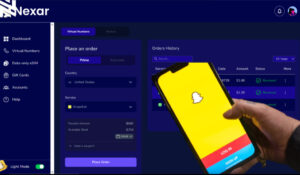
    Step 2 — Get a Virtual Number from Nexar

    Visit Nexar and choose a number suitable for SMS verification.

    Instead of buying another SIM card, Nexar lets you access numbers online instantly.

    This is especially useful for users trying to:

    • verify Snapchat without SIM,
    • manage multiple accounts,
    • or receive OTPs while traveling.

    Related guides:

    • How to Receive SMS Online to Finland Virtual Number
    • How to Open a US Pinterest Account from Nigeria

    Step 3 — Enter the Number on Snapchat

    Copy your Nexar number and paste it into Snapchat verification.

    Snapchat will send an OTP immediately.

    Step 4 — Receive Snapchat OTP Online

    Go back to your Nexar dashboard.

    Your verification code should appear within seconds.

    This process is why many users search for:

    Snapchat OTP online

    and fast verification methods.

    Step 5 — Complete Verification

    Enter the code into Snapchat.

    Done ✅

    Your account is now verified using a Snapchat verification virtual number.

    Can You Verify Snapchat Without a SIM?

    Yes.

    That’s one of the main reasons people use virtual numbers.

    Instead of carrying:

    • dual SIM phones,
    • extra devices,
    • or temporary cards,

    users can simply verify Snapchat without SIM using Nexar’s dashboard-based system.

    Why Nexar Works Better Than Free SMS Websites

    Free public SMS sites usually have problems like:

    • recycled numbers,
    • blocked OTPs,
    • spam abuse,
    • and privacy risks.

    Nexar focuses on cleaner verification support, making it more reliable for:

    • Snapchat,
    • Telegram,
    • WhatsApp,
    • Pinterest,
    • and other social platforms.

    You can also check out our guide on how to get an Austrian virtual number.

    Common Mistakes That Cause Snapchat Verification Failure

    • Using Shared Public Numbers

    These are often already flagged.

    •  Requesting Too Many OTPs

    Repeated requests can temporarily block verification.

    • Switching Locations Constantly

    Rapid IP changes may trigger security checks.

    • Creating Too Many Accounts at Once

    Snapchat may interpret this as automation.

    Is Snapchat Virtual Number Verification Safe?

    Yes, if you use trusted providers.

    Virtual numbers are commonly used for:

    • business accounts,
    • privacy,
    • remote work,
    • and international verification.

    You can learn more about virtual numbers here Virtual Number Overview

    Frequently Asked Questions

    Can I verify Snapchat without SIM?

    Yes. Many users now verify Snapchat without SIM using virtual number platforms like Nexar.

    What is a Snapchat verification virtual number?

    It’s a digital phone number used to receive Snapchat OTP codes online.

    Does Snapchat block virtual numbers?

    Some low-quality or abused numbers may fail. Cleaner providers usually work better.

    Can I receive Snapchat OTP online instantly?

    Yes. Nexar allows users to receive Snapchat OTP online through its dashboard.

    Is virtual number verification legal?

    Yes. Virtual numbers are widely used for privacy and business purposes.

    Can Nigerians use Snapchat virtual numbers?

    Absolutely. Many users searching for Snapchat virtual number Nigeria solutions use platforms like Nexar for verification.

    Final Thoughts

    Snapchat verification shouldn’t feel complicated.

    Most verification failures happen because people rely on:

    • poor-quality free numbers,
    • recycled SMS websites,
    • or unstable setups.

    Using a trusted Snapchat verification virtual number through Nexar gives you:

    • faster OTP delivery,
    • more privacy,
    • and smoother account setup.

    Whether you want to create a new account, separate personal and business profiles, or simply avoid SIM stress, virtual verification is becoming the smarter option.

  • How to Fix Low Engagement on TikTok Videos and Grow Your Views

    You post a TikTok video.

    You wait.

    An hour passes.

    Two hours later you check again and the video only has a few views and almost no interaction.

    This is one of the most frustrating experiences for creators. You might have spent time filming, editing, adding captions, and even choosing trending sounds. Yet the engagement simply does not come.

    If this sounds familiar, you are not alone. Many creators struggle with low engagement on TikTok videos, and it can feel like the algorithm is working against you.

    The truth is that TikTok growth is rarely random. The platform relies heavily on user signals such as watch time, comments, shares, and replays. When these signals are weak, videos stop spreading.

    The good news is that you can fix low engagement on TikTok videos once you understand how the system works.

    This guide will walk you through practical and proven strategies to improve TikTok engagement and stop the frustrating cycle of TikTok views dropping.

    Why TikTok Engagement Drops Suddenly

    Before learning how to fix low engagement on TikTok videos, it is important to understand why engagement drops.

    TikTok distributes content in stages. When you upload a video, it is first shown to a small group of users. Their reaction determines whether the video spreads to a larger audience.

    If viewers quickly scroll away, the algorithm assumes the content is not interesting enough to recommend further.

    Low engagement on tiktok videos

    Common reasons for TikTok views dropping include:

    • Weak opening seconds

    • Poor audience targeting

    • Lack of interaction in the comment section

    • No clear message in the video

    • Poor keyword optimization

    Fixing these issues is the first step to improve TikTok engagement and reach a larger audience. Read this article by buffer on how tiktok videos are ranked.

    How to Fix Low Engagement on Tiktok

    1. Capture Attention in the First Three Seconds

    The first three seconds of a video determine whether viewers continue watching or scroll away.

    To fix low engagement on TikTok videos, your opening must immediately create curiosity.

    Instead of starting with a slow introduction, begin with something that grabs attention.

    Examples include

    • Asking a surprising question

    • Showing the final result first

    • Making a bold statement

    • Revealing a shocking fact

    For example

    Bad opening

    “Hi guys welcome back to my page”

    Better opening

    “Most TikTok creators are making this mistake and it is killing their views”

    This simple change alone can dramatically improve TikTok engagement and prevent TikTok views dropping.

    2. Focus on Watch Time and Retention

    TikTok values watch time more than almost anything else.

    If people watch your video until the end, the platform considers the content valuable and continues promoting it.

    To fix low engagement on TikTok videos, structure your content to keep viewers watching.

    Effective retention strategies include:

    • Teasing the ending early in the video

    • Using quick cuts and fast pacing

    • Avoiding long silent moments

    • Delivering information step by step

    When viewers stay longer, your content naturally improves TikTok engagement and reaches more people.

    3. Use TikTok Search Optimization

    TikTok is no longer just a social media platform. It is also a search engine.

    Millions of users search for content every day.

    If your captions and text do not include relevant keywords, your content may never appear in search results.

    To fix low engagement on TikTok videos, include keywords naturally in

    • captions

    • on screen text

    • voice narration

    Examples of searchable phrases include

    • how to grow on TikTok

    • TikTok growth tips

    • why TikTok views are dropping

    When TikTok understands your topic, it can recommend your video to the right audience and improve TikTok engagement significantly.

    4. Encourage Viewers to Interact

    Engagement grows when viewers participate.

    Simple prompts can dramatically increase comments and shares.

    Ways to encourage interaction include

    • asking viewers a question

    • requesting opinions

    • inviting viewers to share their experiences

    • asking them to choose between two options

    Example:

    “Which strategy works better for you? Comment growth or viral videos?”

    More comments signal to the algorithm that people care about your content, helping fix low engagement on TikTok videos.

    5. Respond to Comments With Videos

    One of the smartest ways to improve TikTok engagement is responding to comments with new videos.

    This creates multiple benefits

    • more content ideas

    • stronger audience connection

    • higher engagement signals

    When people see their comments turned into videos, they are more likely to participate again.

    This strategy alone has helped many creators fix low engagement on TikTok videos and revive accounts experiencing TikTok views dropping.

    6. Use Smart automations like Nexar

    Sometimes creators follow all best practices but still struggle to gain traction.

    In those situations, boosting engagement can help your content gain visibility again.

    Platforms like Nexar provide tools designed to help creators improve TikTok engagement and regain momentum.

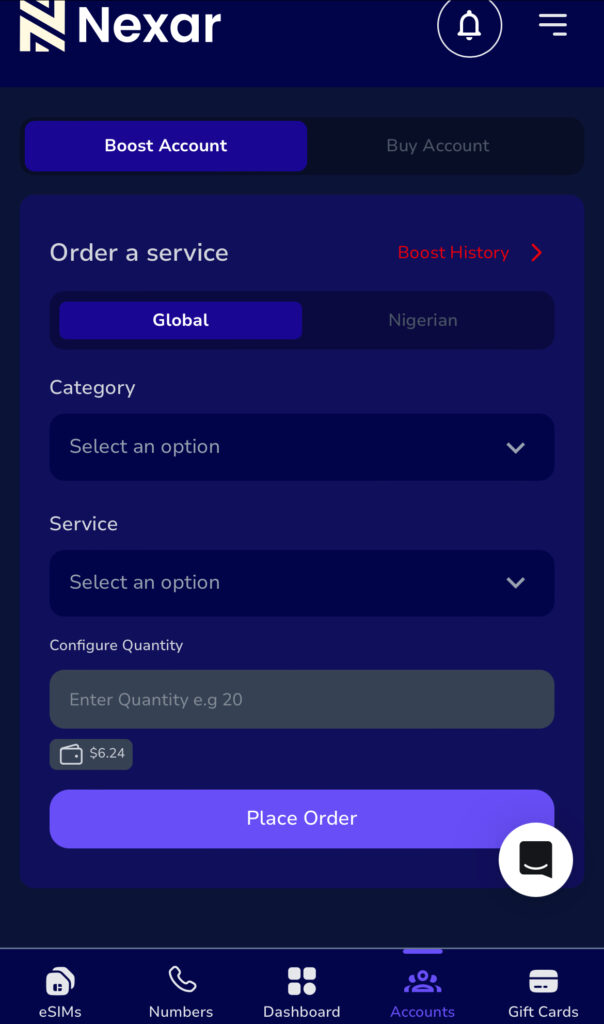
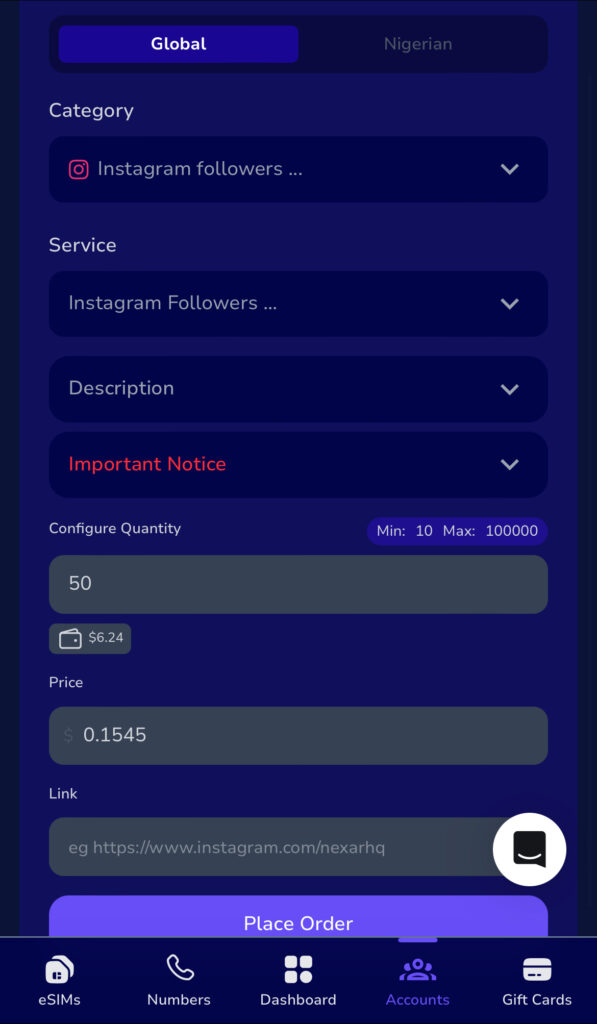
    To use Nexar

    1. Visit Nexar Platform
    2. Scroll to the bottom section of the website
    3. Open the Accounts category
    4. Select Boost Accounts
    5. Choose TikTok as the platform
    6. Select the engagement type: Followers, views, shares, live stream, etc.
    7. Choose the quantity you want
    8. Paste your TikTok profile link or video link
    9. Place the order

    Using a system like this can help creators fix low engagement on TikTok videos while continuing to build organic content strategies.

    You can also explore related guides such as TikTok Virtual Numbers 

    Pro Tips to Improve TikTok Engagement Faster

    If you want to accelerate growth and avoid TikTok views dropping, follow these expert tips:

    • Post consistently at least three to five times weekly

    • Focus on one niche instead of random content

    • Study viral videos in your niche

    • Use trending sounds strategically

    • Always include captions and keywords

    • Engage with your audience daily

    These habits make it easier to fix low engagement on TikTok videos and build long term audience loyalty.

    Final Thoughts

    Every TikTok creator eventually faces periods where engagement drops.

    The key is understanding that growth on the platform depends on retention, interaction, and discoverability.

    When you improve your opening hooks, optimize your content for search, and actively engage your audience, you naturally improve TikTok engagement and reduce the chances of TikTok views dropping.

    With consistent strategy and the right tools, it is absolutely possible to fix low engagement on TikTok videos and turn your account into a powerful platform for reach and influence.

    Sign up on Nexarhq.com to get started with boosting your tiktok videos views today!

  • How to Increase Your Apple Music Streams with Nexar’s Boost Feature

    For artists and musicians in Nigeria, getting their music heard is key to success. With music streaming platforms on the rise, promoting your music on Apple Music is vital. Nexar’s Boost Feature is a great way to boost your visibility and attract more listeners.

    Nexar’s Boost Feature helps artists maximize their streaming potential. It can greatly improve your Apple Music presence, reaching new fans and growing your fanbase. This article will show you how to use Nexar’s Boost Feature to elevate your Apple Music streams.

    Apple Music Streams

    What is in this article?

    • Understand how Nexar’s Boost Feature works to promote your music on Apple Music.
    • Learn strategies to maximize your streaming potential.
    • Discover how to effectively use Nexar’s Boost Feature to grow your audience.
    • Get insights into optimizing your Apple Music presence.
    • Find out how to track your progress and adjust your strategy.

    Understanding Nexar’s Boost Feature for Apple Music

    For Nigerian artists, knowing about Nexar’s Boost Feature is key. It helps them get more Apple Music streams. Nexar’s Boost Feature is a powerful tool for promoting music.

    Apple music promotion

    What is Nexar’s Boost Feature?

    Nexar’s Boost Feature is a social media promotion tool on Nexar’s website and app. With it, you can increase your metrics or numbers on any social media app available on our website. For apple music stream boost, Nexar helps artists get more visibility and streams. It’s easy to use, helping both new and well-known artists.

    How Nexar’s Boost Works Specifically for Nigerian Artists

    Nexar’s Boost Feature is made for Nigerian artists. It targets the local audience, considering what listeners like and who they are. This way, it boosts streaming numbers and popularity. If you also need global audience, that is available on the Nexar app.

    Why Increasing Your Apple Music Streams Matters

    Apple Music is becoming one of the most important streaming platforms in Nigeria. More fans are using it every day, and more industry people pay attention to it when discovering new artists. The more streams your song gets, the more serious your music looks to listeners, curators, and even record labels.

    Streams are not just numbers. They are proof that people are listening.

    1. Streaming Numbers Affect Your Earnings

    Every time someone plays your song on Apple Music, you earn money. The more streams you get, the more you earn. While the amount per stream may vary, growing your total streams directly increases your income. For Nigerian artists, this can become a steady source of revenue, especially when combined with multiple releases.

    2. Higher Streams Help You Get on Playlists

    Apple Music playlists play a huge role in helping songs blow up. Songs with higher stream counts and more listener engagement are more likely to be noticed by the platform and added to playlists. Once a song gets into a popular playlist, it can suddenly reach thousands of new listeners, which leads to even more streams.

    Boost helps kickstart this process by giving your song the early attention it needs.

    Apple Music is getting more popular in Nigeria. It offers a big chance for local artists. By getting more streams, Nigerian artists can reach more fans and grow their careers.

    How to Set Up your Nexar Account for Apple Music Promotion

    Before boosting your Apple Music streams, setting up your Nexar account is key. This first step helps your music get to the right people.

    1. Creating and Verifying Your Nexar Account

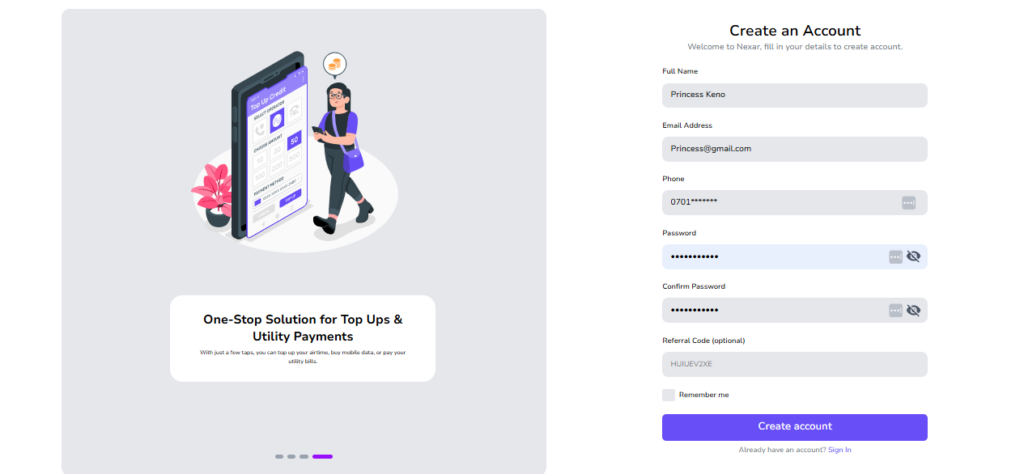
    First, go to the Nexar website and sign up . The sign-up is easy, asking for basic artist info. Then, you must verify your account. This is important for security and to make sure only real artists use Nexar.

    2. Required Documentation for Nigerian Artists

    Nigerian artists need to provide certain documents for verification. This includes a valid ID and proof of your artistic skills. Having your documents ready will make the verification process smoother. After verifying your Nexar account, you can then follow this guide to promote your apple music.

    Final Words

    Nexar’s Boost Feature is a great tool for artists wanting more Apple Music streams. It helps you reach more people in Nigeria. By using it well, you can make your music more visible on Apple Music.

    To promote your music on Apple Music, follow the strategies in this guide. Setting up your Nexar account and optimizing your Boost campaigns are key. Each step is important for your success.

    Using these strategies will help you get more Apple Music streams and grow your fanbase. Promoting on Apple Music takes work, but Nexar’s Boost Feature can help a lot.

    Start boosting your Apple Music presence with Nexar today.

    Frequently Asked Questions

    What is Nexar’s Boost Feature, and how can it help increase my Apple Music streams?

    Nexar’s Boost Feature is a tool to help artists get more Apple Music streams. It targets specific audiences. This way, artists can reach new listeners and grow their fanbase, especially in Nigeria.

    What are the benefits of using Nexar’s Boost Feature for Apple Music promotion?

    Using Nexar’s Boost Feature can boost your Apple Music streams. It also helps improve playlist placement and increases artist visibility in Nigeria.

    How do I determine my promotion budget in Naira for Nexar’s Boost Feature?

    To set your promotion budget, think about your marketing goals and target audience. The “Step-by-Step Guide to Increase Apple Music Streams” section has more details on budgeting.

    Can I target specific demographics with Nexar’s Boost Feature, such as Nigerian listeners?

    Yes, Nexar’s Boost Feature lets you target specific demographics, like Nigerian listeners. You can set up your Boost to reach your desired audience effectively.

    Is Nexar’s Boost Feature available for artists outside of Nigeria?

    While the guide focuses on Nigeria, Nexar’s Boost Feature is available worldwide. However, features and benefits may vary by region.

  • How to Increase Your YouTube Shorts Views with Nexar

    Most YouTube Shorts do not struggle because the content is poor. They struggle because they do not get enough early exposure.

    When Tobi, a creator in Nigeria, launched his YouTube channel, he did everything right. He posted consistently, studied trending sounds, and made sure his Shorts were sharp and engaging. Still, most of his videos barely crossed 200 views. Some never even made it into the Shorts feed.

    The issue was not effort. It was exposure.

    Like many creators in Nigeria and beyond, Tobi realized that great content alone is sometimes not enough. YouTube Shorts rewards videos that gain early traction. Without that initial push, even quality content can disappear quietly. This is where Nexar becomes a game changer.

    If your goal is to increase YouTube Shorts views and grow faster without guessing, this guide will show you exactly how Nexar helps you do that.

    Why YouTube Shorts Views Matter More Than Ever

    YouTube Shorts is one of the fastest growing content formats on the platform. Shorts are shown to users who may have never interacted with your channel before, making them a powerful discovery tool.

    According to how the YouTube Shorts algorithm works, videos that receive early engagement, strong watch time, and interaction are more likely to be pushed to a wider audience. This means views are not just numbers. They are signals.

    More views lead to:

    • Increased reach in the Shorts feed
    • Better engagement signals
    • Faster YouTube Shorts growth
    • More subscribers from Shorts
    • Stronger channel credibility

    Organic Growth Alone Is Not Always Enough

    Organic strategies still matter. Strong hooks, fast pacing, trending audio, captions, and consistency are essential. But organic growth can be slow, especially for new creators or channels trying to break out.

    Many Shorts fail simply because they do not get enough initial visibility for the algorithm to test them properly. Strategic boosting helps solve this problem.

    This is where Nexar fits in.

    What Nexar Does for YouTube Shorts Creators

    Nexar is a digital growth platform designed to help creators increase visibility through controlled and targeted boosting.

    With Nexar, you can:

    • Boost YouTube Shorts views safely
    • Target Nigeria or a global audience
    • Choose the exact number of views you want
    • Get fast delivery once payment is confirmed

    For creators focused on YouTube Shorts growth and reach, Nexar provides structure instead of guesswork.

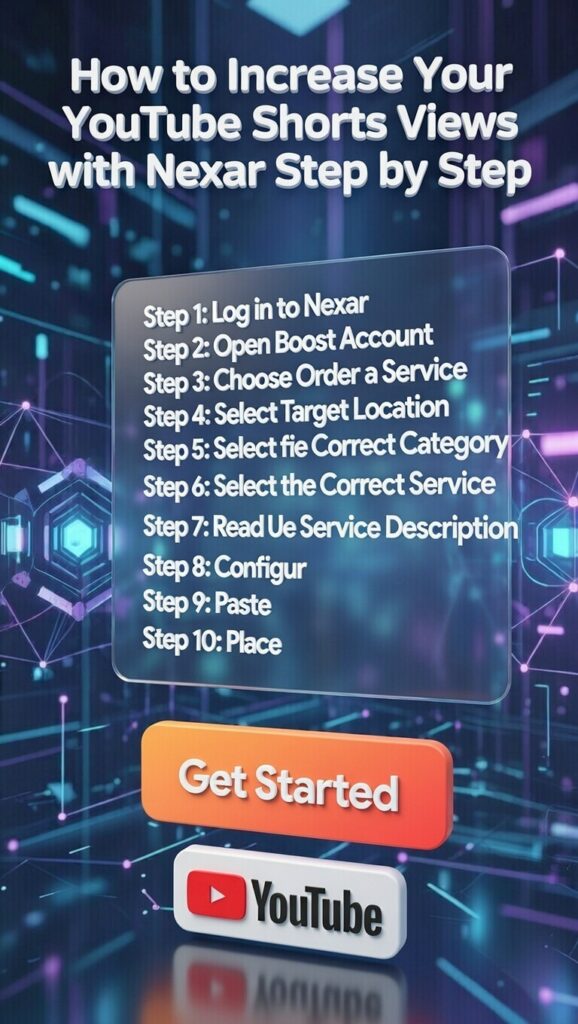
    How to Increase Your YouTube Shorts Views with Nexar Step by Step

    Increase Youtube Shorts Views

    Step 1: Log in to Nexar

    Visit Nexar and log into your account. Once logged in, click on the Account button.

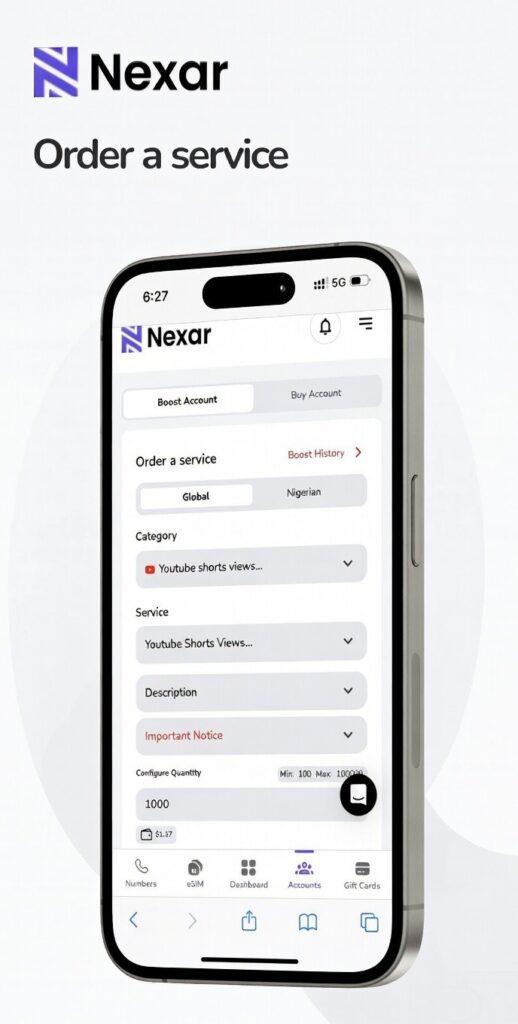
    Step 2: Open Boost Account

    From the account menu, select Boost Account to access the boosting dashboard.

    Step 3: Choose Order a Service

    Inside Boost Account, tap on Order a Service.

    Step 4: Select Target Location

    You will see two options:

    • Global
    • Nigeria

    Choose Global if you want views from different countries.

    Choose Nigeria if you want to boost Shorts views Nigeria, targeting Nigerian viewers only.

    Step 5: Select the Correct Category

    Click the category dropdown and type YouTube in the search bar.

    Select YouTube Shorts Views.

    Step 6: Select the Correct Service

    Under service, again choose YouTube Shorts Views.

    Ensure the category and service both match. Do not mix platforms.

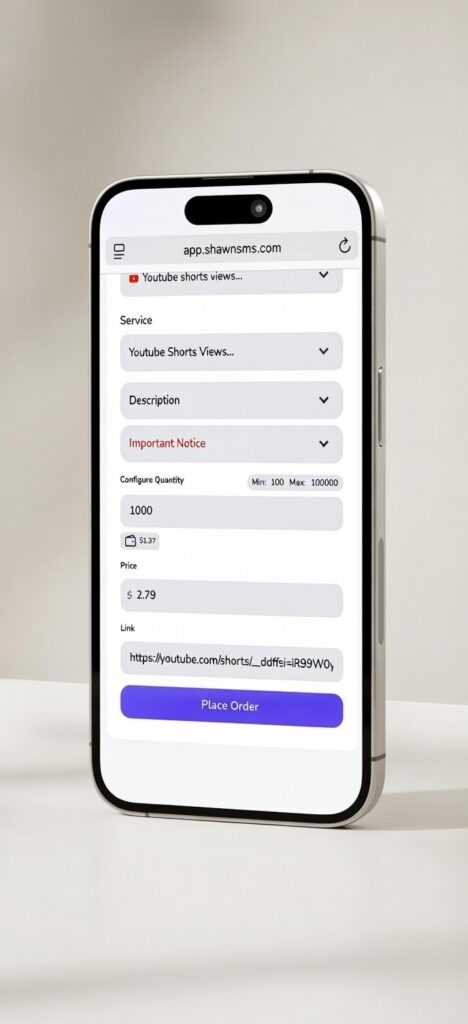
    Step 7: Read the Service Description

    Scroll down and read the description to understand delivery details and requirements.

    Step 8: Configure Quantity

    Enter the number of YouTube Shorts views you want.

    The price will automatically update based on the quantity.

    Step 9: Paste Your YouTube Shorts Link

    Copy the exact link of the Short you want to boost and paste it into the link field.

    Make sure the video is public and is a YouTube Short.

    Step 10: Place Order and Complete Payment

    Click Place Order and complete payment.

    Once confirmed, your views will begin to drop as soon as possible.

    Why Nexar Works Well for Nigerian Creators

    Nexar gives creators the flexibility to grow locally or globally. For Nigerian creators, this is especially powerful.

    Benefits include:

    • Targeted Nigerian Shorts views
    • Global audience reach when needed
    • Simple dashboard
    • Flexible pricing
    • Fast delivery

    This makes Nexar ideal for creators serious about boosting Shorts views in Nigeria while still building global visibility.

    Best Practices When Using Nexar

    To get the best results:

    • Boost only high quality Shorts
    • Focus on strong hooks and retention
    • Do not boost every video, choose your best
    • Combine boosting with organic posting
    • Stay consistent on your channel

    Boosting works best when paired with good content.

    Final Thoughts

    Growing on YouTube Shorts is about visibility, timing, and strategy. If your content is good but struggling to reach people, Nexar helps bridge that gap. If you want to increase YouTube Shorts views, accelerate your YouTube Shorts growth, and reach Nigerian or global audiences faster, Nexar provides a simple and effective solution.

    All you need to do is create quality content, stay consistent and use Nexar to give your Shorts the push they deserve.

  • How to Fix Low Engagement on Instagram Reels (Step-by-Step Guide)

    If you’re dealing with low views, few likes, or zero shares, you’re not alone. Many creators and small businesses across Nigeria are noticing an Instagram Reels reach drop, even when their content is good.

    The truth is: Instagram has changed how Reels are pushed. What worked last year may not work today. Imagine spending hours editing a Reel, posting at the “right” time… and Instagram barely shows it to anyone.

    If this sounds familiar, this guide will show you how to fix low engagement on Instagram Reels using practical steps that actually work in 2026.

    What Causes Low Engagement on Instagram Reels?

    Before you fix low engagement on Instagram Reels, you need to know why it’s happening.

    Here are the most common reasons:

    1. Your Hook Isn’t Strong Enough

    Instagram decides whether to push your Reel within the first 1–3 seconds. If people scroll past quickly, your reach drops.

    2. You’re Posting at the Wrong Time

    If your audience is asleep or offline, your Reel won’t get early engagement and Instagram won’t promote it further.

    3. Inconsistent Posting

    Posting once every two weeks makes it hard for the algorithm to trust your account.

    4. Shadow-Like Restrictions

    Sometimes, your content doesn’t break rules but it also doesn’t get pushed. This often happens when your account has low activity or limited reach history.

    All of these contribute to an Instagram Reels reach drop.

    How to Fix Low Engagement on Instagram Reels (Practical Steps)

    Let’s talk about solutions you can actually use today.

    1. Fix Low Engagement on Instagram Reels with a Strong Opening

    Your first line or visual must stop scrolling.

    Try this:

    • Ask a bold question
    • Start mid-action
    • Use on-screen text that sparks curiosity

    Example:

    “If your Reels aren’t getting views, this is why…”

    This alone can help improve Reels engagement.

    2. Use Shorter, Clearer Reels

    Long Reels don’t always perform better. In fact, many creators see higher reach with 7–15 second videos.

    Short Reels:

    • Get watched till the end
    • Increase retention
    • Signal quality to Instagram

    That’s how you fix low engagement on Instagram Reels without changing your niche.

    3. Post Consistently (Not Randomly)

    Consistency doesn’t mean posting every hour. It means:

    • 3–5 Reels per week
    • Similar content style
    • Same niche focus

    This helps Instagram understand who to show your Reels to, reducing Instagram Reels reach drop over time.

    4. Improve Reels Engagement with Smart Captions

    Your caption matters more than you think.

    Use:

    • Short paragraphs
    • A question at the end
    • A clear call to action

    Example:

    “Have you noticed your Reel reach dropping too? Comment YES.”

    Engagement in comments helps push your Reel further.

    When Organic Growth Isn’t Enough

    Sometimes, you’re doing everything right but your account still struggles.

    This is common for:

    • New creators
    • Business accounts
    • Accounts affected by past low reach

    This is where strategic boosting comes in.

    How Nexar Helps Fix Low Engagement on Instagram Reels

    Nexar doesn’t just give you tools, it helps your content get seen.

    With Nexar’s Instagram Boost Account feature, you can:

    • Push your Reels to real, active users
    • Improve early engagement (likes, views, interactions)
    • Help Instagram re-trust your account
    • Recover from Instagram Reels reach drop faster

    Instead of waiting weeks for organic growth, Nexar helps you improve Reels engagement in a controlled, safe way.

    Learn more about Nexar’s Instagram Boost feature.

    How to Boost Your Instagram Reels with Nexar (Step-by-Step)

    Step 1: Visit the Nexar App and Sign Up

    Start by visiting the Nexar website and signing up. Once you’re logged in, you’ll see different growth and digital tools available.

    Step 2: Select the Instagram Boost Feature

    Inside the app, choose Instagram Boost Account. This feature is designed to help creators and businesses fix low engagement on Instagram Reels by improving early visibility.

    Step 3: Choose Your Boost Package

    Choose the social media account you want to boost, add the quantity then add the right link (profile link or post link) . You don’t need to share your password, Nexar does not ask for login details, which keeps your account safe.

    Pick a boost plan that matches your goal:

    • Increase Reel views
    • Improve engagement on recent posts
    • Revive a slow or new account

    This helps reduce Instagram Reels reach drop by giving your content initial traction.

    Fix Low Engagement on Instagram Reels

    Step 4: Submit and Monitor Results

    Confirm your order and monitor how your Reels start gaining visibility. As engagement increases, Instagram’s algorithm is more likely to push your content organically.

    Why This Works for Low Engagement

    Instagram prioritizes content that gets early interaction. Nexar helps you:

    • Trigger algorithm trust
    • Improve Reels engagement naturally
    • Recover from low or inconsistent reach

    When combined with good content, boosting through Nexar makes it easier to fix low engagement on Instagram Reels without waiting weeks.

    Organic vs Boosted Growth: Why Nexar Stands Out

    Many creators try random boosting tools and get burned.

    Here’s why Nexar is different:

    • Built for African creators and businesses
    • No fake engagement
    • Simple setup
    • Budget-friendly options

    If your goal is to fix low engagement on Instagram Reels, Nexar gives you support without risking your account.

    Extra Tips to Prevent Instagram Reels Reach Drop

    • Avoid reposting TikTok videos with watermarks
    • Use trending audio early
    • Reply to comments within the first hour
    • Engage with similar accounts before and after posting

    These small actions help maintain reach and improve Reels engagement naturally.

    Takeaways: How to Fix Low Engagement on Instagram Reels Fast

    Here’s the quick summary:

    • Start your Reels with strong hooks
    • Keep videos short and clear
    • Post consistently
    • Write engaging captions
    • Use Nexar’s boost feature when organic reach slows

    This combination helps you fix low engagement on Instagram Reels without stress.

    Ready to Boost Your Reels?

    If you’re tired of guessing and want real results:

    Visit the Nexar website and boost your Instagram account today

    Here are Instagram Reels Best Practices by Meta Help Center

  • Best Virtual Number for Facebook Setup in Nigeria (2026 Review)

    Facebook verification is now unavoidable. Whether you’re creating a new account, recovering one, or managing business pages, you will be asked for a phone number.

    In Nigeria, most local SIM cards stop receiving OTPs after a few uses, and free virtual numbers rarely work. That is why many users now rely on the Best Virtual Number for Facebook to verify accounts safely and consistently.

    This review shows why Nexar is the most reliable option in 2026 and how you can use it step by step. Let’s get into it.

    Why Nigerians Need the Best Virtual Number for Facebook

    1. Local numbers are restricted quickly

    Facebook limits how many accounts can be linked to one Nigerian SIM. Once that limit is reached, OTP messages stop coming through. This can happen even if the SIM is active and has airtime. Many users think the network is the problem, when in reality Facebook has already blocked the number from receiving further verification codes.

    2. Free virtual numbers get blocked fast

    Most free virtual number apps recycle numbers. This means the same number has already been used by hundreds of people. Facebook flags these numbers as suspicious and blocks them. When you try to use them, you either never receive the code or Facebook tells you the number is not supported.

    3. Businesses need multiple verified accounts

    Social media managers, ad agencies, freelancers, and small business owners often manage several Facebook pages or profiles. Using personal SIM cards for all of them is not practical. You need a stable system that allows you to verify accounts whenever necessary. This is where the Best Virtual Number for Facebook becomes essential.

    What Makes Nexar the Best Virtual Number for Facebook

    Nexar does not sell phone numbers like SIM cards. Nexar sells OTP-only reusable verification numbers. You cannot make calls or send messages with them. They exist only to receive login and signup codes.

    Here is why Nexar stands out.

    1. OTP-only inbox that Facebook accepts

    Facebook only cares about one thing during verification: can the number receive the OTP? Nexar numbers are designed for exactly that. When Facebook sends a code, it appears inside the Nexar app. If you need the code again, you can tap “Resend” on the Nexar app to receive it again.

    2. One number per service for stability

    When you choose Facebook, Nexar assigns one number strictly for Facebook. This prevents conflicts, reduces bans, and keeps your verification stable long-term. It is one of the main reasons Nexar is trusted as the Best Virtual Number for Facebook.

    3. Works with Facebook-approved countries

    You can choose numbers from the US, UK, and other trusted countries. Facebook is less likely to flag these numbers, which increases your chances of successful verification.

    4. Local payment in Naira

    You can pay using Nigerian bank transfer or card. There is no need for a foreign card or international billing. This makes Nexar accessible to everyone in Nigeria.

    Step-by-Step: How to Get a Facebook Virtual Number on Nexar

    1. Visit Nexarhq.com

    Open Nexarhq.com or download the Nexar app. Tap the account button to begin.

    2. Create your account

    Sign up with your email or Nigerian phone number. You will gain instant access to your dashboard.

    Best Virtual Number for Facebook

    3. Choose your country

    Select a trusted country such as the US or UK for better Facebook acceptance.

    4. Choose Facebook as the service

    This ensures the number is locked specifically for Facebook.

    5. Pay in Naira

    Use bank transfer or card. No foreign card is required.

    6. Activate and verify

    Once payment is confirmed, your number becomes active. Enter it on Facebook and receive your OTP inside the Nexar app.

    This simple process proves why Nexar is the Best Virtual Number for Facebook.

    Common Mistakes to Avoid When Using Virtual Numbers

    1. Using random free numbers

    They are usually blocked and unreliable. Facebook flags them instantly.

    2. Expecting to make calls or chats

    Nexar numbers are OTP-only. They cannot receive calls or normal messages.

    3. Changing IP locations too often

    Facebook may flag suspicious activity. A stable VPN matching your number country is recommended.

    Who Should Use a Facebook Virtual Number

    • Digital marketers running multiple campaigns
    • Social media managers handling client pages
    • Entrepreneurs testing new brands
    • Users recovering locked accounts
    • Content creators managing pages

    Anyone in these categories needs the Best Virtual Number for Facebook.

    Why Nexar Is Better Than Other Providers

    Many providers offer virtual numbers, but most fail at OTP delivery. Nexar is different because it is built specifically for verification. The numbers are stable, reusable, and service-specific. You receive codes instantly, can resend them, and pay locally. This reliability is why users trust Nexar as the Best Virtual Number for Facebook.

    Final Thoughts

    Facebook verification should not block your progress. With Nexar, you get a reliable OTP inbox that works when you need it.

    If you are tired of blocked numbers and missing codes, it is time to use the Best Virtual Number for Facebook.

    Visit Nexarhq.com today and get your Facebook virtual number instantly.