Blog

  • How to Monetize Your YouTube Channel in Nigeria: Requirements and Step-by-Step Guide

    How to Monetize Your YouTube Channel in Nigeria: Requirements and Step-by-Step Guide

    YouTube has become more than just a place to watch funny skits or music videos. For many people, it is now a primary source of income and a way to build a global brand. However, for many creators in Nigeria, the journey from uploading your first video to seeing actual dollars in your bank account can feel like a long, confusing road. Between hitting those massive subscriber goals and finding a way to actually withdraw your money, there are plenty of obstacles to clear.

    Whether you are just starting or you have been posting for months without much traction, understanding the system is the first step to winning. This guide will walk you through the current rules for YouTube monetization Nigeria, how to speed up your growth responsibly, and the easiest ways to manage your earnings once the checks start rolling in.

    Why Subscriber Count Still Matters in 2026

    While some people say “numbers don’t matter as much as engagement,” the truth is that your subscriber count is still the bedrock of your channel’s authority. On YouTube, your subscribers are your first line of defense. They are the people who get notified when you post, providing that initial wave of views that tells the algorithm, “Hey, this video is worth watching!”

    For a creator, having a high subscriber count does three main things:

    • Social Proof: People are much more likely to subscribe to a channel that already has 5,000 followers than one that has 5. It builds instant trust.
    • Algorithm Boost: High subscriber activity signals to YouTube that your content is valuable, which leads to your videos being suggested on the Home page.
    • Brand Opportunities: If you want to work with brands, they will look at your numbers first. A solid following shows you have a reachable audience.

    If you are struggling to get those first few hundred followers, you might need to increase YouTube subscribers Nigeria through a reliable social media boost. This helps build the initial momentum needed for the algorithm to take you seriously.

    Understanding the 2026 YouTube Monetization Requirements

    In 2026, YouTube has made it a bit easier to start earning through “fan funding,” but the big ad revenue still requires a higher threshold. There are two main tiers you should know about for YouTube monetization Nigeria:

    Tier 1: Early Access (Fan Funding)

    This tier allows you to earn from Super Chats, Stickers, and channel memberships. To qualify, you need:

    • 500 subscribers
    • 3 public uploads in the last 90 days
    • 3,000 public watch hours in the last year (or 3 million Shorts views)

    Tier 2: Full Monetization (Ad Revenue)

    This is where you get a share of the money from ads shown on your videos. To reach this, you need:

    • 1,000 subscribers
    • 4,000 public watch hours in the past 12 months (or 10 million Shorts views)

    Reaching these numbers is the biggest hurdle for most. This is why many creators choose to increase YouTube subscribers Nigeria using Nexar’s social media growth service. By getting a professional boost, you can hit these targets faster and move from “hobbyist” to “monetized creator” in a fraction of the time.

    A person using the Nexar app on a smartphone with the official Nexar purple N logo clearly visible

    Accelerating Your Growth: Buying Subscribers vs. Organic Effort

    Is it “cheating” to buy subscribers? Not if you do it right. Think of it as a digital solution to a common problem: the “ghost town” effect. When your channel is empty, real people are hesitant to join. By using a service to jumpstart your numbers, you create an environment where organic viewers feel comfortable hitting that subscribe button.

    The best strategy is a hybrid one:

    1. Create Quality Content: No amount of promotion can save a boring video. Focus on solving a problem or entertaining your viewers.
    2. Use Strategic Boosts: Use Nexar to increase YouTube subscribers Nigeria and give your channel the professional look it deserves.
    3. Optimize Your SEO: Use clear titles and eye-catching thumbnails to improve your click-through rate.

    When you use Nexar for a social media boost, you are choosing a reliable partner that understands the Nigerian market and provides secure, high-quality growth.

    Verifying Your Account with Virtual Numbers

    Once you hit your monetization goals, you will need to set up Google AdSense. This process often requires phone verification to ensure your account is secure. Sometimes, local SIM cards can have issues receiving international verification codes, which can delay your progress for weeks.

    To avoid this, many creators use a virtual number service. Nexar offers Virtual Numbers specifically designed for fast and secure account verifications. This ensures you can set up your AdSense and social media profiles without the stress of “waiting for a code” that never arrives.

    A dark-skinned user viewing a secure virtual number verification code with the official Nexar purple N logo clearly visible

    How to Cash Out YouTube Earnings in Nigeria

    Getting paid is the best part, but for Nigerians, it can also be the most complicated part. YouTube pays through AdSense, usually in US Dollars. Most Nigerian banks require a USD domiciliary account to receive these funds, and even then, getting your money out in Naira at a fair rate can be a struggle.

    This is where the Nexar Crypto-to-Naira exchange becomes a lifesaver. Many creators choose to receive their payments via platforms that allow crypto withdrawals or use their USD to buy stablecoins like USDT. Once you have your assets, you can cash out YouTube earnings Nigeria directly into your local bank account using Nexar.

    The process is simple:

    1. Receive your USD: Wait for your AdSense balance to hit the $100 threshold.
    2. Convert to Crypto/USDT: Use a reputable platform to move your funds into a digital asset.

    By using Nexar, you avoid the long wait times and high fees often associated with traditional bank transfers. It is the fastest way to cash out YouTube earnings Nigeria and get your money working for you immediately.

    Pro Tips for Sustainable YouTube Success

    • Consistency is King: Don’t post five videos in a week and then disappear for a month. Stick to a schedule your audience can rely on.
    • Engagement is Queen: Reply to your comments. Building a community makes people more likely to stay subscribed and watch your future videos.
    • Study Your Analytics: Use the YouTube Studio app to see where people are dropping off in your videos. If everyone leaves at the 2-minute mark, find out why and fix it in your next upload.
    • Leverage Shorts: Short-form content is the fastest way to reach a new audience for YouTube monetization Nigeria in 2026. Use them to teaser your longer videos.

    Youtube Monetization Nigeria

    FAQ: Frequently Asked Questions

    Is it safe to buy YouTube subscribers in Nigeria?

    Yes, as long as you use a high-quality service. Nexar provides safe digital solutions for social media growth that help build your channel’s credibility without risking your account.

    How long does it take to get monetized?

    Depending on how often you post, most creators hit the 1,000 subscriber mark in 3 to 6 months. Using a boost from Nexar can significantly shorten this timeline.

    Can I get paid in Naira directly from YouTube?

    YouTube typically pays in USD. To get Naira, you will usually need a domiciliary account or a service like Nexar to exchange your earnings into local currency.

    Do I need a special ID for AdSense in Nigeria?

    You will need to provide tax information and verify your identity using a government-issued ID (like a NIN or International Passport) and a physical PIN sent to your address.

    Final Thoughts

    Starting a YouTube channel is one of the best decisions you can make for your digital career. While the requirements for YouTube monetization Nigeria might seem steep, they are definitely achievable with the right strategy. By combining high-quality content with Nexar’s services: from social media growth to secure virtual numbers: you can overcome the initial hurdles and start earning.

    Ready to take your channel to the next level? Visit Nexar today to boost your subscribers and ensure your digital earnings are always just a few clicks away from your bank account.

  • How to Get a US Virtual Number for Swagbucks Rewards in Nigeria

    Swagbucks is an online rewards platform where eligible users can earn points, known as SB, by completing surveys, shopping through participating retailers, discovering offers, and performing other activities. These points can be redeemed for eligible rewards, including gift cards and cash options, depending on account and regional availability.

    For Nigerians interested in international rewards platforms, registration and phone verification can raise questions about country eligibility and accepted phone numbers. This is why people search for a US virtual number for Swagbucks.

    A virtual number may be useful for online services that accept it, but it is not a guaranteed solution for Swagbucks. Before purchasing a number, it is important to understand the platform’s eligibility requirements, phone verification rules, and restrictions.

    This guide explains what a US virtual number is, what Nigerians should know about Swagbucks verification, and how to explore virtual number services through Nexar.

    What Is a US Virtual Number for Swagbucks?

    A US virtual number is a telephone number associated with the United States that can be accessed through an online service without necessarily requiring a traditional physical SIM card.

    Depending on the provider, virtual numbers may support incoming text messages, phone calls, or verification codes for compatible applications. Some are intended for temporary, service-specific use, while others may offer different features.

    People searching for an US virtual number for Swagbucks may be looking for a way to receive an SMS verification code or use a US number on an online platform.

    Swagbucks has specific mobile verification requirements. According to its official guidance, it does not accept VoIP, landline, Wi-Fi, or disposable numbers for mobile verification. It requires a mobile number issued by a recognised mobile provider.

    You can read Swagbucks’ official mobile verification requirements for more information.

    Why Do People Search for a US Number for Swagbucks?

    There are several reasons people look for US phone numbers when exploring international websites and digital services.

    Phone Verification

    Some online platforms ask users to verify their phone numbers to protect accounts and confirm ownership. Depending on the platform, verification may involve entering a code sent by SMS.

    However, the target platform determines which number types it accepts. A number that works for one website may be rejected by another.

    Access to Compatible International Services

    A US virtual number may be useful for other online services that accept virtual numbers from the United States. The available uses depend on the provider, the number type, and the receiving platform’s requirements.

    Separating Online Activities From a Personal Number

    Some people prefer to use a separate number for supported online registrations rather than sharing their primary phone number with every service.

    This can help organise certain online activities, but it is important to understand how the number works and whether continued access is guaranteed.

    How to Get a US Virtual Number Through Nexar

    Get a US virtual number for Swagbucks in Nigeria through Nexar

    Nexar provides virtual number services that allow users to explore numbers from different countries for supported applications. If you need a US number for a service that permits virtual numbers, you can check the available options.

    Follow these steps:

    Step 1: Create an account.

    Visit Nexar’s official website to get started and access the available services.

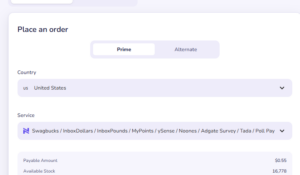
    Step 2: Open the virtual numbers section and select the country.

    When you open the virtual number section, select United States from the list.

    Step 3: Select the service.

    In this case, search for “Swagbucks” and select it.

    Step 4: Complete your purchase.

    Place your order. You will receive a code that you will input in Swagbucks for your verification.

    For more information about obtaining an American number, read Nexar’s guide to getting a US number in Nigeria. 

    What to Check Before Buying a US Virtual Number for Verification

    Before purchasing a US virtual number for verification, consider the following factors.

    Platform Compatibility

    Check whether the platform accepts virtual numbers. Do not assume that a number will work simply because it has a US country code.

    SMS Support

    Confirm whether the selected number can receive the type of verification message you need. Some numbers may support only certain services or functions.

    Number Type

    Mobile-provider-issued numbers, VoIP numbers, and disposable numbers are not necessarily treated the same way. Swagbucks specifically excludes VoIP and disposable numbers from its mobile verification process.

    Country Eligibility

    Check whether the platform allows residents of your country to register, participate, and redeem rewards. A US number does not independently establish US residency.

    Account Ownership and Security

    Use numbers and accounts in accordance with the platform’s rules. Avoid using shared numbers where the platform requires a number belonging exclusively to you.

    These checks can help you avoid paying for a number that cannot fulfil your intended purpose.

    Frequently Asked Questions

    Can I use a US virtual number for Swagbucks in Nigeria?

    A US virtual number is not a guaranteed solution. Swagbucks does not accept VoIP or disposable numbers for its stated mobile verification process, and Nigeria is not included in its published list of countries eligible to redeem rewards. Check the platform’s current requirements before proceeding.

    Does every US number work for Swagbucks verification?

    No. Swagbucks requires a mobile number issued by a recognised mobile provider. A US country code alone does not establish compatibility.

    Can I buy an American virtual number for Swagbucks through Nexar?

    You can explore available US virtual numbers through Nexar, but you should confirm compatibility and eligibility before purchasing. Do not assume a number will work with Swagbucks simply because it is available for another service.

    What else can I use a US virtual number for?

    Depending on the number type and provider, a US virtual number may be useful for compatible online registrations, communications, and verification processes on platforms that permit virtual numbers.

    Final Thoughts

    A US virtual number for Swagbucks is one of the options people explore when looking for ways to use international online platforms. However, choosing the right number requires understanding the receiving platform’s verification requirements and the features offered by the provider.

    Whether you need a US number for online registration, SMS verification or other compatible services, having a reliable provider makes the process easier.

    With Nexar, you can explore available US virtual numbers, compare supported services and find an option that suits your needs.

    Visit Nexar to explore available virtual numbers and discover more ways to simplify your digital activities.

  • Crypto to Naira Exchange: 15 Tips to Get the Best Rates in Nigeria

    Crypto to Naira Exchange: 15 Tips to Get the Best Rates in Nigeria

    Navigating the world of digital assets in Nigeria has always been an adventure. If you are a trader or an investor, you already know the drill: checking the parallel market rates every morning, worrying about the latest P2P restrictions, and trying to avoid the scams that seem to hide in every corner of the internet. The biggest problem many of us face isn’t just buying the coins; it is finding a reliable crypto to naira exchange that doesn’t eat up our profits with hidden fees or terrible rates.

    Whether you are cashing out your monthly trading gains or just trying to move some savings back into your local bank account, getting the best value for your digital assets is essential. The market moves fast, and if you aren’t careful, you might lose a significant percentage of your money to poor timing or outdated platforms.

    In this guide, we will share 15 practical tips to help you get the best rates every time you want to convert your digital assets. We will also show you how to exchange crypto to naira using modern digital solutions that prioritize your security and speed.

    1. Stick to USDT for Cashing Out

    Volatility is your biggest enemy when you want to convert assets to cash. If you are holding Bitcoin or Ethereum, a 5% drop in price while you are waiting for a trade can hurt. By converting your volatile coins to USDT (specifically the TRC20 version) first, you lock in the dollar value. This makes your crypto to naira exchange much more predictable.

    2. Monitor the Parallel Market Rates

    Official bank rates and the “street” rates for the dollar are often very different. Most reliable platforms base their rates on the parallel market. Before you sell, check reputable rate aggregators to see where the Naira is trading against the USD. This gives you a baseline so you know if you are getting a fair deal.

    3. Use the Best Crypto to Naira App Nigeria Has to Offer

    Not all apps are created equal. Some focus on global trading but have poor local payout systems. You need a service that understands the Nigerian banking landscape. Using the best crypto to naira app nigeria ensures that your transactions are processed through local channels that are fast and reliable. Nexar is designed specifically to bridge this gap, providing a seamless experience for local users.

    4. Avoid Peak Network Congestion

    If you are sending crypto from an external wallet to an exchange, do it when the network isn’t busy. High congestion on the Ethereum or Bitcoin networks means high gas fees. While these aren’t part of the exchange rate itself, they reduce the total amount of Naira that actually hits your bank account.

    A professional woman working in a cafe, managing her digital assets securely

    5. Check for “Zero Fee” Traps

    Some platforms advertise zero commission but then offer a conversion rate that is far below the market average. This is a hidden fee. Always compare the final Naira amount you will receive across different platforms rather than just looking at the “fee” percentage.

    6. Prioritize Instant Settlements

    The Naira is volatile. A rate that is good at 10:00 AM might be different by 10:30 AM. Use a service like Nexar that offers instant settlements. This ensures you get the exact amount promised the moment you confirm the trade, without waiting hours for a manual review.

    7. Enable Two-Factor Authentication (2FA)

    The “best” rate is worthless if your account gets compromised. Always use an app that requires 2FA for withdrawals and trades. This protects your funds and ensures that only you can authorize a crypto to naira exchange.

    8. Avoid Informal P2P Deals

    It might be tempting to trade with someone you met in a Telegram group to “save on fees,” but this is where most scams happen. Without an escrow system or a regulated service provider, you have no protection. Always use a platform that acts as a secure intermediary.

    9. Look for Real-Time Mid-Market Rates

    Mid-market rates are the midpoint between the buy and sell prices. While most exchanges take a small spread, the closer they are to the real-time mid-market rate, the better your deal. Nexar prides itself on transparency, offering competitive rates that reflect the actual market conditions.

    10. Centralize Your Digital Services

    Managing five different apps for crypto, bill payments, and data is a hassle. When you use an all-in-one platform, you often get better loyalty perks and a smoother flow of funds. Finding a reliable best crypto to naira app nigeria that also handles your airtime and electricity bills makes life much easier.

    A close-up of the Nexar app showing a successful crypto transaction

    11. Test with Small Amounts First

    If you are using a new service for the first time, don’t move your entire portfolio at once. Send a small amount to test the speed of the payout and the accuracy of the rate. Once you are comfortable with the service, you can scale up.

    12. Trade During High Liquidity

    Liquidity refers to how much of an asset is being traded. When liquidity is high (usually during standard business hours in major financial hubs), spreads tend to be tighter. This means you get a rate closer to the market price.

    13. Pay Attention to Minimum Limits

    Some platforms have high minimum withdrawal limits. If you only need a small amount of Naira for an emergency, you don’t want your funds stuck because you haven’t met a $100 minimum. Choose a service that allows for flexible transaction sizes.

    14. Watch the Charts for “Bounces”

    If the crypto market is crashing, everyone tries to sell at once, which can drive down the rates on local exchanges. If you can wait a few hours for a small “relief bounce,” you might get a significantly better rate for your Naira conversion.

    15. Choose a User-Friendly Interface

    A confusing UI leads to mistakes. You might accidentally click “market sell” when you meant to set a specific price, or send funds to the wrong wallet address. A clean, minimalist design helps you focus on the numbers that matter.

    How to Exchange Crypto to Naira Safely

    If you are wondering how to exchange crypto to naira without the stress of P2P merchants or complicated trading boards, the process has become much simpler. In the past, you had to find a buyer, wait for them to pay, and then manually release your coins. Today, digital solutions have automated this.

    To get started, you simply need to:

    1. Get a Wallet Address: Log into your Nexar account and generate a deposit address for the coin you want to sell (like USDT or BTC).
    2. Send Your Assets: Transfer your crypto from your external wallet (like Trust Wallet or Ledger) to your Nexar wallet.
    3. Confirm the Rate: The app will show you the real-time conversion rate.
    4. Withdraw to Bank: Once the crypto is received, you can instantly convert it and withdraw the Naira to any Nigerian bank account.

    Using this method is much safer than P2P because you are dealing with a regulated platform that manages the liquidity and security for you.

    Why Nexar is the Best Crypto to Naira App Nigeria

    When we built Nexar, we knew that Nigerians needed more than just another exchange. You need a partner that understands the urgency of business and the reality of our local economy. Our crypto-to-naira service is built on three pillars: Transparency, Speed, and Security.

    Unlike other platforms that hide their profit in the “spread,” we show you exactly what you are getting. We provide real-time mid-market rates so you can make informed decisions. Furthermore, because we are an all-in-one platform, you can use your crypto proceeds to buy gift cards or even grow your social media presence without ever leaving the app.

    A team of professionals collaborating in a Nigerian tech hub

    Whether you are a freelancer getting paid in USDT or an investor looking for the best crypto to naira app nigeria, our goal is to help you thrive. We have eliminated the “hurdle” of traditional banking delays by offering instant settlements. Because we value your trust, every transaction is protected by bank-grade security protocols.

    Start Your Journey with Nexar Today

    Stop settling for poor rates and slow payouts. It is time to use a service that was built for the modern Nigerian creator and trader. Whether you need a crypto to naira exchange, a virtual number for verification, or a global eSIM for your next trip, Nexar has you covered.

    Ready to get the best rates? Sign up for Nexar today and experience the future of digital finance.

    Frequently Asked Questions

    What is the safest crypto to naira exchange?
    The safest way to exchange is through a platform that uses secure wallets and offers instant bank payouts. Nexar provides a secure environment where you can sell your crypto and receive Naira in minutes without dealing with unverified third-party buyers.

    How to exchange crypto to naira without P2P?
    You can avoid P2P by using an instant conversion service. Instead of finding a person to buy your coins, you sell directly to the platform at a set rate. This eliminates the risk of payment delays or scams common in P2P marketplaces.

    Which is the best crypto to naira app nigeria?
    The best crypto to naira app nigeria should offer competitive rates, low fees, and multi-service functionality. Nexar is a top choice because it combines crypto conversion with other essential digital solutions like bill payments and social media growth.

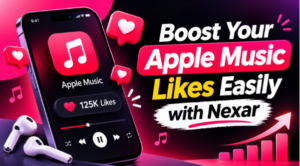
  • Boost Your Apple Music Likes Easily with Nexar

    Making good music is one thing. Getting people to discover it, listen to it and become invested in it is another. For independent artists, this can be one of the most challenging parts of building a music career. You can spend months working on a song, get it distributed across streaming platforms and still struggle to get the attention you hoped for.

    That’s where music promotion comes in.

    Beyond getting streams, artists want people to save their songs, add them to their libraries, share them with friends and show that they genuinely enjoy their work. These interactions can help artists build an audience and create more visibility around their releases.

    If you’re an independent artist, record label manager or music marketer, you may have wondered how to Boost Apple Music Likes and get more people engaging with your releases. Should you focus on organic promotion? Are there tools that can help? And is buying Apple Music likes a good idea?

    In this guide, we’ll explain how Apple Music likes work, explore eight practical ways to increase them, discuss the promotional channels worth investing in and show you how Nexar’s social media boosting tool can support your music promotion efforts.

    Quick Answer: How Can You Get More Apple Music Likes?

    Getting more likes on Apple Music starts with making your music easy to discover and giving listeners a reason to engage with it. You can achieve this through consistent promotion, direct links, social media campaigns and music promotion tools.

    Here are some things to prioritise:

    • Create music people want to revisit: Give listeners a reason to save your songs and return to them.
    • Make discovery easier: Share direct links to your releases instead of making people search for them.
    • Use social media: Promote your music on platforms where your target audience spends time.
    • Explore boosting services: Use promotional tools to support your visibility and engagement goals.
    • Monitor your performance: Use Apple Music for Artists to understand how your music is performing.

    The important thing is to have a promotion strategy that extends beyond release day.

    What Are Apple Music Likes, and Do They Matter?

    Before exploring how to increase your likes, it’s worth understanding what they represent.

    Apple Music allows listeners to express their preference for songs, albums and playlists through its Love and Favorite features. When someone interacts with music this way, they are telling Apple Music what they enjoy, which can help personalise their listening experience and recommendations.

    Unlike Instagram or TikTok, Apple Music doesn’t display a conventional public like counter beneath every song. This means artists may not be able to measure their popularity through visible likes in the same way they would on social media.

    However, that doesn’t make likes irrelevant.

    For artists, getting more people to engage with their releases is part of building a stronger presence on a streaming platform. It can also complement other promotional efforts, particularly when combined with streams, playlist placements, Shazam activity and audience growth.

    Ultimately, the goal is to make your music discoverable and give people more reasons to interact with it.

    How to Boost Apple Music Likes the Right Way

    Getting more likes requires more than simply uploading a song and waiting for people to find it. You need to create opportunities for people to discover your music and make it easy for them to engage.

    Think of the process in three stages:

    1. Discovery: Someone comes across your music through social media, a playlist, a recommendation or another promotional channel.
    2. Engagement: They become interested enough to visit your Apple Music profile, listen to your song or explore your other releases.
    3. Action: They favorite the song, add it to their library, share it or return to listen again.

    Each stage contributes to your overall music promotion strategy. If people aren’t discovering your music, they have little opportunity to engage with it.

    This is why artists should pay attention to both the quality of their releases and the strategies they use to promote them.

    8 Ways to Increase Apple Music Likes Organically
    How to Boost Apple Music Like Organically

    You don’t always need a large marketing budget to get people interested in your music. Sometimes, a few consistent promotional activities can help you reach listeners who would genuinely enjoy your sound.

    Here are eight strategies worth incorporating into your next release campaign.

    1. Make the First 30 Seconds Count

    The opening of your song can influence whether someone decides to keep listening or move on to something else. While there’s no universal formula for a successful song, a compelling introduction gives listeners a reason to stay.

    Pay attention to your song structure, production and overall listening experience. If your strongest hook comes much later in the track, consider how you can introduce it in your promotional clips to capture attention.

    2. Run a Pre-Add Campaign

    Don’t wait until release day to start talking about your music. A pre-add campaign allows interested listeners to add an upcoming release to their Apple Music libraries before it becomes available.

    Work with your distributor to create a pre-add link and share it across your social media platforms, email list and fan communities.

    You can also build anticipation by sharing snippets, artwork, behind-the-scenes footage and stories about the upcoming release.

    3. Claim Your Apple Music Artist Profile

    Your artist profile is an important part of your presence on Apple Music. It gives listeners a place to explore your music, discover your releases and learn more about you.

    Claiming your profile through Apple Music for Artists also gives you access to analytics that can help you understand your audience.

    You can explore listener trends, identify locations where your music is gaining attention and monitor your performance over time. These insights can help you make more informed decisions about where to focus your promotional efforts.

    4. Share Direct Links to Your Music

    Imagine someone discovers your song on Instagram but has to search through Apple Music to find it. There’s a chance they might lose interest before getting to the actual track.

    Direct links eliminate this unnecessary step.

    Whenever you promote a new release, include a link that takes listeners straight to the song or album. You can share it in your social media bio, captions, WhatsApp status, newsletters and other communication channels.

    Make your call to action clear. Rather than simply saying “My new song is out”, encourage people to listen, favorite the track and add it to their libraries.

    5. Use Short-Form Videos to Promote Your Songs

    Short-form video has become an important discovery channel for music. Platforms like TikTok, Instagram Reels and YouTube Shorts allow artists to introduce their songs to people who may not have come across them otherwise.

    You don’t need an elaborate music video for every release. A short performance clip, lyric video, behind-the-scenes recording session or video explaining the inspiration behind a song can create interest.

    Experiment with different formats and pay attention to the clips that generate the most meaningful responses. When people connect with a particular part of your song, make it easy for them to find the full version on Apple Music.

    6. Collaborate With Other Artists and Creators

    You don’t have to promote your music alone. Collaborating with other artists, producers, influencers and content creators can introduce your work to audiences beyond your existing fan base.

    For example, you could feature another artist on a song, participate in a music challenge, create content together or exchange promotional opportunities.

    The key is to find people whose audiences are likely to enjoy your music. A collaboration with the right creator can introduce your release to listeners who may eventually become regular fans.

    7. Build a Community Around Your Music

    People are more likely to support artists they feel connected to. Beyond posting promotional content, create opportunities for listeners to interact with you and become part of your music journey.

    You can share the stories behind your songs, respond to comments, host live sessions and create WhatsApp or Telegram communities for your most engaged listeners.

    Don’t make every interaction about asking people to stream or favorite your music. Give them something interesting to connect with, too.

    Over time, these relationships can turn casual listeners into people who actively look forward to your next release.

    8. Release Music Consistently

    Consistency gives listeners more opportunities to discover your work. It also helps you maintain an active presence across streaming and social media platforms.

    This doesn’t mean releasing a new song every week. Instead, develop a realistic release schedule that gives you enough time to create quality music and promote each project properly.

    You can also revisit older releases by creating new content around them, sharing audience reactions or introducing them to people who may have missed them the first time.

    A good release strategy considers what happens after launch day, not just the excitement surrounding the initial release.

    Apple Music Promotion: Where to Spend Your Time and Budget

    Knowing how to promote your music is just as important as knowing where to promote it. Different platforms serve different purposes, and the best approach is to combine channels that help you reach new listeners, engage existing fans and direct people to your Apple Music releases.

    Here are some promotional options to consider.

    1. Short-Form Video Platforms

    TikTok, Instagram Reels and YouTube Shorts are useful for introducing your music to new audiences. You can share song snippets, lyric videos, performance clips and other creative content that encourages people to discover your work.

    Focus on creating content that fits the platform rather than simply uploading the same promotional poster everywhere.

    2. Playlists and Music Curators

    Playlists can introduce your music to people who already enjoy your genre. Research independent curators, explore submission opportunities and connect with artists who create playlists around similar sounds.

    Prioritise relevant playlists and legitimate placements instead of services promising guaranteed streams or artificial engagement.

    3. Email and Messaging Communities

    Your existing audience can be a valuable source of support whenever you release new music. Use your email list, WhatsApp groups and Telegram communities to share release announcements, direct links and updates.

    Personalised messages often work better than repeatedly sending generic promotional content. Give people a reason to care about the release and make it easy for them to listen.

    4. Collaborations and Features

    Working with other musicians and content creators can help you reach audiences that may not know your music yet.

    Look for opportunities to collaborate on songs, promotional videos, interviews and other creative projects. Choose partnerships that make sense for your genre and target audience.

    5. Paid Social Media Advertising

    If you have a marketing budget, paid advertising can help you reach people based on their interests, location and other targeting options.

    You can run campaigns on Instagram, TikTok and Facebook using engaging clips from your songs. Direct interested viewers to your Apple Music release and monitor the results to understand which creatives and audiences perform best.

    6. Social Media Boosting Tools

    Sometimes, you need more than content and consistent posting to support your promotional goals. Social media boosting tools provide another option for artists who want to improve their visibility and engagement across digital platforms.

    For instance, Nexar’s social media boosting tool can be used to Boost Apple Music Like numbers and support your efforts to promote your releases. Instead of relying entirely on organic discovery, you can explore available boosting services to complement your wider music marketing strategy.

    Whether you’re an independent musician preparing for a new release or a record label managing multiple artists, Nexar provides a convenient way to access social media boosting services from one platform.

    Explore the available options on Nexar’s Buy & Boost Social Media page and find a service that aligns with your promotional needs.

    Should You Buy Apple Music Likes?

    If you’ve searched for ways to grow your Apple Music presence, you’ve probably come across services that offer to sell likes. These services can be tempting, especially when you’re trying to create momentum around a new release.

    But before spending money, it’s important to understand what you’re paying for and how the service works.

    Artificial streaming and fraudulent engagement are serious concerns for music streaming platforms. Apple Music has taken action against manipulated streaming activity, including removing fraudulent stream counts and chart positions. Such practices can also affect royalties and the distribution of revenue to legitimate artists.

    However, not every paid promotional service works in the same way. There is a difference between investing in promotional tools and participating in fraudulent streaming schemes.

    Before using a service, consider the following:

    • Understand the service: Know exactly what you’re purchasing and how the provider delivers it.
    • Check platform support: Make sure the service supports the specific platform and engagement type you’re targeting.
    • Protect your account: Never share your Apple ID password or sensitive account information with a third party.
    • Set realistic expectations: Paid promotion should complement your wider marketing efforts, not replace quality music and audience development.

    If you’re considering a boosting service, you can explore the available options on Nexar’s Buy & Boost Social Media page to see how its services fit into your promotional strategy.

    Common Mistakes to Avoid When Promoting Your Music

    Even with a good song and a reasonable marketing budget, certain mistakes can limit the results of your promotional efforts.

    Chasing numbers instead of building an audience: Getting more likes and streams is great, but these numbers should support a larger goal. You want people who enjoy your music enough to follow your journey and listen to future releases.

    Releasing music without a promotion strategy: Don’t make release day the first time people hear about your song. Build anticipation before launch and continue promoting after the initial excitement fades.

    Using generic promotional content: Posting the same artwork and release announcement repeatedly can make your campaign feel predictable. Experiment with different content formats to give people fresh reasons to engage.

    Making it difficult to find your music: Always include direct links when promoting your releases. Don’t assume that someone who sees your content will automatically search for your song.

    Ignoring your analytics: Your promotional strategy should evolve based on what works. Use Apple Music for Artists and your social media insights to understand your audience and identify opportunities for improvement.

    Relying entirely on one promotional channel: Don’t limit your music promotion to a single platform. Combine social media, playlists, collaborations, direct communication and other relevant channels to expand your reach.

    Frequently Asked Questions

    Does Apple Music show likes publicly?

    Apple Music doesn’t display a public like counter under songs in the same way social media platforms do. Its Love and Favorite features primarily help personalise each listener’s music experience and recommendations.

    How can I get more Apple Music likes?

    You can attract more engagement through pre-add campaigns, direct links, short-form videos, playlist promotion, collaborations and consistent communication with your audience. You can also explore boosting services that support your promotional goals.

    Is it safe to pay for Apple Music likes?

    The safety depends on the service and how it delivers results. Artificial streaming and fraudulent engagement can violate platform rules and carry risks. Always understand what a provider offers, avoid sharing your account credentials and stay away from services that rely on manipulated streams.

    What is the best promotion strategy for Apple Music?

    A combination of promotional channels usually works best. Use short-form videos for discovery, playlists for exposure, fan communities for engagement and Apple Music for Artists to monitor your results. You can also explore social media boosting tools to complement your campaigns.

    How long does it take to see results?

    There is no fixed timeline. Results depend on your music, existing audience, promotional budget, release strategy and consistency. Some artists may notice changes within a few weeks, while others need more time to build momentum.

    Can social media boosting tools help my music promotion?

    Yes. Social media boosting tools can support your promotional efforts by helping you increase visibility and engagement. Nexar offers boosting services, including options for Apple Music likes, alongside services for other social platforms. You can explore the available options on its Buy & Boost Social Media page.

    Final Thoughts

    Getting people to listen to your music is important, but building an audience that continues to support your work is what makes the difference in the long run.

    From creating engaging promotional content to collaborating with other artists and exploring social media boosting tools, there are several ways to improve your music’s visibility and encourage more people to interact with your releases.

    If you’re looking for ways to Boost Apple Music Likes, start by understanding your audience, choosing the right promotional channels and making it easy for people to find your music. You can also explore Nexar’s boosting services as part of your wider promotion strategy.

    Your next release deserves more than an upload and a waiting game. Give it the promotion it needs to reach the people who will enjoy it.

    For more practical guides on growing your online presence, explore the Nexar blog.
  • How to Pay for YouTube Premium in Nigeria Easily

    Ad-free videos, background play, offline downloads and YouTube Music are some of the benefits of a YouTube Premium subscription. However, getting the payment to go through can be a challenge for many Nigerians. If you’ve tried setting up YouTube Premium Nigeria payments only to have your card declined, you’re not alone.

    Many Nigerian users experience difficulties paying for international subscriptions because of restrictions on local bank cards and recurring online transactions. Fortunately, there are several ways to complete your subscription without unnecessary payment struggles.

    This guide explains the available YouTube subscription options in Nigeria, the payment methods you can use, how to subscribe step by step, and what to do when a payment fails.

    Quick Answer: How to Pay for YouTube Premium Nigeria

    How to Pay for YouTube Premium Nigeria

    You can pay for YouTube Premium in Nigeria using a debit or credit card enabled for international and recurring payments. Other options include virtual dollar cards, Google Play billing on Android and Apple billing on iPhone.

    Naira cards are sometimes declined because of international transaction restrictions, making virtual dollar cards a useful alternative.

    Here’s what you should know:

    • Billing: YouTube Premium is reportedly billed in naira in Nigeria, although prices can change.
    • Available payment methods: Naira cards, virtual dollar cards, Google Play and Apple billing.
    • Ways to save: Consider the Family plan or Student plan if eligible.
    • What to avoid: VPN workarounds and suspicious discounted Premium offers.
    • Manage your subscription: Visit youtube.com/paid_memberships.

    YouTube Premium Nigeria: Plans and Prices

    YouTube Premium offers several features designed to improve your viewing experience. Subscribers can watch videos without advertisements, play videos in the background, download content for offline viewing and access YouTube Music Premium.

    The subscription plans typically available include:

    • Individual Plan: Designed for one person who wants access to YouTube Premium features.
    • Family Plan: Allows eligible members of the same household to share one subscription.
    • Student Plan: Offers discounted access to eligible students who meet YouTube’s verification requirements.

    Recent guides report that YouTube Premium is billed in naira in Nigeria, with the Individual plan costing approximately ₦1,700 monthly and the Family plan around ₦2,800 monthly.

    However, these prices are subject to change. Always check the official YouTube Premium page to confirm the current subscription cost before paying.

    You should also note that accepted payment methods vary by country. In some locations, YouTube requires a payment method issued within that country. You can find more information in Google’s official guide to accepted payment methods for YouTube Premium.

    Why Paying for YouTube Premium in Nigeria Can Be Difficult

    One of the biggest challenges with YouTube Premium Nigeria payments is the restrictions Nigerian banks place on international transactions.

    Although some naira debit and credit cards support online payments, they may not work for international subscriptions. This is because recurring payments are sometimes processed differently from regular online transactions.

    For example, your card might work perfectly when shopping online but fail when you attempt to pay for a monthly subscription.

    Some virtual dollar cards issued by Nigerian providers may also experience payment restrictions, particularly when they are linked to naira accounts.

    This explains why a payment method that works for one person might fail for another. Rather than repeatedly attempting the same transaction, it’s better to explore other supported payment options.

    Payment Methods You Can Use for YouTube Premium Nigeria

    There are several payment methods Nigerian users can explore when subscribing to YouTube Premium. The best option depends on your bank, device and available budget.

    Payment method How it works What to consider
    Naira debit or credit card Add your card during checkout and complete the payment in naira where supported. Your bank must allow international and recurring transactions.
    Virtual dollar card Fund your card with naira and use its dollar balance for payment. Check provider fees, exchange rates and renewal requirements.
    Google Play billing Subscribe through the YouTube app on Android using your Google Play payment method. You need an accepted payment method or available balance.
    Apple billing Subscribe through the YouTube app on iPhone using your Apple account. Prices may differ from subscribing through the website.
    Gift card or code Redeem an eligible YouTube gift card or code. Confirm that the card is valid for your country before purchasing.
    Family plan Join an eligible household subscription managed by another person. All members must meet YouTube’s household requirements.

    If you’re considering gift cards or codes, you can explore platforms such as Nexar’s gift cards page for available streaming and subscription gift cards.

    Always confirm that a specific gift card is supported in your region before making a purchase.

    How to Pay for YouTube Premium Nigeria: Step-by-Step Guide

    Once you’ve selected a suitable payment method, subscribing is relatively straightforward.

    Follow these steps:

    Step 1: Sign In to Your Google Account

    Open the YouTube app or visit YouTube.com. Sign in using the Google account you want to associate with your Premium membership.

    Step 2: Open the YouTube Premium Page

    Tap your profile picture and select Get YouTube Premium. Alternatively, visit youtube.com/premium directly.

    Step 3: Choose Your Preferred Plan

    Select the Individual, Family or Student plan, depending on your needs and eligibility.

    Review the subscription price displayed in your local currency before proceeding.

    Step 4: Select a Payment Method

    Choose an existing payment method or add a new card.

    Android users may be billed through Google Play, while iPhone users may complete their subscriptions through Apple billing.

    Step 5: Confirm Your Payment

    Follow the payment instructions and approve any additional verification request from your bank, such as an OTP or banking app notification.

    Step 6: Check Your Subscription

    After completing the transaction, visit youtube.com/paid_memberships to confirm your membership.

    You can also check your next billing date, manage your payment method and add a backup card.

    Paying for YouTube Premium With a Virtual Dollar Card

    If your naira debit card keeps getting declined, a virtual dollar card may be another option worth considering.

    A virtual dollar card is a digital payment card that allows you to make transactions in foreign currencies. You typically fund it using naira, while the card processes payments in dollars.

    Here’s how to use one:

    1. Choose a reliable provider: Look for a provider with transparent fees, good customer support and clear payment terms.
    2. Fund your wallet: Add money using a supported payment method. Consider exchange rate differences and additional charges.
    3. Create your virtual card: Generate a virtual dollar card and note its details.
    4. Add the card to YouTube: Enter your card information when selecting a payment method. Ensure your billing details match your card profile.
    5. Maintain sufficient balance: YouTube Premium subscriptions renew automatically, so ensure your card has enough funds before the next billing date.

    Remember that not every virtual dollar card is guaranteed to work. Check your provider’s restrictions and supported transaction types before funding your account.

    Common Reasons Your YouTube Premium Payment Fails

    Even after choosing a payment method, you might encounter problems during checkout.

    Here are some common reasons payments fail and what you can do about them.

    Why your payment fails How to fix it
    Your naira card doesn’t support international or recurring payments. Contact your bank to enable international online transactions or try another supported payment method.
    Your card has insufficient funds. Add enough money to cover the subscription price, fees and exchange rate differences.
    Your bank flags the transaction. Approve the transaction through your banking app or contact your bank.
    Your billing address or card details are incorrect. Review your payment information and correct any errors.
    Your card has expired or has insufficient funds during renewal. Update your payment details and add a backup payment method.
    Your payment method isn’t supported in Nigeria. Switch to a payment method accepted for your country.

    If you’re still having trouble, check your Google payment settings and contact your bank or payment provider for assistance.

    Smart Ways to Save Money and Stay Safe

    A YouTube Premium subscription doesn’t have to become another unnecessary expense. Here are a few ways to manage your subscription wisely.

    1. Consider the Family Plan

    If you live with other eligible household members who also use YouTube Premium, the Family plan may help reduce the cost per person.

    One person manages the subscription and invites other eligible members.

    2. Check Your Eligibility for the Student Plan

    Students who meet YouTube’s requirements may qualify for discounted subscriptions. You might need to verify your student status through YouTube’s verification process.

    3. Make Use of Free Trials

    If you’re eligible for a free trial, you can explore YouTube Premium features before committing to a paid subscription.

    Set a reminder before the trial ends if you don’t intend to continue paying.

    4. Avoid VPN Workarounds

    Using a VPN to subscribe through another country’s pricing may violate YouTube’s terms and could result in your membership being cancelled.

    Subscribe using the appropriate country and an accepted payment method.

    5. Be Careful With Cheap Premium Offers

    Avoid accepting suspicious invitations from strangers on social media who promise extremely cheap Premium subscriptions.

    Some offers may be scams, while others may put your Google account at risk.

    6. Never Share Your Google Password

    Only complete payments through trusted platforms such as YouTube, Google Play or Apple. Never give your account password or verification codes to someone claiming they can activate your subscription.

    Frequently Asked Questions

    How much is YouTube Premium in Nigeria?

    Recent guides report that the Individual plan costs approximately ₦1,700 monthly, while the Family plan costs around ₦2,800. However, prices can change, so check the official YouTube Premium page for the latest rates.

    Can I use a naira card to pay for YouTube Premium?

    Yes, if your bank allows the required online, international and recurring transactions. However, some Nigerian naira cards are declined because of banking restrictions. You can contact your bank or explore other supported payment methods.

    Is the YouTube Premium Nigeria Family plan worth it?

    It can be a good option if you have eligible household members who want to share a subscription. Splitting the cost can make the plan more affordable for everyone, although the subscription manager remains responsible for billing.

    Can I pay through Google Play or Apple?

    Yes. Android users can subscribe through Google Play billing, while iPhone users can pay through Apple billing using an accepted payment method associated with their accounts.

    Do I need a VPN to subscribe to YouTube Premium in Nigeria?

    No. You can subscribe from Nigeria using an accepted local payment method. Using a VPN to access another country’s subscription pricing may violate YouTube’s terms.

    How do I cancel my YouTube Premium subscription?

    Visit youtube.com/paid_memberships, select Manage membership and follow the instructions to cancel your subscription. Make sure you cancel before your next billing date if you don’t want another charge.

    Why does YouTube keep declining my payment?

    Your card may not support recurring international payments, your balance may be insufficient, or your bank may have flagged the transaction. Check your payment details, contact your bank or try another supported payment method.

    Final Thoughts

    Paying for YouTube Premium in Nigeria becomes easier when you understand the available payment methods and choose one that works with your bank and device.

    If your naira card isn’t working, consider a virtual dollar card, Google Play billing or Apple billing, depending on the options available to you.

    Before subscribing, always confirm the current prices, review the payment requirements and keep a backup payment method for future renewals.

    For more practical guides on online payments, subscriptions and digital services, explore the Nexar blog.

  • How to Get a Jamaica Virtual Number in Nigeria: A Complete Guide

    Need a Caribbean number without leaving Lagos, Abuja or Port Harcourt? Getting a Jamaica virtual number in Nigeria is easier than you might think. You don’t need a physical SIM card, a trip abroad or a relative living in Jamaica to get started.

    With a virtual number, you can access a Jamaican phone number from anywhere in Nigeria using an internet connection. Whether you need it for account verification, business communication or a second phone line, the process is relatively straightforward.

    In this guide, we’ll explain what a Jamaican virtual number is, whether you can use one for WhatsApp, how to buy a Jamaica number online and what to consider before making a purchase.

    Quick Answer: How to Get a Jamaica Virtual Number in Nigeria

    You can purchase a Jamaican virtual number online from Nigeria without needing a Jamaican SIM card. Simply choose a reliable provider, create an account, fund your wallet, select Jamaica and the service you need, and retrieve your verification code from your dashboard.

    However, if you intend to use the number for WhatsApp, understand that not all virtual numbers are supported.

    Here’s what you need to know:

    • Country code: +1
    • Area codes: 876 and 658
    • Requirements: An online account, a supported payment method and a clear purpose for the number.
    • Common uses: Account verification, business communication and maintaining a second phone line.
    • Important consideration: Some virtual number types may not work with certain applications, and rental numbers can expire.

    What Is a Jamaican Virtual Number?

    A virtual number is a phone number that operates without being connected to a physical SIM card. Instead of receiving messages through a traditional mobile network, you access incoming SMS messages and, depending on the provider, calls through an app, website or online dashboard.

    Jamaica is part of the North American Numbering Plan (NANP). This means it shares the +1 country code with countries such as the United States and Canada.

    However, Jamaican phone numbers have their own area codes: 876 and 658. The 658 area code was introduced in 2019 as an overlay for the island.

    A Jamaican phone number typically follows this format:

    • +1 876 XXX XXXX
    • +1 658 XXX XXXX

    With a Jamaica virtual number in Nigeria, you can access a number with these prefixes without travelling to the Caribbean or purchasing a physical SIM card.

    Why Do Nigerians Buy Jamaican Virtual Numbers?

    There are several reasons someone in Nigeria might need a Jamaican phone number. Your intended use will determine the type of number you should purchase.

    Here are some common applications:

    1. Account Verification

    Some websites and online services require users to provide a phone number before creating an account or accessing certain features. A virtual number can help you receive one-time passwords (OTPs) where the platform accepts that number type.

    2. Maintaining a Second Phone Line

    If you manage multiple online accounts, run side projects or frequently shop on international platforms, having a separate number can help you keep your personal and online activities organised.

    3. Business Communication

    Businesses working with Jamaican customers or partners may benefit from having a local contact number. It can make communication more convenient for people who prefer contacting businesses through familiar country codes.

    4. Protecting Your Personal Number

    A separate number can help reduce how often you share your primary phone number with websites and online platforms. This is particularly useful when dealing with services you don’t regularly use.

    Remember to use virtual numbers for legitimate purposes and follow the rules of the platforms where you register. Using them for spam, fraud or ban evasion can result in account restrictions.

    Can You Use a Jamaica Virtual Number for WhatsApp?

    Jamaica virtual number in Nigeria

    Yes, some people report successfully registering WhatsApp accounts with virtual numbers. However, this doesn’t mean every Jamaican virtual number will work.

    WhatsApp requires users to verify their phone numbers through an SMS or phone call. More importantly, its official registration guidelines list VoIP numbers, toll-free numbers and landlines as unsupported for the standard WhatsApp application. Landlines are accepted only on WhatsApp Business.

    This means the success of a Jamaica virtual number for WhatsApp depends on the number type, provider and WhatsApp’s verification requirements.

    You can read the details in WhatsApp’s guide to registering a phone number.

    If you intend to try one, keep these points in mind:

    • Choose a private number: Avoid free public SMS websites. Other people can view incoming messages and potentially access accounts registered with those numbers.
    • Check number compatibility: Confirm that the number type is suitable for the application you’re trying to register.
    • Consider number validity: If you’re using a rental number, make sure you understand how long it remains active.
    • Secure your account: Enable WhatsApp two-step verification and add a recovery email where available.
    • Keep your verification details private: Never share your OTP with anyone.

    Also, remember that WhatsApp and WhatsApp Business require separate phone numbers for registration.

    How to Buy a Jamaica Number Online: Step-by-Step Guide

    Getting a Jamaican virtual number doesn’t require complicated procedures. Once you’ve selected a provider, you can complete the process online.

    Here’s how:

    Step 1: Decide What You Need the Number For

    Start by identifying your purpose. Do you need the number for account verification, business communication or a second phone line?

    This matters because different services may require different number types.

    Step 2: Check the Required Features

    Determine whether you need a number that receives SMS messages, voice calls or both.

    Some virtual numbers support SMS verification only, while others offer additional calling features.

    Step 3: Choose a Reliable Provider

    Look for a provider with transparent pricing, accessible customer support and clear refund policies.

    Avoid purchasing from random social media accounts or sellers who cannot explain their services.

    Step 4: Create an Account and Fund Your Wallet

    Register with your chosen provider and add funds using one of its supported payment methods.

    If you’re paying in naira for a dollar-priced service, account for possible exchange rate differences and transaction fees.

    Step 5: Select Jamaica and Your Preferred Service

    Navigate to the virtual numbers section and select Jamaica from the available countries.

    Choose the application or service you intend to use the number for, then review the available options before proceeding.

    Step 6: Purchase Your Number and Retrieve the Code

    Complete your payment and access the number provided.

    Enter it into the application you’re registering on, request the verification code and check your provider’s dashboard for the incoming message.

    Step 7: Secure Your Account

    Once verification is complete, enable the available security features on your newly registered account.

    If you purchased a rental number, keep track of its expiration date to avoid losing access.

    Buying a Jamaica Virtual Number in Nigeria on Nexar

    If you’re looking for a convenient way to purchase international virtual numbers, Nexar provides a platform where users can select numbers from different countries for account verification.

    You can check whether Jamaica is currently available and explore the services supported on the platform.

    Here’s how to get started:

    1. Visit the Nexar website or open the app.
    2. Sign up for an account or log in if you’re already registered.
    3. Navigate to the Virtual Numbers section.
    4. Select Jamaica from the country list.
    5. Choose the service you need the number for, such as WhatsApp or another supported application.
    6. Complete your payment and receive your number.
    7. Enter the number into the application you’re registering on and retrieve your verification code from Nexar.

    Keep in mind that country and service availability can change. Check the platform for current options before funding your wallet.

    Want to see the process in action? Follow our visual walkthrough: How to Buy a Jamaica Virtual Number on Nexar.

    You can also visit Nexar’s virtual numbers page to explore the available countries and supported services.

    What Determines the Price of a Jamaican Virtual Number?

    Jamaican virtual number price

    The cost of a Jamaican virtual number depends on several factors. Different providers have different pricing structures, and the amount you pay may change over time.

    Before making a purchase, consider the following:

    Pricing factor What it means
    One-time purchase vs. rental One-time numbers are generally intended for a single verification, while rental numbers remain available for a specified period.
    SMS vs. SMS and calls Numbers that support both SMS and voice calls may offer more flexibility.
    Validity period Longer rental periods may cost more but can reduce the risk of losing access to the number.
    Provider fees Some platforms charge additional service fees or require minimum wallet deposits.
    Exchange rates Dollar-priced services may cost different amounts in naira depending on the prevailing exchange rate.

    Compare the total cost rather than looking at the advertised price alone. This helps you avoid unexpected charges during checkout.

    Common Mistakes to Avoid When Buying a Jamaican Virtual Number

    Getting a virtual number is relatively simple, but a few mistakes can create problems later.

    Here are some things to avoid:

    1. Using Free Public SMS Websites

    Free SMS websites allow multiple people to view incoming messages. This makes them unsuitable for sensitive accounts and can expose your verification codes.

    2. Forgetting Your Rental Expiration Date

    If your rental period ends, you may lose access to the number. If an application requests another verification code later, recovering your account could become difficult.

    3. Sharing Your Verification Code

    Your OTP is private. Never send it to another person, even if they claim to be a representative of your provider.

    4. Assuming Every Virtual Number Works With Every Application

    Different applications have different verification requirements. Always check whether the number type is supported before purchasing.

    5. Buying From Unverified Sellers

    Purchasing from random social media sellers can expose you to unreliable services, hidden charges and poor customer support.

    Choose a provider with clear terms and accessible support.

    6. Using Virtual Numbers for Suspicious Activities

    Virtual numbers should be used responsibly. Activities such as fraud, spam and attempts to bypass platform restrictions can lead to blocked numbers and suspended accounts.

    Frequently Asked Questions

    1. Can I buy a Jamaican number from Nigeria?

    Yes. You can purchase a Jamaican virtual number online from Nigeria without travelling to Jamaica or owning a Jamaican SIM card. All you need is an account with a provider and a supported payment method.

    2. What is the country code for Jamaica?

    Jamaica uses the +1 country code, with 876 and 658 as its area codes. Both area codes cover the island.

    3. Will a Jamaica virtual number for WhatsApp always work?

    No. WhatsApp’s official registration guidelines list VoIP numbers as unsupported for the standard application. Some users report successful verification with certain virtual numbers, but results vary depending on the number type and provider.

    4. Is it legal to use a Jamaican virtual number?

    Virtual numbers are commonly used for legitimate activities such as account verification, business communication and maintaining separate phone lines. However, you should comply with applicable laws and the terms of the services where you use the number. This information is not legal advice.

    5. How long does a Jamaican virtual number last?

    The validity depends on the provider and purchase plan. Some numbers are available for a single verification, while others can be rented for days, weeks or months.

    6. Do I need a Jamaican SIM card or bank account?

    No. A virtual number operates over the internet, so you don’t need a physical Jamaican SIM card or local bank account. You only need a payment method accepted by your chosen provider.

    7. Can I receive SMS messages on a Jamaica virtual number in Nigeria?

    Yes, provided the number supports incoming SMS and the service sending the message accepts that number type. You can usually access received messages through your provider’s dashboard or application.

    Final Thoughts

    Getting a Jamaican phone number from Nigeria is a straightforward process when you understand how virtual numbers work. You can purchase one online, receive verification messages and access certain services without needing a physical SIM card.

    The important thing is to choose a reliable provider, understand the number’s limitations and check that it supports your intended use.

    If you want to get started with Nexar, visit the platform, check Jamaica’s availability under Virtual Numbers and follow the steps outlined in this guide.

  • How to Buy a Dominica Virtual Number in Nigeria

    Getting a phone number from another country can be useful when you need to access an online service, manage international communications, or register on a platform that supports numbers from a specific location. For Nigerians looking for a Caribbean phone number, a Dominica virtual number in Nigeria may be an option worth exploring.

    A virtual number allows you to access a telephone number through an online service without necessarily purchasing a physical SIM card from the country associated with that number. Depending on the provider, it may support receiving SMS messages, phone calls, or verification codes for compatible services.

    However, not all virtual numbers have the same features, and not every website or application accepts them. If you want to buy a Dominica number online, you should first confirm its availability, supported features, and compatibility with the service you intend to use.

    This guide explains how Dominica virtual numbers work, what to consider before purchasing one, and how to explore international virtual number services through Nexar.

    What Is a Dominica Virtual Number?

    A Dominica virtual number is a telephone number associated with Dominica, the Caribbean island nation, that can be accessed through a virtual number service rather than a conventional physical SIM card.

    Dominica uses the international telephone calling code +1 767. It is important not to confuse Dominica with the Dominican Republic, which uses different area codes. They are separate countries with different telephone numbering arrangements.

    Depending on the provider and number type, a Dominica virtual number may support receiving SMS messages, registering on compatible platforms, or managing certain online communications.

    People may look for a Dominica virtual number for several reasons:

    • Registering on online platforms that accept Dominica numbers.
    • Receiving verification messages where virtual numbers are permitted.
    • Managing supported international digital accounts.
    • Keeping certain online registrations separate from a personal phone number.
    • Exploring communication options associated with Dominica without travelling there.

    The available features depend on the provider. Some numbers may support SMS only, while others may have different restrictions. Always check the specific number’s capabilities before making a purchase.

    Can You Buy a Dominica Virtual Number in Nigeria?

    You can explore online providers that offer international virtual numbers without travelling to Dominica. However, the availability of Dominica numbers depends on the provider and the service you want to use.

    Before purchasing a number, confirm that the provider offers numbers associated with Dominica, including the correct country code, and check whether the number supports your intended application.

    Nexar provides virtual number services for users who need numbers from different countries. You can visit Nexar’s official website to explore its virtual number services and check the countries and applications currently available.

    Do not assume that Dominica is available for every application. Confirm that it appears in the current selection for your intended service before funding your account or placing an order.

    How to Buy a Dominica Number Online Through Nexar

    If Dominica numbers are available for your intended application, follow these steps to explore the options through Nexar.

    Step 1: Create a Nexar Account

    Visit Nexar’s official website to register or sign in. Once you have access to your account, you can explore the available services.

    Step 2: Open the Virtual Number Section

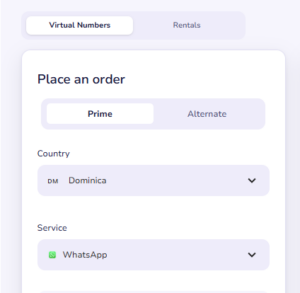
    When you click on the virtual number section, choose Dominica from the country list.

    Step 3: Select Your Intended Application

    Select the service you need the number for, such as WhatsApp or another app.

    Step 4: Complete Your Purchase

    Pay and get your number, then request the verification code in the app you are registering. Afterwards, you can complete your verification with the code you have received.

    Can You Use a Dominica Virtual Number for WhatsApp?

    One reason people search for a Dominica virtual number for WhatsApp is to register an account using a number associated with Dominica.

    However, buying a virtual number does not guarantee that WhatsApp will accept it. WhatsApp may reject numbers depending on their type, provider, previous usage, or other verification checks. The number must also support the verification method WhatsApp makes available to you.

    Before purchasing a Dominica number for WhatsApp, consider the following factors.

    Country and Number Availability

    Confirm that a Dominica number is available through your chosen provider. Check that the number is associated with the correct country and that the intended service is supported.

    Dominica Virtual Number
    Dominica Whatsapp is available on Nexarhq.com

    Verification Compatibility

    Check whether the number can receive the verification code required by WhatsApp. A number that receives SMS messages from one service may not work with another.

    WhatsApp Acceptance

    Virtual numbers may be rejected even when they can receive SMS from other platforms. Do not purchase a number with the expectation that WhatsApp registration is guaranteed.

    Previous Use

    Some numbers may have been used by previous customers or reassigned by a provider. This can create complications if a number is already associated with another account.

    Account Security

    Use the number in accordance with WhatsApp’s terms and applicable provider restrictions. Avoid using virtual numbers for spam, impersonation, or unauthorised account activity.

    If WhatsApp is your main reason for purchasing a number, check the specific options available through Nexar before paying. A number available for another application may not necessarily work with WhatsApp.

    What Are the Benefits of a Dominica Virtual Number?

    The benefits depend on the number type, the provider’s features, and the platform you intend to use.

    1. Online Access From Nigeria

    Virtual number services allow you to explore international phone numbers remotely without travelling to Dominica or purchasing a physical SIM card there.

    2. Convenient Digital Management

    An online platform may make it easier to access supported numbers and manage verification orders from one place.

    3. International Registration Options

    For websites and applications that accept Dominica numbers, a compatible number may provide another option for registration or verification.

    4. Separation From Your Personal Number

    A separate number can help you keep certain online registrations apart from your primary phone number, provided the target service permits this arrangement.

    These benefits are not universal. Check the capabilities and limitations of the specific number before relying on it.

    Things to Consider Before Buying a Dominica Virtual Number

    Before you buy a Dominica number online, review these important factors.

    Availability

    Dominica numbers may not be offered by every provider or for every application. Confirm availability before making a payment.

    SMS and Call Support

    Some numbers support SMS only, while others may offer different features. Check what is included in the specific service you select.

    Verification Restrictions

    Messaging applications, banking services, government platforms, and other websites may impose restrictions on virtual or temporary numbers. A number that works for one platform may be unsuitable for another.

    Pricing

    Review the displayed price and the features included in the purchase. Check whether the number is temporary, service-specific, or subject to usage restrictions.

    Account Security

    Avoid relying on a temporary number as the only recovery method for an important account. If the number expires or is reassigned, you may lose access to future verification messages.

    Correct Country Selection

    Make sure you select Dominica rather than the Dominican Republic. Their names are similar, but they are different countries with different telephone numbering arrangements.

    Frequently Asked Questions

    How can I get a Dominica virtual number in Nigeria?

    You can explore international virtual number providers online. On Nexar, visit the virtual number section and check whether Dominica is available for your intended service before placing an order.

    Can I buy a Dominica number online without travelling?

    Yes. Online virtual number services allow users to explore numbers associated with other countries remotely. Availability, supported features, and purchasing requirements depend on the provider.

    Can I use a Dominica virtual number for WhatsApp?

    Possibly, if the number is available, supports the required verification method, and is accepted by WhatsApp. Acceptance is not guaranteed, so check compatibility before paying.

    What is Dominica’s telephone country code?

    Dominica uses the international calling code +1 767. It should not be confused with the Dominican Republic, which uses different area codes.

    Can I use a Dominica virtual number for banking?

    Do not assume that a virtual number will work for banking or financial accounts. Many financial institutions apply stricter verification requirements and may reject virtual or temporary numbers. Check the institution’s requirements before using one.

    Does Nexar always have Dominica virtual numbers available?

    Availability can vary by country, application, and provider. Visit Nexar to check its currently available virtual number options before making a purchase.

    Final Thoughts

    A Dominica virtual number in Nigeria can be an option for people exploring international digital services, but the right choice depends on availability, supported features, and the requirements of the platform where the number will be used.

    Before you buy a Dominica number online, confirm that the country is available, review the price, and check whether the number supports your intended application. If you need a Dominica virtual number for WhatsApp, remember that virtual number acceptance is not guaranteed.

    Nexar provides virtual number services for users looking to explore international number options from Nigeria. Visit Nexar to explore available countries and supported virtual number services and confirm which options are currently available for your needs.


  • eSIM for Spain: Where to Buy One and What to Know

    Planning a trip to Spain?

    One of the first things you will need after landing is reliable mobile data.

    You need internet for Google Maps, airport directions, hotel bookings, ride-hailing apps, WhatsApp, restaurant searches, translation apps, and keeping in touch with family and friends.

    Instead of waiting at an airport shop to buy a physical SIM card, you can use an eSIM for Spain.

    A travel eSIM can be purchased before your trip and activated on a compatible phone, allowing you to connect to mobile data as soon as you arrive.

    In this guide, we will explain what a Spain eSIM is, where to buy one, what to check before purchasing, and how Nexar can help you stay connected during your trip.

    What Is an eSIM for Spain?

    eSIM for Spain

    An eSIM is a digital SIM that is built into your compatible smartphone.

    Unlike a traditional SIM card, you do not need to physically insert anything into your phone.

    A Spain eSIM provides mobile data through a supported network while you are travelling in Spain.

    This can be especially useful for international travelers because you can keep your normal SIM card in your phone while using the eSIM for mobile data.

    Nexar’s travel eSIM service is designed for data connectivity and allows travelers to keep their main SIM active while using the eSIM for internet access. (Nexar)

    Why Use a Spain eSIM Instead of a Physical SIM?

    There are several advantages.

    No Airport SIM Shopping

    You can purchase your eSIM before leaving home.

    That means you do not have to find a mobile shop immediately after landing.

    No Physical SIM Card

    There is nothing to remove from your phone and nothing small to lose.

    Keep Your Main Number

    You can keep your regular Nigerian SIM in the phone while using the eSIM for data, depending on your device and settings.

    Nexar specifically notes that its eSIM can be used for data while your regular SIM remains active for calls and SMS. (Nexar)

    Easy Activation

    A compatible eSIM can be installed digitally, usually through a QR code or activation instructions.

    Useful for Travel

    Your internet connection can be ready when you need maps, messaging, translation, and other travel apps.

    Where Can You Buy an eSIM for Spain?

    You have several choices when looking for a Spanish eSIM.

    You can purchase a travel eSIM from an international eSIM provider before your trip.

    For Nigerians travelling to Spain, Nexar is one option to consider because it provides travel eSIM plans covering multiple countries.

    Nexar’s eSIM platform allows you to select your destination, purchase a plan, receive the eSIM, and activate it by scanning the provided QR code. You can check the available options through Nexar eSIM.

    How to Buy an eSIM for Spain on Nexar

    The process is straightforward.

    Step 1: Open Nexar

    Visit Nexar and open the eSIM section.

    Step 2: Select Spain

    Search for Spain among the available destinations.

    Nexar provides eSIM coverage across many countries, although available plans and destinations can change. 

    Step 3: Choose Your Data Plan

    Review the available Spain plans.

    Pay attention to:

    • Data allowance
    • Validity period
    • Price
    • Coverage
    • Activation requirements

    Choose a plan based on how long you expect to stay and how much data you normally use.

    Step 4: Purchase the eSIM

    Complete the payment process.

    Nexar says the eSIM is sent after payment, allowing you to proceed with installation and activation. (Nexar)

    Step 5: Install the eSIM

    Follow the instructions provided with your eSIM.

    Depending on your phone, this may involve scanning a QR code through the mobile or cellular settings.

    It is a good idea to install the eSIM before travelling while you still have a stable internet connection.

    Step 6: Activate Your Data

    Once you arrive in Spain, select the eSIM as your mobile-data line if required.

    Your phone should then connect to a supported network.

    Spain eSIM for Travelers: What Does It Cover?

    A Spain eSIM is particularly useful for mobile data.

    You can use your data connection for:

    • Google Maps
    • WhatsApp
    • Uber or other transport apps
    • Hotel bookings
    • Google Search
    • Social media
    • Email
    • Video calls
    • Translation apps
    • Online banking
    • Travel information

    Nexar’s eSIM service is data-only, meaning the eSIM itself does not provide traditional phone calls or SMS. However, internet-based services such as WhatsApp, FaceTime and Skype can work over the data connection. (Nexar)

    Can You Use WhatsApp With a Spanish eSIM?

    Yes.

    If your WhatsApp account is already registered to your normal phone number, you can generally continue using WhatsApp over the eSIM’s mobile data connection.

    Your WhatsApp account does not automatically change simply because you are using a different data connection.

    This is useful for travelers who want to stay in contact with family and friends without paying traditional roaming charges.

    Can You Keep Your Nigerian SIM While Using a Spain eSIM?

    Sim Card Pictures | Download Free Images on Unsplash

    On compatible dual-SIM devices, yes.

    You can keep your Nigerian physical SIM in the phone while using the Spain eSIM for data.

    This means you can maintain access to your regular number while using the travel eSIM for internet connectivity.

    However, be careful with your Nigerian SIM’s roaming settings. If you do not want roaming charges, make sure your phone is configured to use the Spain eSIM for mobile data.

    Nexar also highlights the ability to keep your main SIM active while using its eSIM for data. (Nexar)

    Is Your Phone Compatible With eSIM?

    Before buying a Spain eSIM, check whether your phone supports eSIM technology.

    Many recent smartphones do, but compatibility depends on the specific model and sometimes the region where the device was purchased.

    Nexar lists examples including:

    • iPhone XS and newer
    • Samsung Galaxy S20 and newer
    • Google Pixel 3 and newer

    You should still check your exact phone model before purchasing. (Nexar)

    How Much Data Do You Need for Spain?

    This depends on how you use your phone.

    Light User

    If you mainly use WhatsApp, maps, email, and occasional browsing, a smaller data plan may be enough.

    Moderate User

    If you regularly use social media, maps, music streaming, and video calls, choose a larger allowance.

    Heavy User

    If you stream lots of video, upload content, use your phone as a hotspot, or work online while travelling, you will need considerably more data.

    A good approach is to look at your current mobile-data usage and use that as a starting point.

    Spain eSIM vs Physical SIM

    Feature Spain eSIM Physical SIM
    Physical card required No Yes
    Can buy before travelling Yes Usually
    Airport shop required No Sometimes
    Installation Digital Physical insertion
    Keep main SIM Often yes Depends on device
    Risk of losing SIM Very low Possible
    Data-only plans Common Available
    Useful for travelers Yes Yes

    For many travelers, the convenience of installing an eSIM before departure makes it an attractive option.

    Spain eSIM vs Roaming

    International roaming can be convenient because you do not have to change anything.

    However, roaming costs can vary considerably depending on your Nigerian mobile provider and plan.

    A travel eSIM gives you another option.

    Instead of relying entirely on your home network’s roaming service, you can purchase a dedicated travel data plan for Spain.

    Nexar positions its eSIMs as a way to avoid expensive roaming charges and connect to mobile data without purchasing a physical SIM at your destination. (Nexar)

    Things to Check Before Buying a Spanish eSIM

    Before paying, check these five things.

    1. Phone Compatibility

    Make sure your phone supports eSIM.

    2. Coverage

    Check that the plan covers Spain and the locations you intend to visit.

    3. Data Allowance

    Choose enough data for your expected usage.

    4. Validity

    Check how many days the plan remains active.

    5. Activation Rules

    Some eSIMs begin their validity when installed, while others start when they connect to a supported network.

    Read the specific plan instructions before installation.

    Tips for Using a Spain eSIM

    Install Before You Travel

    If possible, install the eSIM while you still have reliable internet access.

    Label Your SIMs

    If your phone supports multiple lines, label them clearly, such as:

    Nigeria SIM

    and

    Spain eSIM

    This makes it easier to select the correct line.

    Set the Spain eSIM as Your Data Line

    When you arrive, select the travel eSIM for mobile data.

    Turn Off Data Roaming on Your Main SIM

    If you want to avoid unexpected roaming charges, check the data-roaming settings for your Nigerian SIM.

    Download Offline Maps

    Even with an eSIM, having offline maps is useful in case you temporarily lose signal.

    Frequently Asked Questions

    What is the best eSIM for Spain?

    The best option depends on your trip length, data needs, phone compatibility, coverage, and price. Nexar offers Spain eSIM options as part of its international travel eSIM service, subject to current availability.

    Can I buy an eSIM from Spain while in Nigeria?

    Yes. You can purchase a travel eSIM online before travelling to Spain.

    Can I activate eSIM for Spain before travelling?

    You can usually install the eSIM before your trip, but the exact activation process depends on the provider and plan. Follow the instructions supplied with your specific eSIM.

    Does a Spain eSIM have a phone number?

    Not necessarily. Nexar’s travel eSIMs are data-only, so they do not provide traditional calls or SMS. 

    Read also: How to Set up a data eSIM on an Andriod Device.

    Can I use WhatsApp with a Spain eSIM?

    Yes. WhatsApp can use the eSIM’s mobile data connection for messaging and calls.

    Can I keep my Nigerian number?

    On a compatible dual-SIM phone, yes. You can keep your Nigerian SIM active while using the Spain eSIM for data, subject to your phone’s capabilities and network settings.

    Final Thoughts

    An eSIM for Spain can make travelling much easier because you can arrange your mobile data before leaving Nigeria instead of waiting until you land.

    You can use it for maps, WhatsApp, social media, bookings, email and other internet-based services while keeping your main SIM available on a compatible phone.

    If you are planning a trip to Spain, check your phone compatibility, choose the right data allowance, confirm the plan’s validity and install the eSIM for Spain before you travel.

    You can check the latest available Spain options through  Nexar eSIM and get connected without needing to queue for a physical SIM when you arrive.

  • PlayStation Gift Card Region Restrictions: How to Buy and Redeem the Right Card

    Buying a PlayStation gift card is usually straightforward. You choose a denomination, make payment, receive your code, and redeem it on your PlayStation account.

    However, there is one important detail you need to consider before making a purchase: region compatibility.

    Understanding PlayStation gift card region restrictions can save you from buying a voucher that you cannot redeem. PlayStation gift cards are designed for specific countries and regional PlayStation Stores. This means a gift card purchased for one region may not work on an account registered in another.

    Whether you are buying a PlayStation gift card for yourself or sending one to someone in another country, knowing how these restrictions work is essential.

    In this guide, we explain PlayStation gift card region restrictions, how to check your PSN account region, what happens when you buy the wrong voucher, and how to choose and redeem the correct PlayStation gift card.

    What Are PlayStation Gift Card Region Restrictions?

    PlayStation gift card region restrictions refer to the country-specific limitations that determine which PlayStation accounts can redeem a particular gift card.

    Every PlayStation Store operates within a specific country or region. Gift cards issued for these stores are generally designed to work only with accounts registered to the corresponding region.

    For example, a US PlayStation Store gift card is intended for an account registered in the United States, while a UK PlayStation gift card is designed for a UK account.

    This means the location where you physically purchase a gift card does not determine whether you can redeem it.

    Instead, the most important question is:

    Which country or region is your PlayStation account registered to?

    Sony confirms that PlayStation Store voucher codes must match the country or region of the account.

    Understanding this requirement is the first step towards avoiding problems associated with PlayStation gift card region restrictions.

    Do PlayStation Gift Cards Have Country Restrictions?

    Yes. PlayStation gift cards have country and region restrictions that affect where their codes can be redeemed.

    These restrictions mean that a voucher issued for one country generally cannot be used on an account registered in another country.

    For example:

    • A US PlayStation gift card works with a compatible US PlayStation Store account.
    • A UK PlayStation gift card requires a compatible UK PlayStation Store account.
    • A gift card issued for another country must match an account registered to that country’s PlayStation Store.

    You cannot simply purchase a gift card because it uses a currency you recognise.

    For example, having a PlayStation account registered in the UK does not mean you can redeem a US gift card just because both vouchers are available online.

    This is why checking PlayStation gift card region restrictions before purchasing a voucher is so important.

    Why Do PlayStation Gift Card Region Restrictions Matter?

    PlayStation gift card region restrictions determine whether you can successfully redeem a voucher on your account.

    When you redeem a PlayStation gift card, its value is added to your account’s wallet or the relevant content is made available to your account.

    However, if the voucher belongs to a different PlayStation Store region, the redemption may fail.

    For instance, purchasing a US PlayStation gift card for a UK account will generally result in an error because the two regions do not match.

    This can be particularly frustrating when buying gift cards online, especially when you are purchasing them for someone who lives in another country.

    Before paying for a voucher, always confirm the recipient’s PlayStation account region.

    Can You Use a US PlayStation Gift Card on a UK Account?

    No. A US PlayStation gift card cannot generally be redeemed on a UK PlayStation account.

    PlayStation gift card region restrictions

    This is because Sony requires PlayStation Store voucher codes to match the country or region associated with the account.

    For example:

    • US PlayStation account: Requires a compatible US PlayStation gift card.
    • UK PlayStation account: Requires a compatible UK PlayStation gift card.

    The same principle applies to other PlayStation Store regions.

    PlayStation gift card region restrictions

    If you are unsure which voucher to purchase, check the country associated with the recipient’s account before making payment.

    Can You Change Your PlayStation Account Region?

    No. According to Sony, the country or region selected when creating a PlayStation account cannot be changed afterwards.

    This is an important detail to understand before purchasing a gift card.

    If you created your PlayStation account with the United States as your country, you cannot simply switch it to the United Kingdom to redeem a UK voucher.

    Instead, you need to purchase gift cards that are compatible with your existing account region.

    This is another reason to understand PlayStation gift card region restrictions before buying a voucher.

    If you are creating a new PlayStation account, carefully consider the country you select because it can affect the gift cards you can redeem and the PlayStation Store you can access.

    How to Check Which PlayStation Gift Card Region You Need

    Before purchasing a PlayStation gift card, you need to identify your account’s country or region.

    Here is how to approach it:

    Step 1: Sign in to your PlayStation account.

    Visit PlayStation’s official website and sign in using your account details.

    Step 2: Open Account Management.

    Navigate to your account information and look for the country or region associated with your account.

    Step 3: Confirm your account region.

    Identify whether your account is registered in the United States, United Kingdom, or another supported country.

    Step 4: Purchase a matching gift card.

    Once you know your account region, select a PlayStation gift card issued for that same country.

    For example:

    If your account region is the United States:

    Buy a US PlayStation Store gift card.

    If your account region is the United Kingdom:

    Buy a UK PlayStation Store gift card.

    Remember that the goal is to match the voucher’s region to your account, not simply choose a card based on its currency or price.

    What Happens If You Buy the Wrong PlayStation Gift Card Region?

    Buying a gift card from the wrong region can prevent you from redeeming it.

    For example, if you have a US PlayStation account and purchase a UK PlayStation gift card, the code will generally not work on your account.

    You may receive an error message when attempting to redeem the voucher.

    Unfortunately, having the correct amount of money on the gift card does not solve the problem. The region still needs to match.

    Here are some common issues associated with PlayStation gift card region restrictions:

    • Failed redemption: The code may be rejected because it belongs to another region.
    • Wasted money: You may have to purchase another voucher that matches your account.
    • Refund complications: Digital gift card purchases may have specific refund conditions.
    • Unnecessary delays: You may spend time trying to troubleshoot a code that is simply incompatible with your account.

    To avoid these problems, always verify the gift card region before purchasing or revealing a digital code.

    How to Redeem a PlayStation Gift Card

    Once you have confirmed that your voucher is compatible with your PlayStation account, redeeming it is relatively simple.

    Follow these steps:

    Step 1: Sign In to Your Account

    Open the PlayStation Store and sign in to the account where you want to redeem the gift card.

    Step 2: Select Redeem Code

    Open your profile menu and select the Redeem Code option.

    Step 3: Enter Your Gift Card Code

    PlayStation Store voucher codes typically contain 12 digits.

    Enter the code carefully, making sure you do not mix up any numbers.

    Step 4: Confirm Your Redemption

    Select the option to redeem your code.

    If the voucher is valid and compatible with your account, the wallet credit or purchased content will be applied accordingly.

    You can redeem supported PlayStation gift cards through the PlayStation Store website or compatible consoles.

    Can a PlayStation Gift Card Be Used on Any PlayStation Console?

    The console you use is not usually the main issue when redeeming a PlayStation gift card.

    What matters most is the region associated with your PlayStation account.

    For example, owning a PS5 does not automatically mean you can redeem gift cards from every country.

    If your account is registered to the US PlayStation Store, you still need a compatible US voucher, regardless of whether you use a PS4 or PS5.

    Therefore, PlayStation gift card region restrictions apply to the account’s Store region rather than simply the console you own.

    PlayStation Gift Card Region vs Currency: What’s the Difference?

    It is easy to confuse a gift card’s currency with its region, but they are not exactly the same thing.

    A PlayStation gift card may be displayed in US dollars, British pounds, or another currency.

    However, the currency alone does not tell you whether the voucher is compatible with your PlayStation account.

    For example, seeing a gift card priced in dollars does not automatically mean it will work on every PlayStation account that uses dollars.

    You need to establish the country or region for which the voucher was issued.

    Instead of asking:

    “Is this gift card in dollars?”

    Ask:

    “Is this PlayStation gift card issued for the same region as my account?”

    This simple distinction can help you avoid common mistakes when buying international gift cards.

    How to Buy the Correct PlayStation Gift Card

    Now that you understand PlayStation gift card region restrictions, here are five things to check before purchasing a voucher online.

    1. Check Your PlayStation Account Region

    First, identify the country associated with the PlayStation account receiving the gift card.

    Do not assume your account region is the same as your current physical location.

    For example, someone living in Nigeria may have a PlayStation account registered in the United States.

    2. Confirm the Gift Card Region

    Once you know your account region, look for a gift card issued for that specific country.

    A US account requires a compatible US PlayStation Store voucher, while a UK account requires a compatible UK voucher.

    3. Check the Currency

    Although currency is not the same as region, it can help you identify the type of voucher you are purchasing.

    However, always verify the country or region independently.

    4. Choose the Right Denomination

    PlayStation gift cards come in different denominations.

    Consider how much you need for the game, add-on, subscription, or wallet balance you intend to purchase.

    5. Buy From a Trusted Seller

    Choose a reliable platform that clearly displays its available gift card regions and denominations.

    Nexar provides digital gift cards through its platform, with available products and denominations depending on current stock.

    You can explore Nexar Gift Cards to find available options.

    Can Nigerians Buy PlayStation Gift Cards?

    Yes. Nigerians can purchase supported international PlayStation gift cards through digital gift card platforms, subject to availability.

    However, understanding PlayStation gift card region restrictions is particularly important when buying international vouchers.

    For example, if you live in Nigeria but have a US PlayStation account, you need a compatible US PlayStation Store gift card.

    Your physical location does not automatically determine the region of your PlayStation account.

    Before making a purchase, confirm the account region, select a matching voucher, and check that the denomination meets your needs.

    If you are looking for a platform to purchase digital gift cards in Nigeria, you can explore Nexar Gift Cards.

    PlayStation Gift Card Region Restrictions: Practical Examples

    Let’s look at a few examples to make these restrictions easier to understand.

    Example 1: Matching Regions

    PlayStation account: United States

    Gift card purchased: United States

    Result: Compatible.

    Example 2: Different Regions

    PlayStation account: United States

    Gift card purchased: United Kingdom

    Result: Not compatible.

    Example 3: Buying From Another Country

    Physical location: Nigeria

    PlayStation account: United States

    Gift card purchased: United States

    Result: Compatible, provided the voucher is valid and otherwise eligible for redemption.

    These examples show why the region of your PlayStation account matters more than the country where you physically purchase the voucher.

    Frequently Asked Questions About PlayStation Gift Card Region Restrictions

    Can I use a PlayStation gift card from another country?

    Generally, no. PlayStation Store voucher codes must match the country or region of the account where you intend to redeem them.

    Can I change my PlayStation account country?

    No. Sony does not allow users to change the country or region selected when creating a PlayStation account.

    Do PlayStation gift cards expire?

    Expiration conditions can vary depending on the specific voucher and its terms. Check the conditions attached to your gift card before purchasing or redeeming it.

    Can I redeem a US PlayStation gift card in Nigeria?

    Yes, if your PlayStation account is registered to the US PlayStation Store and the voucher is a compatible US gift card.

    Your physical location in Nigeria does not prevent you from redeeming a compatible US voucher.

    What if my PlayStation gift card does not work?

    Start by checking that you entered the code correctly and that it has not already been redeemed.

    Next, confirm that the voucher is valid and that its region matches your PlayStation account.

    If the problem continues, consult PlayStation Support for assistance.

    Can I buy a UK PlayStation gift card for someone in the US?

    Only if the recipient has a compatible UK PlayStation account. If their account is registered to the US PlayStation Store, they will generally need a US voucher instead.

    Why can’t I redeem my PlayStation gift card even though the code is correct?

    A correctly entered code can still fail if it belongs to a different PlayStation Store region. Check the voucher’s country and compare it with your account region before attempting another redemption.

    Final Thoughts

    Understanding PlayStation gift card region restrictions is one of the most important things to consider before purchasing a PlayStation voucher.

    The rule is simple: your gift card region must match your PlayStation account region.

    Whether you are buying a US, UK, or another supported PlayStation gift card, always verify the account country before making payment.

    This is particularly important when purchasing international gift cards or sending vouchers to friends and family in other countries.

    Ready to buy a PlayStation gift card? Explore Nexar Gift Cards, check the available regions, and choose a voucher that matches your PlayStation account.

  • Budget Travel from Nigeria: How to Plan an International Trip

    Budget Travel from Nigeria: How to Plan an International Trip

    Dreaming of exploring another country but worried about the cost? Between flight tickets, visa fees, accommodation, foreign exchange rates, and daily expenses, planning an international trip from Nigeria can feel expensive before you even leave home.

    The good news is that you don’t need a luxury budget to experience another country. With the right destination, early planning, and careful spending, you can make your travel dreams more realistic.

    Planning budget travel from Nigeria starts with knowing what you can afford, comparing your options, and avoiding expenses that add little value to your trip. You should also plan for practical needs like internet access, local transportation, and emergency expenses.

    How to organize an affordable trip

    1. Set a Realistic Travel Budget from Nigeria

    Tola planning a budget travel from Nigeria

    Before searching for flights or booking accommodation, decide how much you can comfortably spend. Your budget should cover the entire trip, not just the flight ticket.

    Create a simple breakdown for:

    • Passport and visa application fees, where applicable
    • Return flights and baggage charges
    • Accommodation
    • Food and drinks
    • Local transportation
    • Activities and sightseeing
    • Travel insurance
    • Internet and mobile data
    • Emergency funds

    For budget travel from Nigeria, keep your savings separate from your everyday spending money. Avoid borrowing for a holiday if repayment would affect your rent, bills, or essential responsibilities.

    It also helps to set a daily spending limit. If you have a fixed amount for food, transport, and activities, you can enjoy your trip without constantly worrying about money.

    A successful budget travel from Nigeria plan starts with realistic expectations. Decide what you can afford before choosing your destination, and prioritize expenses that make your trip safe and comfortable.

    2. Choose Affordable International Destinations from Nigeria

    Your destination can make a major difference to your total expenses. Instead of choosing a country simply because it is popular on social media, compare its flight prices, entry requirements, accommodation costs, and cost of living.

    Some destinations worth researching include:

    • Ghana: Accra may be worth considering for a shorter regional trip, depending on transport costs and current entry requirements.
    • Benin Republic: Cotonou can be an option for travellers exploring nearby destinations, although you should compare safe transport costs and check the rules that apply to your passport.
    • The Gambia: Research flight availability, accommodation, and seasonal prices before deciding whether it fits your budget.
    • Morocco: Cities such as Marrakech and Casablanca may appeal to travellers interested in culture, food, and sightseeing. Compare airfare and visa requirements before committing.
    • Kenya: Nairobi offers urban attractions and access to wildlife experiences, but activity fees and transport can increase your spending.

    These are starting points for research, not guaranteed cheapest destinations. Visa rules, flight availability, and total costs vary, so confirm the details before booking.

    When comparing cheap international destinations from Nigeria, calculate the full cost of getting there and staying there. A low-priced flight may not save you money if accommodation and transport are expensive.

    3. Book Flights at the Right Time

    Airfare can take up a large part of your travel budget, so compare different airlines and departure dates before paying.

    Use flight comparison websites to check fares from Lagos, Abuja, or your nearest international airport. If your schedule allows, compare weekday departures with weekend flights and check whether travelling outside peak holiday periods reduces the price.

    Here are a few ways to save:

    • Book ahead: Start monitoring fares several weeks or months before your trip, especially during busy travel seasons.
    • Compare nearby dates: Shifting your departure by a day or two may reveal a cheaper option.
    • Check baggage rules: A low fare may exclude checked luggage, so compare the total price.
    • Review stopovers: A connecting flight may cost less, but consider the extra time, transit visa requirements, and potential overnight expenses.
    • Calculate the full journey: Include transport to the airport and any overnight stay you may need.

    One smart budget travel from Nigeria strategy is to compare the total journey cost rather than focusing only on the cheapest ticket. Consider baggage fees, airport transfers, and stopover expenses before making your decision.

    When researching how to travel abroad from Nigeria on a budget, avoid booking solely because you see a discount. Confirm the airline, baggage allowance, refund rules, and travel dates before paying.

    4. Check Visa Requirements Before Spending Money

    Visa expenses can affect your budget significantly. Some destinations have simpler entry requirements for Nigerian passport holders than others, but you must verify the current rules for your exact trip.

    Start with the destination’s official immigration website or embassy. Check the application fee, processing time, required documents, proof of funds, accommodation requirements, and any transit visa rules.

    The IATA Travel Centre is also useful for checking passport, visa, and health requirements. You can consult Nigeria’s Ministry of Foreign Affairs travel advisory for additional guidance.

    Do not assume that a destination is visa-free simply because another Nigerian traveller visited without a visa. Entry rules can depend on your passport, travel purpose, length of stay, and transit route.

    To protect your money, avoid non-refundable bookings until you understand the visa process and the risks involved. A destination with lower entry costs may be a better fit when exploring affordable international trips from Nigeria.

    5. Save on Accommodation, Food, and Transport

    You do not have to stay in a luxury hotel to enjoy your trip. Look for clean, well-reviewed accommodation near public transport, supermarkets, or the places you plan to visit.

    Consider guesthouses, hostels with private rooms, or reputable short-stay apartments. Compare the final price, including taxes, cleaning fees, and deposits. Read recent reviews and check the property’s location before booking.

    You can also reduce everyday spending by:

    • Buying breakfast or snacks from supermarkets.
    • Eating at reputable local restaurants instead of tourist hotspots for every meal.
    • Using public transport where it is safe and practical.
    • Grouping attractions by location to reduce transport costs.
    • Choosing free museums, parks, walking tours, and cultural sites.
    • Booking popular activities directly through verified providers.

    For budget travel from Nigeria, convenience matters too. Saving a small amount on accommodation may not be worthwhile if you spend much more on transport or compromise your safety.

    6. Plan Your Internet Access Before Departure

    Internet access is easy to overlook when preparing a travel budget. However, you may need it to check maps, contact your accommodation, book rides, access travel documents, or let family know you have arrived safely.

    International roaming on your Nigerian SIM may be expensive, depending on your network and destination. Buying a local SIM after landing is another option, but it can involve queues, registration, or extra setup.

    A travel eSIM offers another way to get mobile data without inserting a physical SIM card. If your phone supports eSIM and is unlocked, you can check available plans before traveling and follow the provider’s activation instructions.

    Nexar offers eSIMs for travellers who want mobile data abroad. Before purchasing, check that the plan covers your destination, provides enough data for your trip, and matches your phone’s compatibility requirements. Also confirm when the plan starts and whether it supports calls and SMS or data only.

    An eSIM can make staying connected more convenient, but it is not automatically the cheapest option for every destination. Compare the cost with local SIM cards and roaming packages.

    7. Prepare for Currency Changes and Unexpected Expenses

    Exchange rates can change, so calculate your estimated spending in the destination’s currency before you travel. Check your bank’s foreign transaction fees and confirm that your payment cards will work abroad.

    Carry a suitable backup payment method and keep emergency funds separate from your daily spending money. Avoid exchanging all your money at the airport without comparing rates, and use reputable financial providers.

    Travel insurance is another expense worth considering. Choose cover that fits your destination, trip duration, and planned activities, including medical expenses and disruptions where available.

    Keep digital and offline copies of your passport, visa, insurance details, accommodation booking, and emergency contacts. Share your itinerary with someone you trust.

    8. Follow a Simple Pre-Travel Checklist

    Before departure, confirm that you have:

    • Checked your passport validity and entry requirements.
    • Confirmed flights, baggage allowances, and accommodation.
    • Set aside money for daily expenses and emergencies.
    • Arranged suitable travel insurance.
    • Checked your phone’s eSIM compatibility and data options.
    • Downloaded offline maps and saved important documents.
    • Informed family or friends of your itinerary.

    These small preparations can help you avoid unnecessary expenses and make budget travel from Nigeria less stressful.

    With careful preparation, budget travel from Nigeria can be an achievable goal rather than a distant dream. Review your spending plan one final time and confirm that you have enough money for both planned activities and unexpected costs.

    Final Thoughts

    International travel becomes more manageable when you plan around your finances instead of stretching your finances to fit a destination. Compare total costs, verify entry requirements, book carefully, and leave room for unexpected expenses.

    You can enjoy a memorable trip without paying for every luxury. Start with a realistic budget, choose a destination that fits it, and prepare for practical needs such as internet access before leaving Nigeria.

    If you need mobile data abroad, explore the eSIM options available through Nexar and check the coverage and plan details for your destination before purchasing. A little preparation can help you spend less time solving problems and more time enjoying your trip