You’re trying to create a Snapchat account. You enter your number, wait for the code and nothing arrives.
Or worse:
“This number cannot be used for verification.”
If you’ve experienced this before, you’re not alone.
Many users in Nigeria struggle with Snapchat verification because:
- some local numbers fail verification,
- certain carriers delay OTP delivery,
- or users simply want more privacy online.
That’s where using a Snapchat verification virtual number becomes useful.
In this guide, we’ll show you how to verify Snapchat using Nexar virtual numbers safely and easily without needing an extra SIM card.
Why People Use Virtual Numbers for Snapchat
Not everyone wants to use their personal number for social apps anymore.
Some people:
- manage multiple accounts,
- separate business from personal life,
- test marketing campaigns,
- or simply want privacy.
Using a Snapchat verification virtual number helps users:
- receive OTPs online,
- avoid exposing personal numbers,
- and create accounts more flexibly.
For many Nigerians, this has become one of the easiest ways to verify Snapchat without SIM complications.
With Nexar, users can access verification-friendly virtual numbers without dealing with unreliable public SMS websites.
Why Snapchat Sometimes Rejects Numbers

Snapchat’s system watches for suspicious behavior.
Verification may fail because of:
- overused public numbers,
- spam activity,
- fake carriers,
- or unstable connections.
That’s why random free SMS sites often stop working.
Using a cleaner Snapchat verification virtual number improves your chances significantly
Step-by-Step: How to Verify Snapchat with Nexar Virtual Number
Step 1 — Create Your Snapchat Account
Download Snapchat or visit Snapchat Official Website
Enter:
- your name,
- birthday,
- username,
- and password.
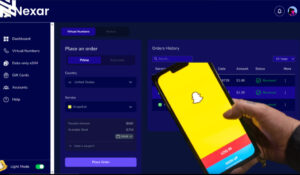
Step 2 — Get a Virtual Number from Nexar
Visit Nexar and choose a number suitable for SMS verification.
Instead of buying another SIM card, Nexar lets you access numbers online instantly.
This is especially useful for users trying to:
- verify Snapchat without SIM,
- manage multiple accounts,
- or receive OTPs while traveling.
Related guides:
- How to Receive SMS Online to Finland Virtual Number
- How to Open a US Pinterest Account from Nigeria
Step 3 — Enter the Number on Snapchat
Copy your Nexar number and paste it into Snapchat verification.
Snapchat will send an OTP immediately.
Step 4 — Receive Snapchat OTP Online
Go back to your Nexar dashboard.
Your verification code should appear within seconds.
This process is why many users search for:
Snapchat OTP online
and fast verification methods.
Step 5 — Complete Verification
Enter the code into Snapchat.
Done ✅
Your account is now verified using a Snapchat verification virtual number.
Can You Verify Snapchat Without a SIM?
Yes.
That’s one of the main reasons people use virtual numbers.
Instead of carrying:
- dual SIM phones,
- extra devices,
- or temporary cards,
users can simply verify Snapchat without SIM using Nexar’s dashboard-based system.
Why Nexar Works Better Than Free SMS Websites

Free public SMS sites usually have problems like:
- recycled numbers,
- blocked OTPs,
- spam abuse,
- and privacy risks.
Nexar focuses on cleaner verification support, making it more reliable for:
- Snapchat,
- Telegram,
- WhatsApp,
- Pinterest,
- and other social platforms.
You can also check out our guide on how to get an Austrian virtual number.
Common Mistakes That Cause Snapchat Verification Failure

- Using Shared Public Numbers
These are often already flagged.
- Requesting Too Many OTPs
Repeated requests can temporarily block verification.
- Switching Locations Constantly
Rapid IP changes may trigger security checks.
- Creating Too Many Accounts at Once
Snapchat may interpret this as automation.
Is Snapchat Virtual Number Verification Safe?
Yes, if you use trusted providers.
Virtual numbers are commonly used for:
- business accounts,
- privacy,
- remote work,
- and international verification.
You can learn more about virtual numbers here Virtual Number Overview
Frequently Asked Questions

Can I verify Snapchat without SIM?
Yes. Many users now verify Snapchat without SIM using virtual number platforms like Nexar.
What is a Snapchat verification virtual number?
It’s a digital phone number used to receive Snapchat OTP codes online.
Does Snapchat block virtual numbers?
Some low-quality or abused numbers may fail. Cleaner providers usually work better.
Can I receive Snapchat OTP online instantly?
Yes. Nexar allows users to receive Snapchat OTP online through its dashboard.
Is virtual number verification legal?
Yes. Virtual numbers are widely used for privacy and business purposes.
Can Nigerians use Snapchat virtual numbers?
Absolutely. Many users searching for Snapchat virtual number Nigeria solutions use platforms like Nexar for verification.
Final Thoughts
Snapchat verification shouldn’t feel complicated.
Most verification failures happen because people rely on:
- poor-quality free numbers,
- recycled SMS websites,
- or unstable setups.
Using a trusted Snapchat verification virtual number through Nexar gives you:
- faster OTP delivery,
- more privacy,
- and smoother account setup.
Whether you want to create a new account, separate personal and business profiles, or simply avoid SIM stress, virtual verification is becoming the smarter option.
Leave a Reply