Category: Bill payment

  • How to Avoid Failed Subscription Payments in Nigeria

    Few things are as frustrating as being locked out of a service you’ve already paid for.

    One moment everything is working fine, and the next, your subscription suddenly stops because of a failed payment. For many users, failed subscription payments in Nigeria are not just occasional issues, they happen repeatedly across different platforms.

    Whether it’s streaming services, software tools, or online platforms you rely on daily, these disruptions can affect your work, entertainment, and even your business. The reality is that failed subscription payments in Nigeria are often caused by deeper issues like card restrictions, international payment limits, and unsupported billing systems.

    If you’ve ever dealt with unexpected renewal failures or ongoing recurring payment problems, you’re not alone.

    In this guide, you’ll learn why these issues happen, how to fix subscription payment issues Nigeria users commonly face, and how to avoid failed payments completely using a more reliable solution.

    Why Failed Subscription Payments in Nigeria Happen

    Before fixing the problem, it’s important to understand why failed subscription payments in Nigeria are so common.

    International Card Restrictions

    Many Nigerian debit cards don’t support international recurring payments. This leads to frequent subscription payment issues Nigeria users face.

    Dollar Spending Limits

    Banks often place limits on how much you can spend internationally. When your subscription tries to renew, it may fail due to these limits, causing recurring payment problems.

    Unsupported Payment Gateways

    Some platforms don’t fully support Nigerian payment systems, leading to failed subscription payments in Nigeria.

    Currency Conversion Issues

    Fluctuations in exchange rates can cause payments to fail, especially when the exact amount cannot be processed.

    Common Platforms Affected by Subscription Payment Issues

    Many Nigerians experience failed subscription payments in Nigeria on platforms like:

    • Streaming services
    • SaaS tools
    • Online learning platforms
    • Cloud services

    These subscription payment issues Nigeria users face are not limited to one platform, they happen across different services.

    How to Fix Failed Subscription Payments in Nigeria

    If you’re tired of dealing with failed subscription payments in Nigeria, here are practical steps you can take.

    Use a Reliable Payment Solution

    Instead of relying on local cards that may fail, switch to a more stable solution.

    This is where Nexar comes in.

    Nexar provides a seamless way to handle international payments and avoid recurring payment problems.

    Ensure Your Card Supports Recurring Billing

    Not all cards support subscriptions. Confirm with your bank before using it.

    Maintain Sufficient Balance

    Always ensure you have enough funds before your billing date to avoid failed subscription payments in Nigeria.

    Use Virtual Payment Options

    Virtual cards or alternative payment methods can help reduce subscription payment issues Nigeria users face regularly.

    How Nexar Helps You Avoid Failed Subscription Payments in Nigeria

    Nexar is designed to solve the exact problems Nigerians face with global payments.

    Instead of dealing with constant failed subscription payments in Nigeria, Nexar gives you a more reliable way to pay for subscriptions.

    With Nexar, you can:

    • Make international payments easily
    • Avoid recurring payment problems
    • Access global platforms without restrictions
    • Enjoy smoother subscription renewals

    If you’re already using international services, you can also check our guide on how to buy a USA eSIM from Nigeria.

    Practical Tips to Prevent Subscription Failures

    Here are simple habits to avoid failed subscription payments in Nigeria:

    • Set reminders before billing dates
    • Use a reliable payment method
    • Monitor your account balance
    • Avoid relying on unstable cards

    These steps can reduce subscription payment issues Nigeria users face daily.

    Why Recurring Payment Problems Keep Happening

    Many users think it’s just a one-time issue.

    But in reality, recurring payment problems happen repeatedly because the root cause is not fixed.

    If your card or payment method is not reliable, you’ll keep experiencing failed subscription payments in Nigeria every month. Many global platforms rely on automated billing systems for international subscription payments, which can cause issues if your card doesn’t support recurring charges.

    Switching to a better solution is the key.

    Is It Safe to Use Alternative Payment Methods?

    Yes, as long as you use trusted platforms.

    Solutions like Nexar are built to handle international transactions securely and reduce subscription payment issues Nigeria users encounter.

    Key Takeaways

    • Failed subscription payments in Nigeria are common due to card and system limitations
    • Subscription payment issues Nigeria users face can be solved with better payment methods
    • Recurring payment problems often happen because of unreliable cards
    • Nexar provides a more stable solution for international subscriptions

    Start Avoiding Failed Payments Today

    If you’re tired of dealing with failed subscription payments in Nigeria, it’s time to switch to a better solution.

    Use Nexar to handle your subscriptions smoothly and avoid unnecessary interruptions.

    Get started today and enjoy stress-free payments across your favorite platforms.

  • How to Renew DSTV Subscription Online Without Stress

    It is a Saturday evening and your family is gathered in the living room waiting for a big football match. Just as the match is about to start, the screen suddenly shows a message saying your DSTV subscription has expired.

    This situation happens to many people in Nigeria. In the past, the only solution was to rush to a nearby shop or vendor to make payment. That meant dealing with traffic, queues, and wasted time.

    Today things are different. You can renew a DSTV subscription online in just a few minutes using your phone or computer. With the right steps and a reliable platform, the process is quick and stress free.

    In this guide, Nexar explains the easiest methods you can use to renew a DSTV subscription online without leaving your home.

    Why Many People Prefer to Renew DSTV Subscription Online

    Digital payments have changed the way people manage their bills. Instead of visiting physical outlets, many Nigerians now prefer to renew DSTV subscription online because it is faster and more convenient.

    Some of the major benefits include:

    Convenience from anywhere

    You can complete your payment whether you are at home, in the office, or even traveling.

    Faster activation

    Once payment is completed, your decoder usually reconnects almost immediately.

    Multiple payment options

    Users can pay using debit cards, bank apps, transfers, or online wallets.

    Easy account management

    Online platforms allow you to check your subscription status, upgrade your package, or fix common errors.

    For example, someone living in Abuja might forget their subscription expiration date. Instead of driving across the city to a service center, they can simply open their phone and renew DSTV online within a few minutes.

    What You Need Before You Renew Your DSTV Subscription

    Before attempting to renew a DSTV subscription online, there are a few important details you should have ready.

    These include:

    • Your DStv smartcard number or IUC number

    • The package or bouquet you want to renew

    • A working payment method such as a debit card or bank transfer

    • A stable internet connection

    Having these details ready helps ensure that your DSTV payment Nigeria process goes smoothly without errors.

    Best Ways to Renew DSTV Subscription Online

    renew DSTV Subscription online

    There are several reliable ways Nigerians can renew DSTV subscription online. Each method works slightly differently, so you can choose the one that suits you best.

    1. Renew DSTV Subscription Through the MyDStv App

    One of the most popular ways to renew DSTV subscription online is through the official MyDStv mobile application.

    The app allows users to manage their entire account directly from their smartphone.

    Steps to follow:

    • Download the MyDStv app from the Google Play Store or Apple App Store

    • Log in using your registered phone number or surname

    • Enter your smartcard number to access your account

    • Tap the Pay option on the dashboard

    • Select your preferred DStv package

    • Choose a payment method and confirm

    Once the payment is successful, your decoder will reconnect almost immediately.

    The MyDStv app also allows users to fix decoder errors, upgrade packages, and monitor subscription history.

    For official payment instructions you can visit the DStv payment guide here:

    2. Renew DSTV subscription Using Your Bank Mobile App

    Another simple option is using your bank’s mobile application.

    Most Nigerian banking apps now support cable TV payments, making it easy to renew DSTV subscription online without visiting a vendor.

    Typical steps include:

    • Open your bank’s mobile banking app

    • Navigate to the Bills Payment section

    • Select Cable TV services

    • Choose DStv as the provider

    • Enter your smartcard number

    • Select the subscription package

    • Confirm the payment

    After completing the process, the DSTV payment Nigeria system will update your account and activate your channels.

    For example, someone using the Zenith Bank or GTBank mobile app can complete the payment within two minutes.

    4. Renew DSTV Subscription Through Trusted Digital Platforms

    Another convenient way to renew DSTV subscription online is by using reliable digital service platforms that support bill payments.

    These platforms allow users to manage multiple services in one place. Instead of switching between different apps, you can pay for subscriptions, manage virtual numbers, and access other online tools easily.

    For example, platforms like Nexar allow users to handle several digital services from a single dashboard. This makes it easier for people who already use the platform for other online activities.

    A typical process usually looks like this:

    • Visit the Nexar platform

    • Navigate to the dashboard and tap on TV 

    • Enter your DStv smartcard number

    • Select the package you want to renew

    • Complete the payment using your preferred method

    Once the payment is confirmed, your DSTV payment Nigeria request is processed and your subscription should reconnect shortly.

    Tips to Avoid Problems When Renewing DSTV Online

    Although the process is simple, small mistakes can sometimes delay activation.

    Here are a few tips to ensure your payment goes smoothly.

    • Double check your smartcard number before confirming payment

    • Make sure your decoder is switched on during the payment process

    • Use trusted platforms or official apps only

    • Ensure your bank card or wallet has enough funds

    For example, if your decoder is turned off during payment, the signal might not refresh immediately.

    Can You Set Up Automatic DSTV Renewal

    Yes, DStv allows users to enable automatic renewal.

    This feature deducts your subscription fee automatically each month so you never forget your payment date.

    Auto renewal can be activated through the MyDStv app or official website. Once enabled, your subscription will renew automatically and your entertainment will never be interrupted.

    Frequently Asked Questions

    How long does it take for DSTV to reconnect after payment

    Most payments activate within a few minutes as long as your decoder is switched on and connected to the satellite signal.

    Can I pay for someone else’s DSTV subscription

    Yes. Simply enter the person’s smartcard number when making payment.

    Is it safe to renew DSTV online

    Yes, as long as you use official platforms or trusted services. Millions of people now renew DSTV subscription online every month without problems.

    Conclusion

    Renewing your cable TV should never interrupt your entertainment. Instead of dealing with queues and unnecessary stress, you can simply renew DSTV subscription online in a few minutes.

    Whether you use the MyDStv app, your bank mobile app, USSD banking, or a reliable digital platform, the process is quick and convenient.

    At Nexar, we believe digital services should make life easier. With the right tools and information, you can renew DSTV online anytime and continue enjoying your favorite sports, movies, and shows without interruption.

  • How to Buy Airtime & Data on Nexar

    Staying connected is essential in today’s digital world — whether you’re working remotely, running a business, or simply catching up with loved ones. With Nexar, you can buy airtime & data online in seconds, anytime and anywhere.

    In this guide, you’ll learn how to buy data on Nexar using the website or app, plus how to fund your wallet, track your top-ups, and enjoy the best network rates in Nigeria.

    Buy Data on Nexar

    Why Buy Airtime & Data on Nexar?

    Unlike unreliable mobile apps or bank USSD codes that often fail during peak hours, Nexar gives you a fast, secure, and wallet-based platform to handle all your recharges in one place.

    Here’s why thousands of users now buy data on Nexar every day:

    • Instant Delivery: Airtime and data reflect within seconds after payment.
    • Multiple Networks Supported: MTN, Airtel, Glo, and 9mobile — all available.
    • Wallet-Based Payments: No card errors or failed debits.
    • 24/7 Access: Recharge anytime — day or night, even during bank downtime.
    • Affordable Rates: Nexar offers some of the best value data bundles in Nigeria.

    Step-by-Step: How to Buy Data on Nexar

    Step 1: Create or Log in to Your Nexar Account

    Go to nexarhq.com or open the Nexar app on your device.
    Log in using your email or phone number. If you’re new, sign up for free — it takes less than a minute.

    Step 2: Fund Your Nexar Wallet

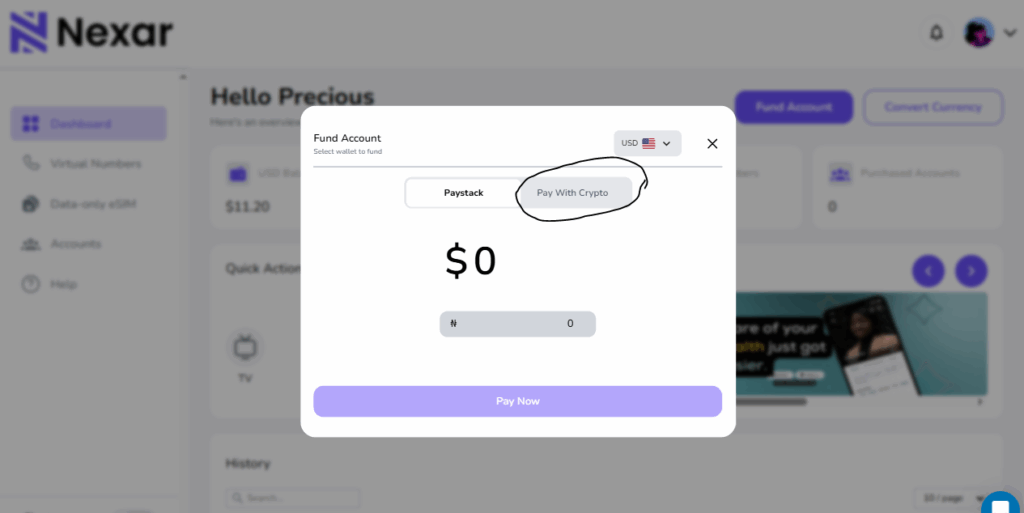
    Before you can buy airtime or data on Nexar, you need to fund your wallet. You can do this using

    • Bank Transfer (instant reflection)
    • Cryptocurrency (USDT or Bitcoin)
    • Mobile Money (Momo) — coming soon

    Once funded, your Nexar wallet balance can be used for all Nexar services, including gift cards, social media marketing, and utility payments.

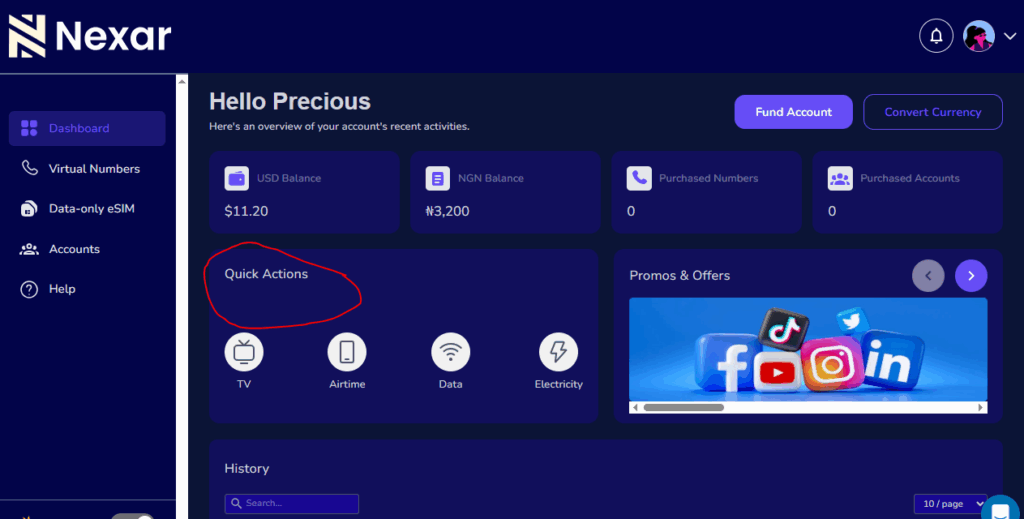
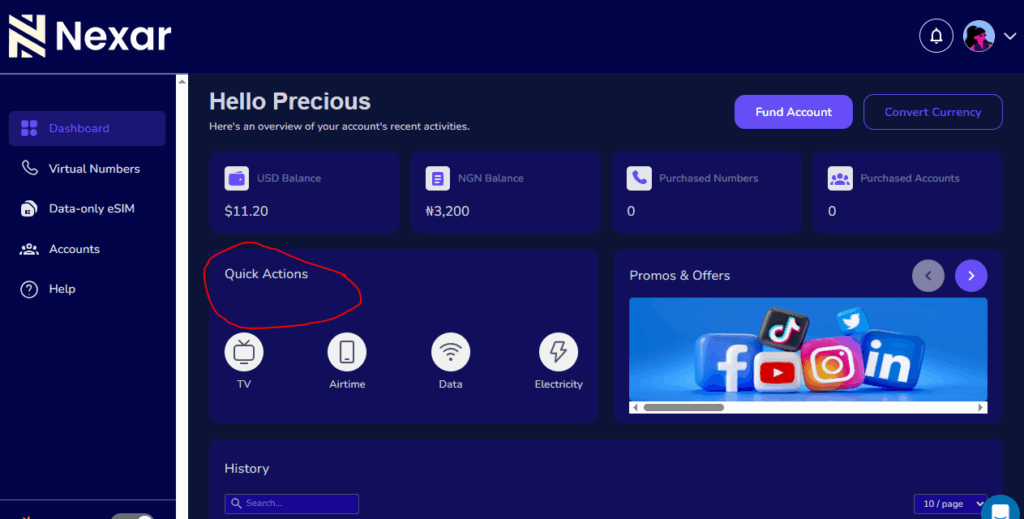
    Step 3: Go to the “Quick Action” Section

    From your dashboard, click “Quick Action.” You’ll see options to buy data on Nexar or purchase airtime directly.

    Select your preferred service:

    • Airtime Recharge
    • Data Bundle Purchase

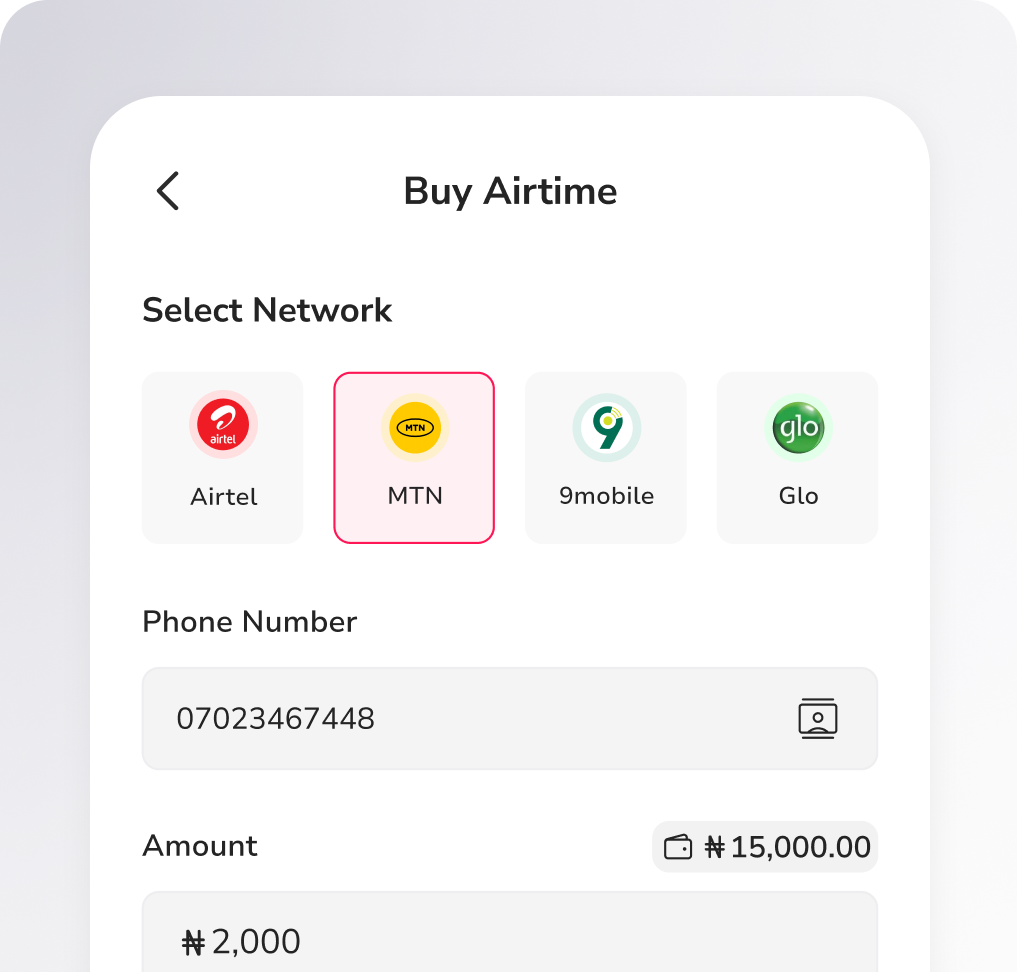
    Step 4: Enter Your Details

    Provide the following information:

    • Network Provider: MTN, Airtel, Glo, or 9mobile
    • Phone Number: The number to receive the data or airtime
    • Amount or Plan: Choose your data plan or airtime amount

    You can also buy for family, friends, or clients using their numbers.

    Step 5: Confirm and Complete Payment

    Click “Buy Now” to finalize your transaction. The amount will be deducted from your wallet, and your data or airtime will be delivered instantly.

    That’s it! You’ve successfully learned how to buy data on Nexar — fast, safe, and reliable.

    Benefits of Using Nexar to Buy Data and Airtime

    1. Instant Top-Up: Forget waiting — your recharge reflects within seconds.
    2. No Hidden Fees: What you see is what you pay.
    3. All Networks Supported: One platform for all your lines.
    4. Simple Wallet System: Fund once, use anytime.
    5. Transaction History: Track every purchase in your dashboard.
    6. Cross-Border Access: Even if you’re abroad, you can still buy airtime & data on Nexar for Nigerian numbers.

    Pro Tips for Buying Data on Nexar

    • Save Numbers: Nexar allows you to save frequent contacts for one-click recharges.
    • Double-Check Networks: Always confirm you’ve selected the right provider to avoid delays.
    • Watch for Promos: Nexar occasionally offers discounted data bundles — don’t miss them!
    • Use Your Wallet Balance Wisely: Top up before your balance runs low to avoid service interruptions.

    Why Nexar Is the Best Place to Buy Data in Nigeria

    Nexar combines speed, reliability, and simplicity in one easy-to-use platform. Whether you’re buying a 500MB plan for daily browsing or a 20GB plan for work, you can buy data on Nexar instantly with just a few clicks.

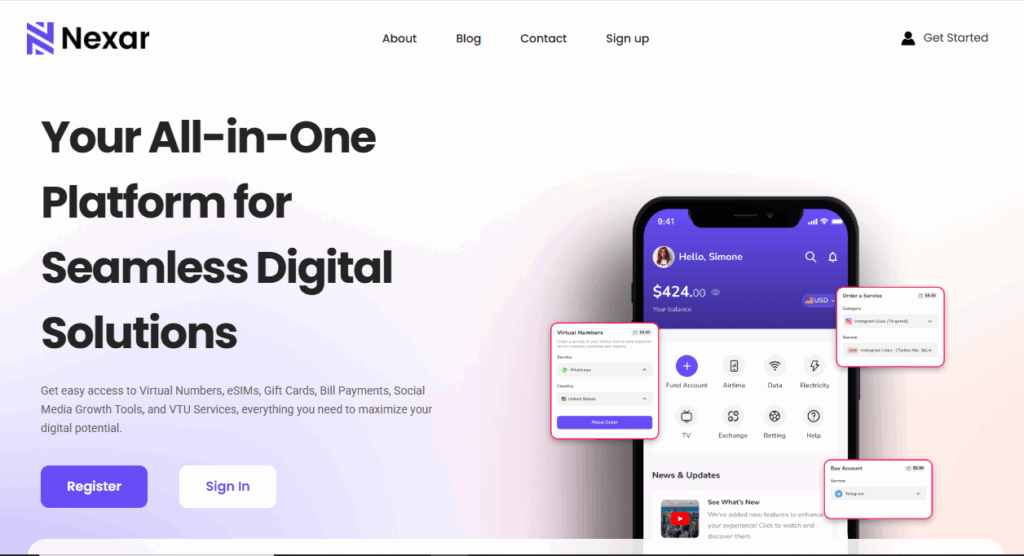
    Plus, Nexar isn’t just for mobile top-ups — it’s a full-service digital platform that lets you:

    • Pay bills and subscriptions
    • Buy and redeem gift cards
    • Access social media boosting tools
    • Fund your wallet with crypto or local payment methods

    With Nexar, you’re not just buying data — you’re upgrading your entire digital lifestyle.

    FAQs — How to Buy Data on Nexar

    1. How do I buy data on Nexar?

    To buy data on Nexar, log into your account via nexarhq.com or the Nexar app. Go to the “Airtime & Data” section, select your network, enter your phone number, choose a plan, and confirm payment. Your data bundle is activated instantly.

    2. Can I buy airtime on Nexar too?

    Yes! You can buy airtime on Nexar for any Nigerian network — MTN, Airtel, Glo, or 9mobile. Simply choose “Airtime Recharge” under the Airtime & Data section, enter the amount, and confirm. Your airtime is delivered in seconds.

    3. Is it safe to buy airtime & data on Nexar?

    Absolutely. All transactions on Nexar are wallet-based and encrypted, ensuring 100% payment security. You never have to share your card details, and every transaction is verified before completion.

    4. Can I buy data on Nexar for another person’s number?

    Yes, you can buy data on Nexar for friends, family, or clients. Just enter their phone number when filling in the details. The selected plan will be credited directly to their line instantly.

    5. What should I do if my data or airtime doesn’t reflect immediately?

    Most purchases on Nexar reflect instantly. However, if your buy data on Nexar transaction takes longer than expected, check your transaction history for confirmation or contact Nexar’s customer support. Their team is available 24/7 to assist with verification or refunds if needed.

    Final Thought


    When you buy data on Nexar, you’re choosing convenience, transparency, and speed. From funding your wallet to instant delivery, Nexar simplifies digital transactions and helps you stay connected — anytime, anywhere.

    👉 Visit nexarhq.com today to buy airtime & data on Nexar and enjoy Nigeria’s most seamless recharge experience.

  • How to Renew Your GOtv Subscription with Nexar

    How to Renew Your GOtv Subscription with Nexar

    A GOtv subscription always seems to expire at the most inconvenient time. Maybe you’re about to watch a match. Maybe your favourite show is starting. Maybe the kids just settled down to watch cartoons. Whatever the situation is, the screen suddenly goes blank and you see the “E16” error.

    At that moment, your first thought is how to renew your GOtv subscription quickly. Most people start searching for agents, looking for shops that are still open, or calling someone to help them make the payment. This often leads to delays, long queues, and unnecessary stress.

    Renewing manually through physical agents also means dealing with limited working hours, extra charges, or waiting for someone to “help you fix it.” That is why more users are turning to online platforms. It’s faster, cleaner, available at any time, and gives you control over the entire process.

    If you’re trying to figure out where to renew your GOtv subscription in Nigeria without stress, this guide shows you the best options and explains why Nexar is one of the most efficient ways to do it.

    Renew Your GOtv Subscription with Nexar

    Where to Renew Your GOtv Subscription in Nigeria

    You can renew your GOtv subscription from several places in Nigeria. The main options people use are:

    1. Physical GOtv Agents
      These are shops and kiosks where agents process renewals manually. They work, but you may face queues, delays, closing hours, or extra charges.
    2. Bank Mobile Apps and USSD
      Some banks allow you to renew your GOtv subscription through their app or USSD. It’s digital, but the process can sometimes be slow or require several steps.
    3. Nexar
      This is the best and most reliable option if you want to renew your GOtv subscription instantly.
      Nexar is fast, simple, and built for seamless digital payments. It processes renewals in minutes, works round the clock, and gives you a clean dashboard where you can manage everything without waiting for any agent or support. If you want a smooth renewal process without stress, Nexar should be your first choice.

    How to Renew Your GOtv Subscription with Nexar

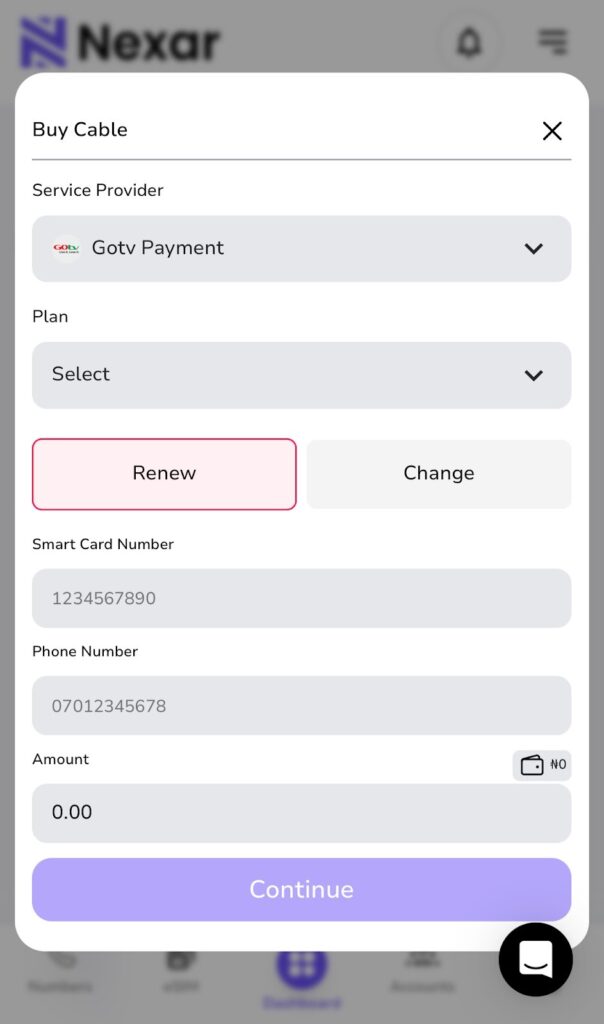
    You can pay GOtv bills online directly through your Nexar dashboard. The process is designed for convenience, even if it’s your first time using the platform.

    1. Visit https://app.shawnsms.com/user/dashboard
    2. Log in or create an account.
    3. Tap “Buy Cable” and select GOtv.
    4. Enter your IUC or smartcard number.
    5. Choose your desired bouquet.
    6. Complete your payment through your Nexar wallet, debit card, or bank transfer.

    With these steps, your GOtv will be renewed instantly, and you won’t need to clear error codes manually.

    Why You Should Renew Your GOtv Subscription with Nexar

    1. Fast Processing

    Nexar processes GOtv renewals within minutes. Once your payment goes through, your channels come back almost instantly. This helps you avoid long delays or waiting for someone to assist you.

    2. 24/7 Access

    You can renew your GOtv subscription at any time. Early morning, late night, weekends — Nexar works around the clock, so you’re not limited by an agent’s working hours.

    3. Secure and Transparent Transactions

    Every payment generates an automatic receipt. You can always see what you paid for, when you paid, and track all renewals from your dashboard.

    4. Easy-to-Use Dashboard

    Nexar is beginner-friendly. The layout is simple and clear, so even first-time users can complete a renewal without confusion.

    Important Tips for a Smooth GOtv Renewal

    • Keep your decoder turned on: This helps your renewal reflect immediately.
    • Double-check your IUC number: Mistyped numbers may delay activation.
    • Save your transaction receipt: Nexar automatically generates receipts for every successful renewal.
    • Check your balance regularly: Send “BALANCE [your IUC number]” by SMS to 4688 to see your expiry date.
    • Avoid last-minute payments: Renew your GOtv subscription at least a few hours before it expires to prevent service interruptions.

    Thousands of users now prefer to renew GOtv with Nexar because it’s reliable, instant, and simple. The platform combines bill payment, wallet funding, and cable subscription management in one place. Whether you are trying to pay GOtv bills online or renew multiple accounts for family and friends, Nexar handles it all securely.

    With each renewal, Nexar helps you stay connected to your entertainment without the usual stress or delays. No more calling agents or waiting hours for confirmation — just a few clicks, and your GOtv is active again.

    Final Thoughts

    The next time your screen goes blank with the “E16” error, don’t panic. Simply log in to Nexar, renew your GOtv subscription, and your channels will be back in minutes.

    You can always access your account here.

    Nexar’s mission is to make everyday payments — from airtime to TV subscriptions — easier, faster, and accessible to everyone. So go ahead, stay connected, and enjoy uninterrupted entertainment with Nexar.

  • Apple Music Debit Card Error: Why Nigerian Cards Don’t Work & How to Fix It

    There’s nothing more frustrating than trying to renew your Apple Music subscription and seeing that annoying “Debit Card Error” message again. If you’re in Nigeria, you’ve probably seen it too — “Payment Failed,” “Payment Declined,” or “Payment Method Not Accepted.”

    But why does the Apple Music Debit Card Error keep happening, and what’s the easiest way to fix it so you can enjoy your songs without stress?

    This guide breaks everything down in a simple and relatable way and gives you the best working solution that actually fixes Apple Music payment problems in Nigeria.

    What Exactly Is the Apple Music Debit Card Error?

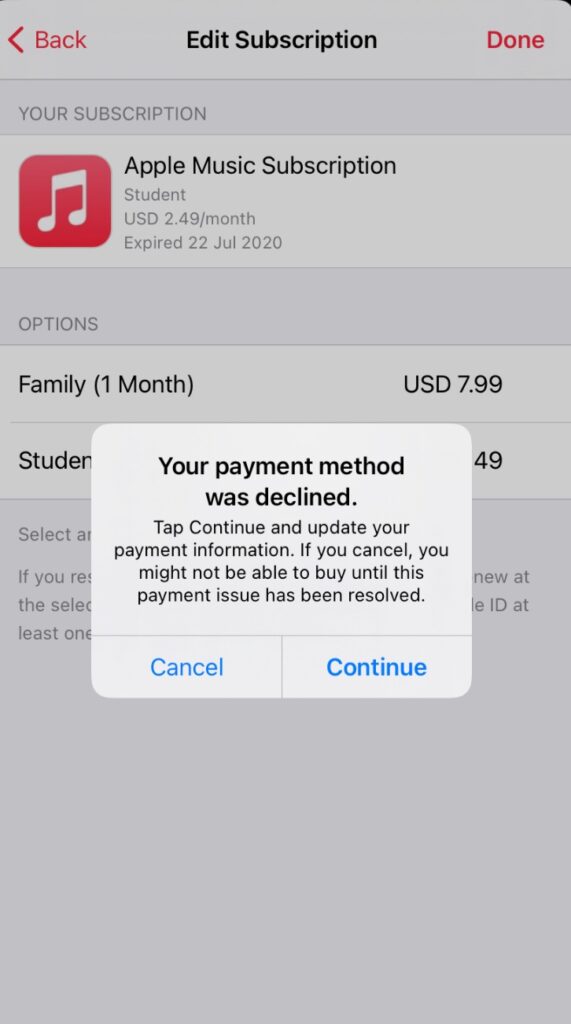
    When Apple shows you “Payment Declined” or “This payment method is not accepted”, it means that Apple is rejecting your debit card during subscription renewal.

    This Apple Music Debit Card Error usually pops up when:

    • You add a new card
    • Your subscription tries to renew
    • You switch phones or Apple IDs

    It is not just a glitch, it’s Apple blocking your Nigerian debit card due to strict security and international payment rules.

    Why Nigerians See the Apple Music Debit Card Error More Often

    Apple Music Debit Card Error

    Here are the major reasons behind the problem:

    Nigerian Cards Have Dollar Limits

    Due to strict banking rules, some Nigerian debit cards can no longer make international payments, especially subscriptions like Apple Music.CBN puts restrictions on international spending using Naira cards. CBN puts restrictions on international spending using Naira cards.

    As a result:

    • Some banks limit you to $20/month
    • Some have reduced it to $0 (no international spending at all)

    So even if Apple Music is cheap ($1.40/month), your card won’t go through leading to the Apple Music Debit Card Error.

    Apple Nigeria Region Still Requires International Authorization

    Even if your Apple region is set to Nigeria, Apple processes payments internationally. Apple processes payments in USD, but many Nigerian cards only work in Naira for local transactions, this triggers the Apple Music Debit Card Error every time. So for Apple Music, Apple Pay or App Store, your card MUST be dollar-enabled

    No dollar access = Apple Music Debit Card Error

    Banks Automatically Block Some Transactions for Security

    Banks block Apple charges for:

    • VPN usage
    • New devices
    • International merchants
    • Small recurring subscriptions (fraud risk)

    Many Nigerian banks no longer fully support international subscriptions, this restriction was confirmed by updated banking regulations from the Central Bank of Nigeria.
    Your bank thinks it’s protecting you. Meanwhile, you just want music

    Apple Requires Strong Payment Verification

    Apple doesn’t trust cards that:

    • Fail multiple times
    • Come from restricted countries
    • Don’t support 3D Secure

    That’s why so many Nigerians get stuck with this annoying Apple Music Debit Card Error.

     Ways to Pay for Apple Music in Nigeria

    If you’re tired of seeing the Apple Music Debit Card Error every time you try to renew your subscription, don’t worry you’re not out of options. A lot of Nigerians are now using alternative payment methods that actually work. Here are the top ones you can try:

    1. Use an Apple Gift Card (Works perfectly for Nigerians)

    This is one of the easiest ways to avoid the Apple Music Debit Card Error entirely. When you redeem an Apple Gift Card, the money goes straight into your Apple ID balance. No bank wahala. You can buy Apple Gift Cards from trusted platforms like Nexar. Aside from virtual cards, Nexar also lets users buy and sell various gift cards, virtual Numbers and boost social media accounts. Here’s how to do it:

    Step One: Buy an Apple Gift Card in USD     

    1. Download the Nexar app on your mobile device.

    2. Login or create an account if you don’t have one.

    3. On your dashboard, locate and click onBuy Gift card.

    4. Although you are in Nigeria, SelectUSAas the country you want to buy from. Don’t worry; it doesn’t affect your purchase.

    5. Click on Apple Store & iTunes US.”

    6. Choose and confirm the desired amount you want on your gift card.

    7. Review the terms and summary of the trade you are about to make.

    8. Click on “Purchaseand complete the process.

    Within the next 10 seconds, you will receive an email containing the code for your gift card. If you can’t access your mail, you can view your code in the transaction history section of the Nexar  app.

    You can also watch the video below for more practical steps on how to buy gift card on Nexar. 

    Step Two: Open your Apple Music or App StoreAccount   

    Sign in to your Apple Music or App Store account using your Apple ID and password. Always make sure you’re logged into the right account before moving forward.

    Step Three: Go to Redeem Gift Card                         

    Go to the “Redeem Gift Card” area on your Apple Music or App Store account.

    Step Four: Enter the Gift card code                       

    Simply type in the gift card code you got from Nexar, and the amount will be added to your Apple ID balance immediately.

    Step Five: Set Apple Balance as Your Payment Option

    This step is very important: Set your Apple Balance as your payment option. 

    First, go to “Settings,” then “Payment and Shipping,” and select “Apple ID Balance” as your payment option. This will remove your Apple Music subscription from your Apple balance. 

    2. Pay Using a Domiciliary Account Debit Card

    If you already have a dollar domiciliary account with a USD Mastercard or VISA card, you’re in luck. These cards usually bypass the Apple Music Debit Card Error because Apple prefers foreign currency cards.

    Why it works better:

    • USD transaction = no card restrictions
    • Apple accepts it directly without currency conversion issues

    Downside:

    • You need constant dollar funding which is not always easy in Nigeria, but if you already have a dom account, this is a solid fix.
    • Domiciliary accounts often have high maintenance fees, including minimum balance requirements.

    3. Use Third-Party or Virtual Payment Platforms

    Third-party payment services like PayPal can also be another way to pay for Apple Music in Nigeria. Unfortunately, PayPal does not currently support international transactions from Nigerian accounts. This means you cannot directly link your Nigerian PayPal account to Apple Music unless you have access to a PayPal account from another country.  

    When it comes to cryptocurrency as a payment method, you can use platforms to buy Apple Gift cards with crypto and then redeem the gift card on Apple Music.

    By using third-party payment services like PayPal (with a foreign account) or crypto, you can access Apple Music in Nigeria without relying on traditional payment methods.

    Why Nexar Is the Best Way to Pay for Apple Music in Nigeria

    Many platforms claim to support international payments until you try them.

    But Nexar gives you:

    • Card always accepted for Apple Music
    • Fast funding with local payment methods
    • Works instantly across Apple services
    • Built for Africans, no foreign account needed
    • Secure and verified platform

    No more trying 6 different cards or begging bank support, just pure convenience.

    Frequently Asked Questions

    Q: Can Nigerian debit cards work on Apple Music?

    Sometimes, but they fail often, leading to the Apple Music Debit Card Error.

    Q: How do I pay for Apple Music in Nigeria without issues?

    Use a Nexar Virtual Dollar Card for smooth USD payments.

    Q: Why is my Apple Music payment method not accepted?

    Your bank likely blocked international subscriptions or the card doesn’t support USD.

    Q: Can Nexar fix Apple Music payment declined issues?

    YES!1 That’s exactly what it’s designed for.

    Final Takeaway : Fix Apple Music Debit Card Error Forever

    If you want the simplest, fastest, and most stable way to fix Apple Music Debit Card Error in Nigeria, Nexar is the answer.

    Stop worrying about bank restrictions.

    Get Nexar now and fix your Apple Music Debit Card Error today. Instant setup. No stress. No declined payments.

  • How to Pay Bills in Nigeria Instantly on Nexar’s Website and App

    How to Pay Bills in Nigeria Instantly on Nexar’s Website and App

    Paying bills in Nigeria has never been easier —especially with Nexar, the all-in-one digital services platform that helps you handle everything from electricity payments to DSTV subscriptions, airtime, and data, all in one place.

    Whether you’re at home, in the office, or abroad, Nexar lets you pay bills in Nigeria quickly and securely without the stress of queues or failed transactions. In this guide, we’ll walk you through exactly how to use Nexar’s website and mobile app to manage your recurring payments effortlessly.

    Pay Bills in Nigeria

    ⚡ Why Use Nexar to Pay Bills in Nigeria?

    Traditional payment methods can be frustrating — unstable banking apps, delayed confirmation, or even failed payments. Nexar solves these problems by offering a fast, transparent, and wallet-based solution that lets you pay all your bills from one account.

    Here’s what makes Nexar the smarter way to pay bills in Nigeria:

    • Instant Processing: Payments reflect immediately on the provider’s side — no long wait times.
    • Secure Transactions: Every payment goes through your Nexar wallet, keeping your bank details safe.
    • Multiple Services: You can handle everything from electricity bills, DSTV subscriptions, airtime, and data in one dashboard.
    • 24/7 Access: Nexar’s website and app are available anytime, anywhere — even on weekends and public holidays.

    Step-by-Step: How to Pay Bills in Nigeria on Nexar

    Step 1: Create or Log in to Your Nexar Account

    Visit nexarhq.com or open the Nexar app.
    Sign in with your registered email or phone number, or create a new account if you’re a first-time user.

    Step 2: Fund Your Wallet

    Before you can make any payment, you’ll need to fund your Nexar wallet.
    You can do this easily using:

    Once your wallet is funded, you can pay any bill instantly.

    Step 3: Go to the “Quick Actions” Section

    From your dashboard, select “Quick Actions”. You’ll find a list of categories including:

    • Electricity Bills
    • TV
    • Airtime & Data Top-Up

    Choose the service you want to pay for.

    Step 4: Enter Your Payment Details

    Fill in the required information:

    • For electricity: choose your DISCO provider, input your meter number, and select the amount.
    • For DSTV: enter your smart card number and subscription package.
    • For airtime and data: simply choose your network provider and desired plan.

    Double-check your details before confirming payment.

    Step 5: Confirm and Complete Your Payment

    Click “Pay Now” — Nexar will process your payment instantly.
    You’ll receive both an on-screen confirmation and an email receipt showing your transaction details.

    Congratulations! You’ve just learned how to pay bills in Nigeria the fast and easy way using Nexar.

    Popular Bills You Can Pay on Nexar

    1. Pay Electricity Bills Online

    No more standing in queues or dealing with disconnections. Nexar lets you pay electricity bills online instantly for major providers like Ikeja Electric, Eko Electric, Abuja Electric, Enugu Electric, and more. Just enter your meter details, choose prepaid or postpaid, and your power is restored within minutes.

    1. Pay DSTV Subscription in Nigeria

    Renew your DSTV or GOTV package effortlessly with Nexar. You can pay DSTV subscriptions in Nigeria for any plan — from Compact to Premium — and get instant activation without calling customer service.

    1. Buy Airtime and Data in Nigeria

    Need to stay connected? With Nexar, you can buy airtime and data in Nigeria for MTN, Airtel, Glo, and 9mobile at unbeatable rates. Whether it’s a quick recharge for yourself or a top-up for friends and family, it takes just a few taps.

    Additional Benefits of Paying Bills Through Nexar

    1. All-in-One Dashboard: Manage electricity, cable, internet, and mobile top-ups in one place.
    2. Instant Wallet Deductions: No card errors or bank delays — just smooth, direct payments.
    3. Real-Time Notifications: Get instant receipts and transaction tracking inside your account.
    4. Cross-Border Access: You can fund your wallet and pay bills in Nigeria even while living abroad.
    5. Excellent Customer Support: Nexar’s team is always available to help with failed payments, account verification, or refund issues.

     Expert Tips When Using Nexar to Pay Bills in Nigeria

    • Verify your details: Always double-check meter numbers and smart card IDs before confirming payment.
    • Keep your wallet funded: Top up your Nexar wallet ahead of time to avoid service interruptions.
    • Save your favorites: Nexar lets you save biller profiles for faster future payments.
    • Monitor your history: Use your transaction log to track all payments and download receipts anytime.
    • Contact support early: If you notice any delay, Nexar’s support team is responsive and ready to help 24/7.

    Frequently Asked Questions (FAQs)

    1. How can I pay bills in Nigeria using Nexar?

    You can easily pay bills in Nigeria by logging into your Nexar account via nexarhq.com or the Nexar mobile app. Once logged in, go to the “Bills Payment” section, choose your preferred service (electricity, DSTV, airtime, or data), enter the required details, and confirm payment. Your transaction will be processed instantly, and a digital receipt will be sent to your email.

    2. Can I pay electricity bills online through Nexar?

    Yes! Nexar allows you to pay electricity bills online for major Nigerian electricity distribution companies (DISCOs) such as Ikeja Electric, Eko Electric, Abuja Electric, and more. Simply select your provider, input your meter number, choose prepaid or postpaid, and complete the transaction — power is restored within minutes.

    3. Is it possible to pay for my DSTV subscription in Nigeria with Nexar?

    Absolutely. Nexar makes it easy to pay DSTV subscriptions in Nigeria or renew GOTV and Startimes packages. Just enter your smart card number, select your preferred bouquet, and confirm payment. Your subscription is renewed instantly, saving you the stress of visiting physical payment outlets or dealing with long queues.

    4. Can I buy airtime and data in Nigeria through Nexar?

    Yes, Nexar supports airtime and data purchases in Nigeria for all major networks — MTN, Glo, Airtel, and 9mobile. You can buy for yourself or for others directly from your Nexar wallet, with instant top-up confirmation and the best rates. It’s fast, secure, and available 24/7.

    5. What payment methods can I use to fund my Nexar wallet?

    You can fund your Nexar wallet using several convenient options, including bank transfer, cryptocurrency (USDT or Bitcoin), and Mobile Money (Momo) (coming soon). Once your wallet is funded, you can use it to pay bills in Nigeria or access any of Nexar’s digital services without worrying about failed transactions or card errors.

    Why Nexar Is the Smartest Way to Pay Bills in Nigeria

    Nexar isn’t just another online payment platform because It is built to make everyday life easier for Nigerians and users abroad. With Nexar, you can pay bills in Nigeria, buy airtime, recharge data, fund your wallet with crypto, and even access social media marketing tools — all in one secure account.

    Every transaction is fast, transparent, and verified, giving you peace of mind with every payment. Whether you’re renewing your DSTV subscription, paying electricity bills online, or topping up data, Nexar helps you do it smarter, faster, and more securely.

    👉 Ready to simplify your digital life?
    Visit nexarhq.com today and experience the easiest way to pay bills in Nigeria — anytime, anywhere.

  • DStv Subscription Nigeria: How to Renew Online Easily with Nexar

    DStv Subscription Nigeria: How to Renew Online Easily with Nexar

    Renewing your DStv subscription Nigeria shouldn’t feel like a battle but for many people, it does. Long queues at payment centers, failed transactions, or waiting hours before your viewing is restored can be frustrating. Imagine missing a live football match or your favorite Nollywood series just because of payment delays.
    With Nexar, you don’t have to deal with those problems anymore. You can renew your DStv subscription online in Nigeria in just few minutes, securely and without hidden charges, all from your phone.

    Why DStv Subscription Nigeria Payments Can Be Stressful

    For most Nigerians, paying for DStv can come with challenges like:

    • Unnecessary queues: Payment shops close early and are often overcrowded.
    • Network failures: Bank apps and ATMs sometimes decline transactions.
    • Agent charges: Some agents add extra fees, making your subscription more expensive.
    • Slow processing: You might wait hours before your viewing is restored.
    • Inconvenience: Payments often have to be made during working hours, which clashes with busy schedules.

    These challenges make renewing your DStv subscription Nigeria harder than it needs to be. That’s why switching to Nexar is the smarter move.

    Common Problems Nigerians Face with DStv Subscription Payments

    Let’s look deeper at some issues Nexar solves for Nigerians:

    Failed Payments

    Many users complain about making payments but still seeing an “inactive” decoder. Nexar’s instant verification reduces this risk significantly.

    Agent Delays

    Using middlemen often means waiting hours before your payment reflects. Nexar connects you directly to DStv, cutting out the delay.

    Limited Payment Options

    Some platforms accept only debit cards, leaving out bank transfers or wallet options. Nexar gives you flexible choices.

    The same issues happen with GOtv too, which is why Nexar also makes it easy to renew your GOtv subscription online instantly. Some platforms accept only cards. Nexar lets you choose what works best for you; card, transfer, or wallet

    What You Need Before Renewing Your DStv Subscription Online

    Before you begin, make sure you have these ready:

    • DStv Smartcard/IUC Number → This is the unique number linked to your decoder. You can find it on the card inside your decoder or on your TV screen by pressing the “Menu” button.
    • Internet Access → A stable connection ensures smooth payment.
    • Nexar Account → This gives you access to quick, secure payments from your phone or computer.

    Once you have these, you’re ready to go.

    Step-by-Step Guide: How to Renew DStv Subscription Nigeria Using Nexar

    DStv Subscription Nigeria

    Wondering exactly how to renew a DStv subscription online in Nigeria? Here’s the simple process with Nexar:

    Step 1 – Log in to Nexar

    Open the Nexar app on your phone or visit the Nexar website. If you don’t have an account yet, it takes just a few minutes to sign up with your phone number or email.

    Step 2 – Select TV Bills

    On your Nexar dashboard, tap on “Pay Bills” and select TV Subscription. This option covers both DStv and GOtv payments.

    Step 3 – Enter Your DStv Details

    Type in your Smartcard/IUC number and confirm your details. Select the package you want to renew, such as Compact, Premium, Confam, or Yanga.

    If you’re unsure about packages, you can always check the latest plans on the DStv packages page.

    Step 4 – Make Payment

    Choose your preferred payment method — debit card, bank transfer, or Nexar wallet. With Nexar, all payments are processed securely using bank-level encryption.

    Step 5 – Enjoy Seamless Viewing

    After payment, your subscription renews instantly. Your channels come back within minutes, so you don’t have to miss out on the fun.

    Why Choose Nexar for Your DStv Subscription Nigeria Renewal?

    Unlike other methods, Nexar was designed with Nigerians in mind. Here’s why it’s the best platform for your DStv subscription Nigeria payments:

    • Instant Renewal – Get reconnected in minutes.
    • Secure Payments – Every transaction is protected.
    • No Hidden Fees – You only pay for your package.
    • Multiple Payment Options – Pay your way.
    • 24/7 Access – Anytime, anywhere in Nigeria.

    With Nexar, you’re always in control of your DStv subscription Nigeria.Whether you’re a freelancer working late at night, or a parent trying to keep the kids entertained, Nexar makes renewing your DStv subscription stress free.

    FAQs About DStv Subscription in Nigeria

    • Can I renew my DStv subscription online in Nigeria?

    Yes. With Nexar, you can renew quickly and securely without leaving your home.

    • How do I find my DStv Smartcard number?

    Check the card inserted in your decoder, or press the “Menu” button on your remote to see it on your TV screen.

    • How long does it take after payment?

    With Nexar, reconnection usually happens within minutes.

    • Can I pay for someone else’s DStv?

    Yes, as long as you have their Smartcard/IUC number.

    Absolutely. Nexar uses bank-level encryption and verified payment channels.

    Quick Takeaways

    • You can renew your DStv subscription Nigeria online without stress.
    • All you need is your Smartcard/IUC number, package details, and Nexar.
    • Nexar ensures instant, secure, and reliable payments anytime.
    • Nexar allows you to renew your DStv subscription online in Nigeria in minutes.

    If you’re also trying to grow your online presence, check out our guide on how to grow your TikTok followers organically

    Get Started with Nexar Today

    Stop worrying about missed matches or interrupted shows. With Nexar, you can renew your DStv subscription Nigeria online, instantly and securely.

    Download the Nexar app now and enjoy uninterrupted entertainment.