Bryan is a 22-year-old student flying from Lagos to Houston for his master’s degree. He planned everything, tuition, accommodation, airport pickup. But there was one thing he ignored: mobile data.
“Once I land, I’ll just buy a SIM at the airport,” he told himself. After 13 hours in the air, Bryan lands in the U.S. He switches on his phone.
No service.
The airport Wi-Fi is slow. He can’t contact his cousin. He can’t order a ride. He can’t even check his admission email. That’s when he realizes he should have bought a USA eSIM from Nigeria before travelling.
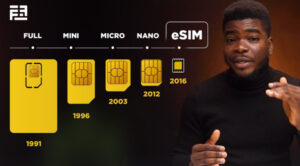
Instead of scrambling after arrival, Bryan could have activated his data before leaving Lagos and landed fully connected. In this guide, you’ll learn exactly how to buy a USA eSIM from Nigeria before travelling. If you’re unsure how eSIMs work, read our guide on What Is an eSIM and How Does It Work to understand the basics.
What Is a USA eSIM from Nigeria?
A USA eSIM from Nigeria is a digital SIM that gives you mobile data in the United States without inserting a physical SIM card.
Instead of:
Roaming with Nigerian networks (very expensive)
Searching for a U.S. SIM at the airport
Borrowing hotspot from strangers
You install your eSIM digitally and activate it before travel.
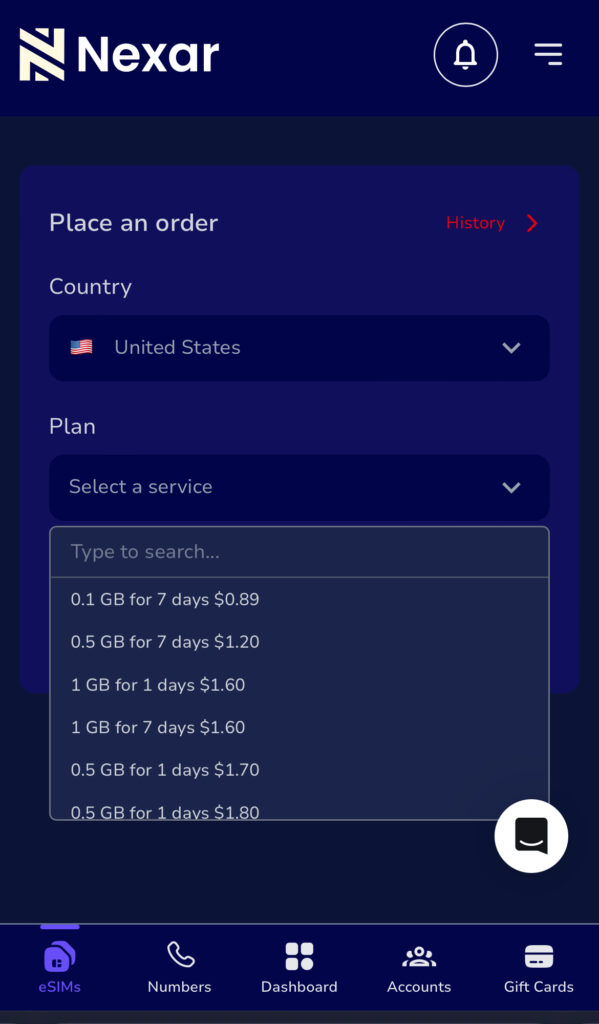
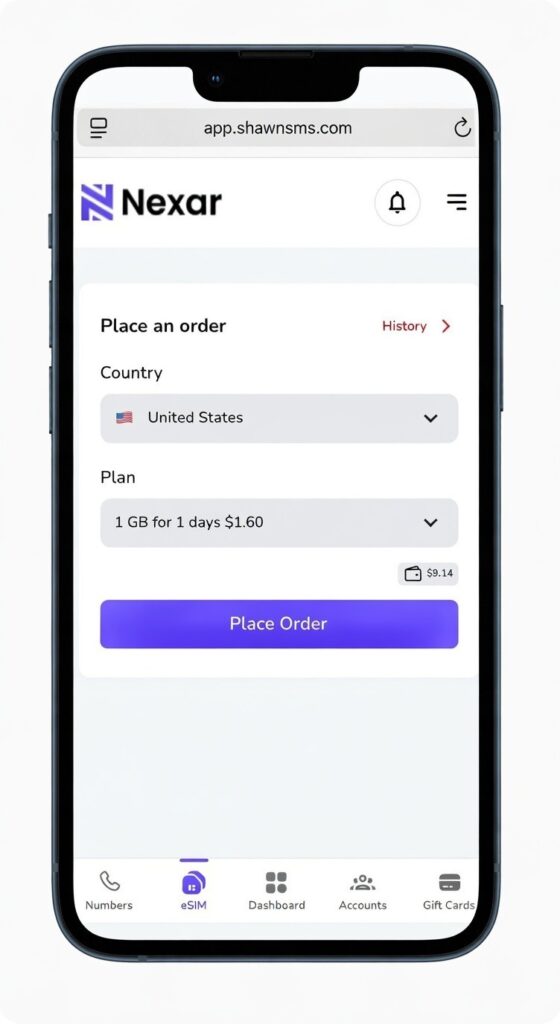
With Nexar, you can buy and activate your USA eSIM from Nigeria in minutes directly from the app.
Why You Should Buy a USA eSIM from Nigeria Before Travelling
Let’s be honest; roaming charges from Nigerian networks are painful.
Here’s why getting your USA eSIM from Nigeria early makes sense:
You Avoid Roaming Charges
International roaming can drain thousands of naira in minutes. An America eSIM plan gives you fixed data pricing.
You Land Connected
Order Uber immediately. Message family. Access your maps.
You Don’t Need a Physical Store
No airport queues. No passport photocopies. No stress.
It’s Perfect for Nigerians
Whether you’re:
A student
A freelancer
A business traveler
A tourist
A US travel eSIM Nigeria solution keeps you online from day one.
Choose the USA eSIM from Nigeria option inside the eSIM section.
Step 3: Choose Your USA eSIM Plan
Pick a data bundle based on:
Length of stay
Data needs
Budget
Nexar shows plan details clearly before payment.
Step 4: Pay Securely
Fund your wallet and complete your purchase.
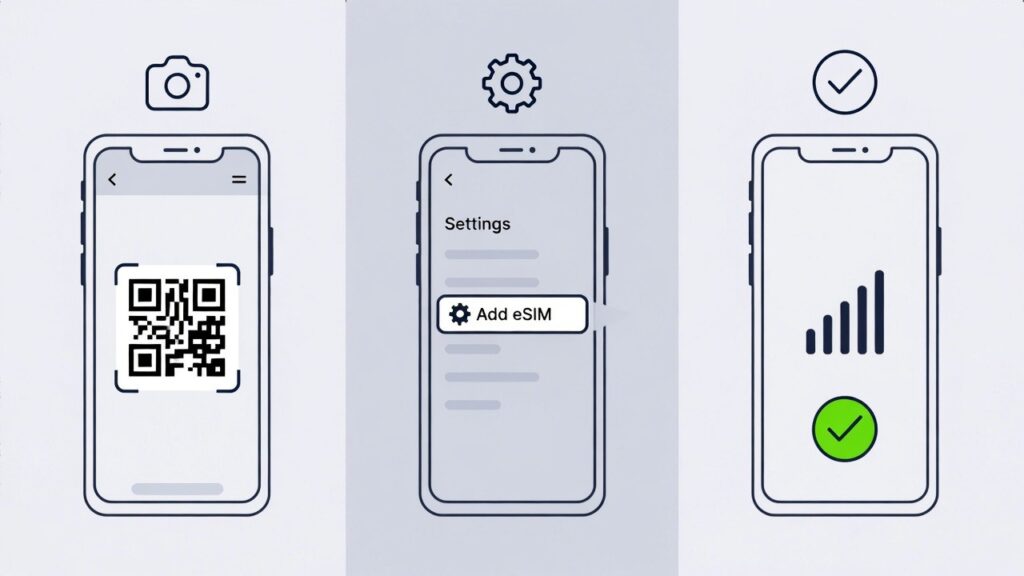
Step 5: Install & Activate
Follow the installation guide. Activate before departure or upon landing.
That’s it. Your USA eSIM from Nigeria is ready.
Who Needs a US Travel eSIM Nigeria Option?
You might think eSIMs are only for tech people. Not true.
Here’s who benefits most:
Students
Moving for school? Your US travel eSIM Nigeria keeps you connected before you open a U.S. bank account.
Business Owners
Attending meetings? You need reliable data immediately.
Freelancers
Remote work doesn’t stop because you’re flying.
Tourists
Maps, bookings, and reservations require stable data.
An America eSIM plan makes your trip smoother.
How to Choose the Right America eSIM Plan
Before buying a USA eSIM from Nigeria, consider:
How many days will you stay?
Do you stream or just browse?
Will you use a hotspot?
Is it data-only or do you need calls?
Most travelers choose 5GB–20GB plans depending on usage.
If your trip is short, a smaller America eSIM plan saves money. Before choosing your America eSIM plan, confirm coverage in the U.S. cities you’re visiting. You can check general U.S. network coverage.
Is Your Phone eSIM Compatible?
Before buying a USA eSIM from Nigeria, confirm your device supports eSIM. Check your phone specifications as this helps you avoid compatibility issues.
Common Mistakes Nigerians Make
Let’s keep it real.
Waiting Until Arrival
Airport SIM cards are usually overpriced.
Activating Too Early
Activate your US travel eSIM Nigeria close to departure to maximize validity.
Ignoring Data Limits
If you stream heavily, choose a higher America eSIM plan.
FAQs About USA eSIM from Nigeria
Q. Can I buy a USA eSIM from Nigeria without travelling yet?
Yes. That’s the point. You install it before departure and activate it when needed.
Q. Does a US travel eSIM Nigeria include calls?
Most plans are data-only. You can use WhatsApp, Telegram, or FaceTime.
Q. How long does activation take?
Usually a few minutes after payment.
Is it safe?
Yes. Nexar provides secure activation and clear instructions.
Final Takeaway
Buying a USA eSIM from Nigeria before travel saves money, time, and stress.
Instead of landing confused, you land connected.
If you want a reliable US travel eSIM Nigeria solution with flexible pricing and fast activation, Nexar makes it simple.
Visit the Nexar website now and activate your American eSIM plan before your next trip.
Leaving Nigeria for a new life abroad is both thrilling and tough. Many Nigerians worry about keeping their phone number when they move. It’s key for staying in touch with loved ones and business contacts.
Without a way to keep your Nigerian number active, you might miss calls and messages. Luckily, there are ways to retain your Nigerian phone number while abroad. This article will look at the hurdles and options you have.
In this article, you will:
Understand the importance of retaining your Nigerian phone number abroad.
Preparing Your Nigerian Number Before Departure
Discover available solutions to maintain your Nigerian phone number.
How to Keep Nigerian Number Abroad with Minimal Costs
Keeping your Nigerian number active while abroad is very important. Today, it’s key to stay connected with family, friends, and business contacts back home.
1. Personal Connections and Relationships
Having your Nigerian number active lets you keep in touch with loved ones. You can get calls and messages from family and friends. This is especially important for staying close to children, spouses, or elderly parents who might not use new tech.
2. Business and Professional Contacts
For professionals, keeping a Nigerian number is crucial. It lets clients and colleagues reach you easily. This consistency builds trust and keeps professional relationships strong.
3. Banking and Two-Factor Authentication Services
Nigerian banks and online services use your phone number for 2FA. Keeping your number active means you can get these codes, even abroad. This is key for accessing your bank accounts and keeping your online presence safe. Without your Nigerian number, you might lose access to your accounts or face financial risks.
Preparing Your Nigerian Number Before Departure
Before you leave, make sure your Nigerian number works abroad. This is key to staying in touch with friends and family back home. With the right steps, you can keep your communication flowing without a hitch.
1. Activating International Roaming Services
Start by turning on international roaming with your provider. Nigerian telecoms like MTN, Airtel, Glo, and 9mobile have this service. Just call your provider or use their app to get it started.
2. Updating Your Account Information and KYC Details
Update your account and KYC details before you go. This keeps your account active and meets legal rules. Your provider will tell you how to do this, maybe online or in person.
3. Setting Up Auto-Recharge Options
Think about auto-recharge for your Nigerian number. It keeps your account topped up automatically. This way, you won’t lose your number due to low funds. Most providers let you set this up through their apps or websites.
How to Keep Nigerian Number Abroad with Minimal Costs
1. Periodic Recharging Strategy
One smart way is to recharge your SIM card at set times. This keeps your number active without costing too much. It means you don’t have to recharge often.
2. Using VoIP Services with Your Nigerian Number
Using VoIP services with your Nigerian number is another good idea. VoIP lets you call and text over the internet, which can save money. Apps like WhatsApp, Skype, or VoIP providers help you stay in touch with Nigeria.
3. Cost Comparison of Different Methods
It’s important to look at the costs of keeping your Nigerian number abroad. Compare the prices of international roaming, recharging, and VoIP. This helps find the best option for you.
If you talk to Nigeria a lot, VoIP might be cheaper than roaming. But, if you only use your number sometimes, recharging might be enough.
Choosing the right method lets you keep your Nigerian number without spending a lot. This way, you can stay connected with loved ones and work contacts back home.
Carrier-Specific Solutions for International Use
To stay connected abroad, it’s key to look at international roaming options from Nigerian carriers. Each carrier has special packages and plans for different needs. This way, Nigerians abroad can keep using their local number.
MTN Nigeria has many international roaming packages. These include data, voice, and SMS bundles for various countries. For example, MTN’s “Roaming Daily Bundle” is great for short trips. It offers data and voice services for a day at a low cost.
“Our roaming services are designed to keep you connected wherever you are, without breaking the bank.”
2. Airtel Nigeria Global Roaming Options
Airtel Nigeria has global roaming options for easy communication abroad. Airtel’s services include data, voice, and SMS roaming in many countries. They offer good prices and special bundles, like the “Airtel Roaming Pack.”
Airtel’s global roaming services are designed to be cost-effective and user-friendly.
3. Glo and 9mobile International Plans
Glo and 9mobile also have international roaming plans. Glo’s services include data, voice, and SMS with daily, weekly, and monthly bundles. 9mobile offers roaming in many countries with data, voice, and SMS packages. Both carriers have competitive prices and flexible plans.
For example, Glo’s “Glo Roaming” service lets subscribers roam in many countries affordably.
In conclusion, Nigerian carriers have many solutions for using your number abroad. By picking the right roaming package, you can stay connected while saving money.
Using Virtual Number Services for Your Nigerian Number
Virtual number services are a great way for Nigerians living abroad to keep their Nigerian phone number. These services let you get calls and texts on your Nigerian number, even when you’re not in Nigeria. You don’t need a physical SIM card for this.
Google Voice: It’s mainly for US numbers but can work with international numbers, including Nigerian ones, with call forwarding.
Skype: Skype lets you port your current number or get a new one. This way, you can get calls and texts.
Localphone: Localphone gives you virtual numbers, including Nigerian ones. You can forward calls and get SMS.
Nexarhq.comNexar gives you access to virtual numbers from 180+ countries that can be used to verify various apps and websites.
Setting Up Call Forwarding to International Numbers
To use a virtual number service well, you need to set up call forwarding. Here’s how:
First, turn on call forwarding on your Nigerian number through your carrier’s settings or USSD code.
Then, set up your virtual number service to forward calls to your international number.
Cost Considerations for Virtual Solutions
The cost of virtual number services depends on the provider and what you need. Things to think about include:
Monthly fees for using a virtual number service.
Charges for call forwarding, from both your Nigerian carrier and the virtual number service.
Any extra fees for SMS or other services.
Knowing these costs helps Nigerians abroad decide if virtual number services are right for them.
Maintaining Your Nigerian SIM Card While Living Overseas
Living abroad doesn’t mean you lose touch with your Nigerian contacts. Keeping your Nigerian SIM card active is easier than you think. With the right strategies, you can stay connected with family, friends, and business associates back home.
For Nigerians living abroad, keeping a local SIM card active is a big concern. The key is to use the number regularly to avoid deactivation.
Preventing Number Deactivation Through Regular Use
To stop your Nigerian number from being deactivated, use it often. Make calls or send SMS to your contacts in Nigeria. Also, using data services or browsing the internet with your Nigerian SIM card keeps it active.
Make regular calls to family and friends
Send periodic SMS to keep the number active
Use data services for browsing and staying connected
By following these tips, your Nigerian SIM card will stay active. It will continue to receive calls and messages from back home.
Remote Recharging Options and Services
Recharging your Nigerian SIM card from abroad is now easy. Thanks to online platforms and international payment methods. Use services like Nexarhq platforms that support Nigerian mobile networks.
Online banking and credit card payments
International money transfer services
Dedicated recharge platforms for Nigerian SIM cards
With these remote recharging options, you can keep your Nigerian SIM card topped up. This is even when you’re living overseas.
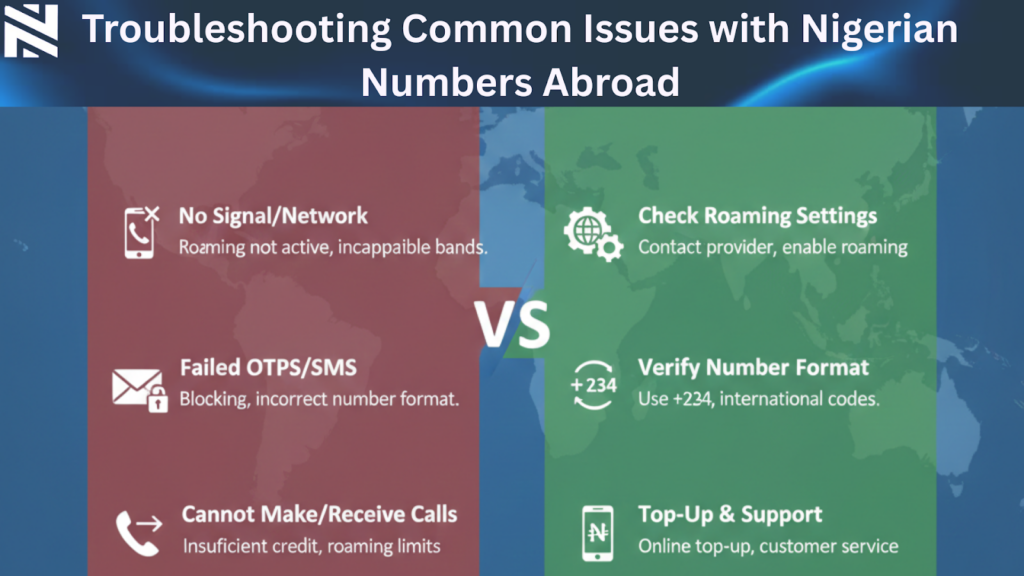
Troubleshooting Common Issues with Nigerian Numbers Abroad
Fixing problems with Nigerian numbers abroad is essential. You might face issues like network problems, trouble recharging, and SIM deactivation. These can happen when you keep your Nigerian number active while abroad.
1. Network Connection Problems and Solutions
Network issues can stem from roaming settings and network compatibility. To fix these, make sure your phone automatically picks a network or manually selects one that works in your area. Also, restarting your phone or turning on airplane mode can help.
Tips for resolving network issues:
Check your phone’s roaming settings
Manually select a compatible network
Restart your phone or toggle airplane mode
2. Recharging Difficulties and Workarounds
Recharging your Nigerian number abroad can be tough due to international payment limits. To get around this, use online recharge services or buy recharge cards from Nigerian vendors online. Some providers also offer auto-recharge options that you can set up remotely.
Popular methods for recharging:
Online recharge services
Nigerian online vendors for recharge cards
Auto-recharge options
3. SIM Card Deactivation Issues and Recovery
SIM deactivation happens if you don’t use your number for a long time. To avoid this, use your SIM regularly or reactivate it through customer service. Sometimes, you’ll need to verify your account details to reactivate your SIM.
“Using your SIM card often keeps it active,” MTN Nigeria advises. “Customers can reactivate their SIMs by contacting our customer service.”
Knowing how to tackle these common problems helps you keep your Nigerian number active while abroad.
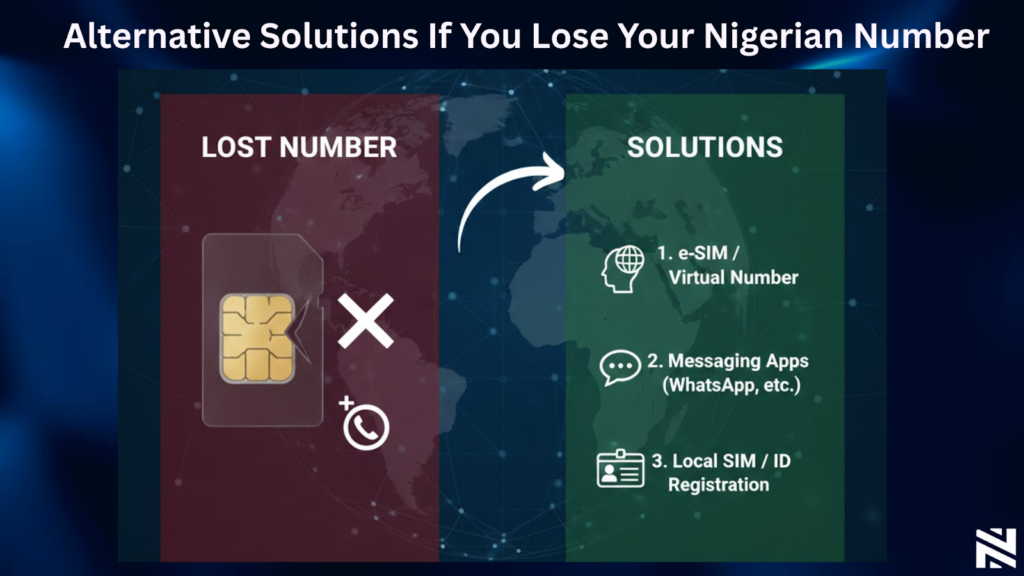
Alternative Solutions If You Lose Your Nigerian Number
Losing your Nigerian number abroad can be a big problem. But, there are ways to keep in touch with Nigeria. You can still get important calls and messages.
1. Getting a New Nigerian Number Through a Proxy
One way to get a new Nigerian number is through a proxy. Ask a trusted friend or family member in Nigeria to buy a new SIM card for you. MTN Nigeria, Airtel Nigeria, Glo, and 9mobile are good choices. They can register the SIM in your name and send it to you.
Make sure your proxy has all the needed documents. This includes a copy of your ID and proof of address. This way, you can keep a Nigerian number without going back to Nigeria.
2. Using Nigerian Virtual Numbers as Replacements
Virtual numbers are another option. They give you a Nigerian number that can receive calls and messages online. d online. This makes them a good choice for Nigerians overseas. You can now rent a Nigerian virtual number from Nexar to stay connected.
Conclusion
It’s important to keep your Nigerian number active while living abroad. This helps you stay in touch with loved ones and business contacts back home. There are several ways to do this, like understanding mobile network policies and using cost-effective methods.
Services like MTN Nigeria’s international roaming packages can help. Also, apps like WhatsApp and Nigerian banking apps can make communication easier. These tools help you keep your Nigerian number active, even when you’re far away.
Consider setting up auto-recharge options to keep your number active. You can also look into VoIP services and carrier-specific solutions. By using these strategies, you can keep your Nigerian number active abroad.
Frequently Asked Questions
How can I keep my Nigerian number active while living abroad?
To keep your Nigerian number active abroad, activate international roaming. Update your account info and set up auto-recharge before you leave.
What are the costs associated with using a Nigerian number abroad?
Costs depend on the carrier and services used. Use periodic recharging, VoIP, or virtual numbers to save money.
Can I use my Nigerian SIM card while living overseas?
Yes, you can use your Nigerian SIM card overseas. Just make sure to use it regularly to avoid deactivation. Also, consider remote recharging options.
How do I troubleshoot common issues with my Nigerian number abroad?
For common issues, check network and recharge problems. Also, look into SIM card deactivation. Find solutions for these issues.
What are the alternatives if I lose my Nigerian number?
If you lose your Nigerian number, get a new one through a proxy. Or use Nigerian virtual numbers as a replacement.
Can I retain my Nigerian phone number overseas using virtual number services?
Yes, you can keep your Nigerian number overseas with virtual services. They forward calls to international numbers.
How do I keep my Nigerian number abroad with minimal costs using Nexarhq?
Use Nexarhq’s services to keep your Nigerian number abroad affordably. They offer reliable solutions for maintaining your number. Visit Nexar to get started.
Traveling from Nigeria to Canada is exciting until you land and realize your phone has no internet. No maps, no ride apps, no way to message family back home. This is a common experience for many travelers, students, and freelancers.
That’s why more people are choosing a Canada eSIM from Nigeria instead of waiting to buy a physical SIM at the airport or paying expensive roaming charges. With the right setup, you can land in Canada already connected.
This guide shows you exactly how to buy and activate a Canada eSIM from Nigeria, step by step.
What Is a Canada eSIM from Nigeria?
A Canada eSIM from Nigeria is a digital SIM that gives you mobile data in Canada without using a physical SIM card. You install it on your phone before or after travel and activate it once you arrive.
With a Canada travel eSIM:
You don’t swap SIM cards
You avoid roaming charges
You get instant data access
For Nigerians traveling for work, school, or vacation, this is one of the easiest ways to stay connected.
Why Nigerians Prefer a Canada eSIM Instead of Roaming
Using roaming with Nigerian networks in Canada is expensive and unreliable. That’s why many travelers now choose an eSIM Canada Nigeria option.
Here’s why it makes sense:
No surprise roaming bills
Works immediately on arrival
More affordable data plans
Easy setup from your phone
A Canada eSIM from Nigeria gives you control over your data and spending.
Check If Your Phone Supports a Canada eSIM from Nigeria
Before buying, confirm that your phone supports eSIM.
Your phone must also be carrier-unlocked to use a Canada travel eSIM.
How to Buy a Canada eSIM from Nigeria Using Nexar
Nexar makes it easy to get an eSIM Canada Nigeria users can trust.
Step 1: Visit the Nexar Website
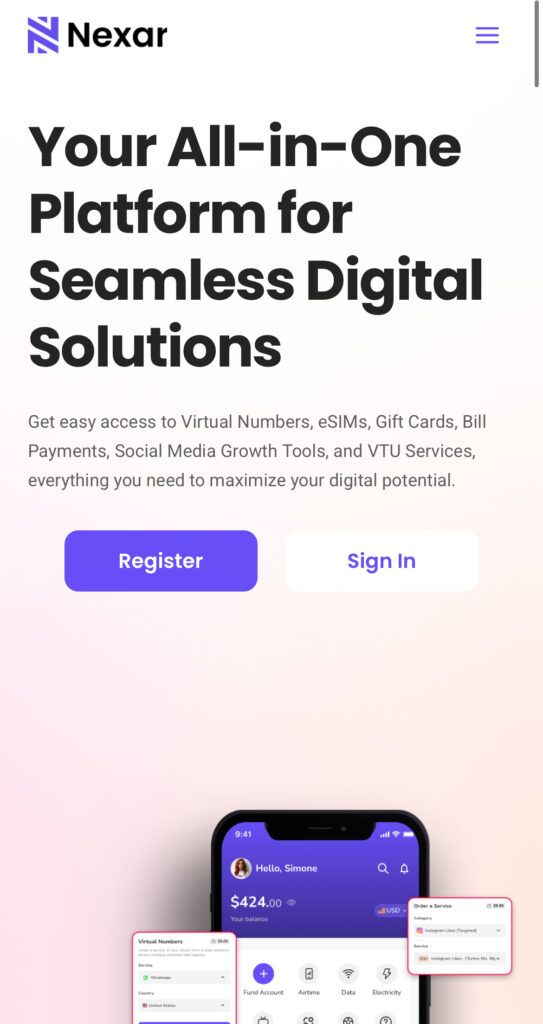
Visit the Nexar website on your phone and create an account. If this is your first time buying an eSIM, you can follow our step-by-step guide on how to buy an eSIM on Nexar to see the full process from choosing a plan to activation.
Step 2: Locate the “eSIM” section
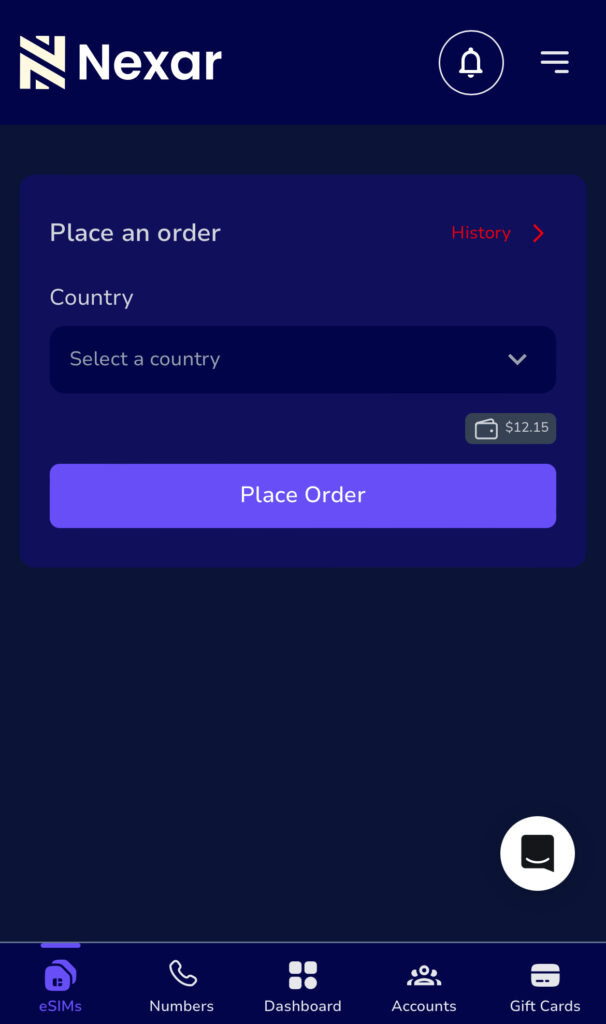
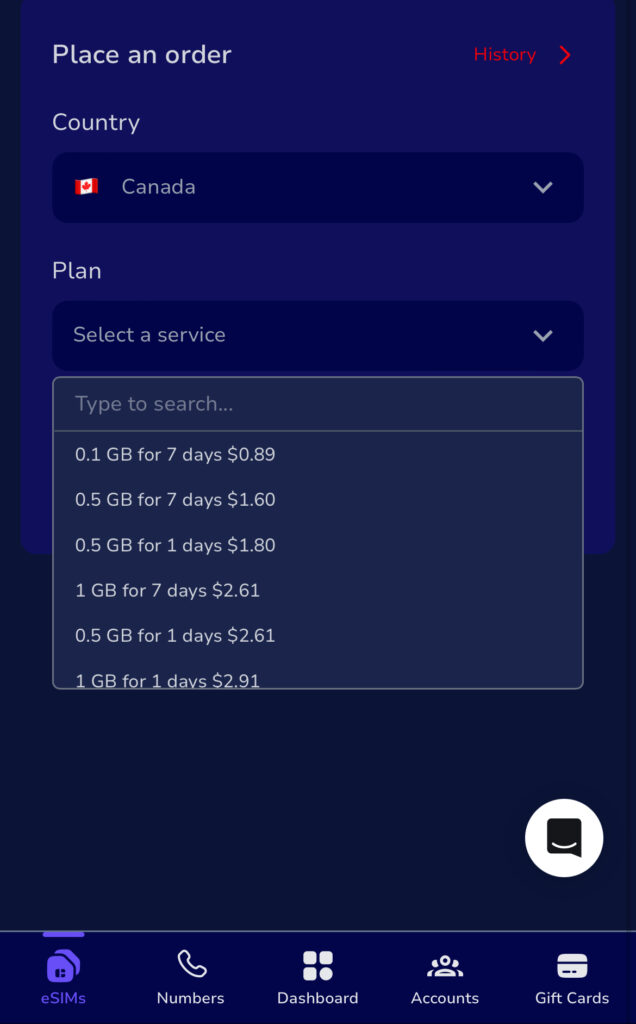
After creating an account, locate the “eSIM” section and select Canada as your destination then choose a data plan that fits your stay.
Step 3: Complete Payment
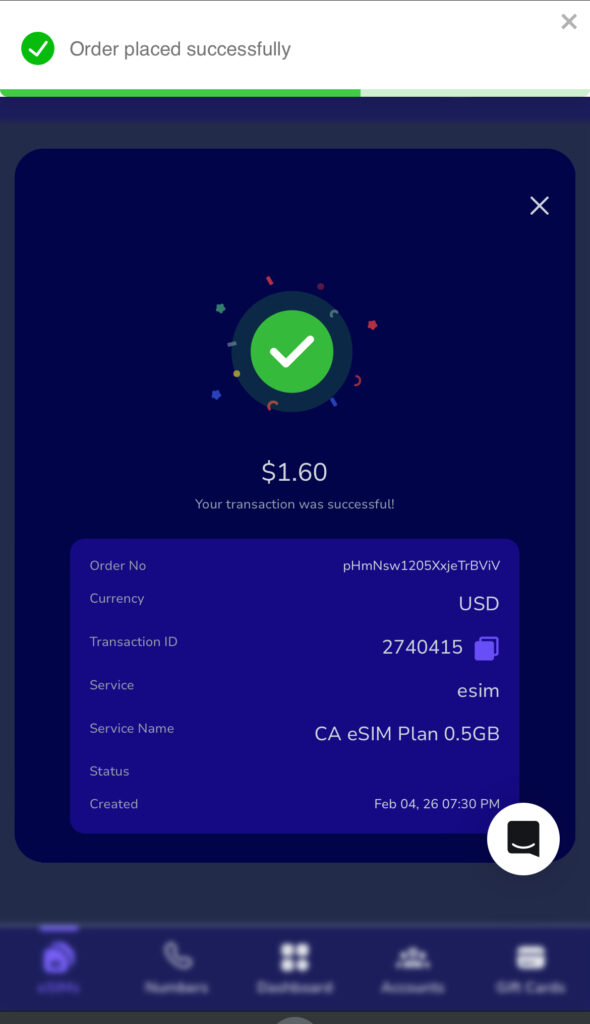
Pay securely using available payment options. Once payment is confirmed, your Canada eSIM from Nigeria is sent instantly.
How to Activate a Canada eSIM from Nigeria
Activating your Canada eSIM from Nigeria is simple and takes only a few minutes.
You land in a new country, turn off airplane mode, and everything seems fine. Messages start coming in. Google Maps opens. Social media loads normally.
Then you see a small warning on your screen.
“Data roaming charges may apply.”
Most people ignore it. After all, you are just checking directions or replying to a few messages.
The real problem shows up later when you return home and check your bill.
For many Nigerians traveling abroad, data roaming is one of the most expensive travel mistakes. It works quietly in the background and drains money without clear warnings.
In this guide, you will learn what data roaming really means, how roaming charges work, why Nigerians are affected the most, and how to stay connected abroad without stress using smarter alternatives like travel eSIMs.
What Is Data Roaming?
Data roaming happens when your phone connects to the internet using a mobile network outside your home country.
When you leave Nigeria, your SIM card can no longer connect to your local network. Instead, it connects to a foreign network that has an agreement with your Nigerian provider. That connection is called roaming.
With data roaming, you can still:
• Browse the internet
• Use social media apps
• Access Google Map
• Send emails and messages
• Make and receive calls
The service feels normal, but the cost is very different.
How Data Roaming Works
Here is what happens when you travel abroad with roaming enabled.
You arrive in a new country
You turn on your phone
Your phone searches for available networks
It connects to a partner network
You start using mobile data
Your usage is tracked by the foreign network
Your home provider bills you at roaming rates
All of this happens automatically. You do not approve the charges manually, which is why many travelers only notice the cost after the trip.
Why Data Roaming Is So Expensive
To fully understand roaming charges explained, you need to know how billing works.
Your home network pays the foreign network to carry your data. That cost is transferred to you, often with added fees.
Roaming charges usually include:
• High data cost per megabyte
• Expensive incoming and outgoing calls
• Charges for SMS messages
• Extra fees for hotspot usage
Just a few minutes of scrolling Instagram or loading Google Maps can cost more than an entire day of local data.
Hidden Data Usage While Roaming
Even if you are not actively browsing, your phone may still use data for:
• Email syncing
• App notifications
• Cloud backups
• Location services
• Software updates
This is why roaming charges can increase even when your phone is in your pocket.
Data Roaming in Nigeria: What You Should Know
For Nigerian travelers, data roaming Nigeria problems are very common.
Most Nigerian SIM cards do not offer affordable roaming plans. Even when roaming is available, the rates are often extremely high. Network stability can also be inconsistent.
Because of this, many Nigerians now turn off roaming completely and rely on better alternatives.
Pros and Cons of Data Roaming
Advantages
• Instant connection when you land
• No SIM card changes
• You keep your phone number
• Useful for emergencies
Disadvantages
• Very expensive
• Charges can start without warning
• Poor cost control
• Background apps consume data
• Unexpected billing after travel
Roaming is convenient, but it is rarely cost effective.
How to Control Data Roaming Settings
On iPhone
Open Settings
Tap Mobile Data
Tap Mobile Data Options
Turn Data Roaming on or off
On Android
Open Settings
Tap Network and Internet
Tap Mobile Network
Turn Data Roaming on or off
If you are not using a travel plan, it is best to turn roaming off.
How to Avoid High Data Roaming Charges
Here are smarter ways to stay connected while traveling.
An eSIM is a digital SIM that gives you mobile data in another country without roaming. You buy it online, install it on your phone, and connect instantly when you arrive.
As long as you are physically in Brazil, you can activate your Nexar Brazil eSIM and connect instantly. You get a local Brazilian data connection, which means fast browsing, smooth navigation, and reliable access to all your apps.
You do not need to buy a local SIM card or depend on slow airport WiFi. Just scan your eSIM and go.
Important Note
Nexar eSIMs work only within the country they are purchased for. A Brazil eSIM must be activated and used in Brazil.
Data Roaming vs Travel eSIM
Data roaming is automatic but expensive and unpredictable.
Travel eSIMs offer:
• Clear pricing
• Local network access
• Faster speeds
• Better control
• No billing surprises
For frequent travelers and digital nomads, eSIMs are the smarter choice.
Frequently Asked Questions
Is data roaming the same as mobile data?
No. Mobile data at home uses your local network. Abroad, it becomes data roaming.
Should I turn off data roaming when traveling?
Yes, unless you are using a roaming plan or a travel eSIM.
Does data roaming drain battery?
Yes. Constant network switching can increase battery usage.
Can I receive calls if data roaming is off?
Yes. Turning off data roaming only affects internet usage.
Final Thoughts
Data roaming looks convenient, but it often comes with painful costs.
For Nigerian travelers especially, roaming charges can ruin a trip if you are not careful. The good news is that you now have better options.
By turning off roaming and using a travel eSIM from Nexar, you can stay connected anywhere in the world without stress, surprises, or unnecessary spending.
In 2026, travel is no longer just for the ultra-rich. With better flight deals, flexible work, and smarter planning, more Nigerians are looking for the cheapest countries to visit in 2026 without sacrificing comfort or experience. The real challenge isn’t the desire to travel, it’s figuring out where your naira can go the farthest.
From affordable visas to low daily living costs, some destinations make budget travel destinations feel realistic, even if it’s your first international trip. This guide breaks down the cheapest countries to visit in 2026, especially for Nigerians who want value, safety, and memorable experiences.
Why Focus on the Cheapest Countries to Visit in 2026?
Travel costs are rising globally, but not evenly. While some countries are becoming expensive, others remain surprisingly affordable due to currency exchange rates, cost of living, and tourism policies.
Choosing the cheapest countries to visit in 2026 helps you:
Stretch your travel budget longer
Spend more on experiences, not survival
Avoid unnecessary financial stress
Enjoy affordable travel 2026 without cutting corners
For Nigerians, this approach is even more important due to exchange rate realities and visa costs.
Cheapest Countries to Visit in 2026 for Nigerians
🇬🇪 Georgia
Georgia consistently ranks among the cheapest countries to visit in 2026. Daily expenses like food, transport, and accommodation remain low. In its eccentric capital, crumbling façades of traditional wooden Georgian houses stand next to Soviet-era architecture and daring contemporary designs. From Tbilisi, you can explore the stunning Caucasian Mountain range, take a dip in the Black Sea, or visit ancient hilltop monasteries (and a few of them even built inside caves).
Why it works for Nigerians:
Visa-friendly policies
Affordable meals and lodging
Beautiful cities like Tbilisi
🇲🇦 Morocco
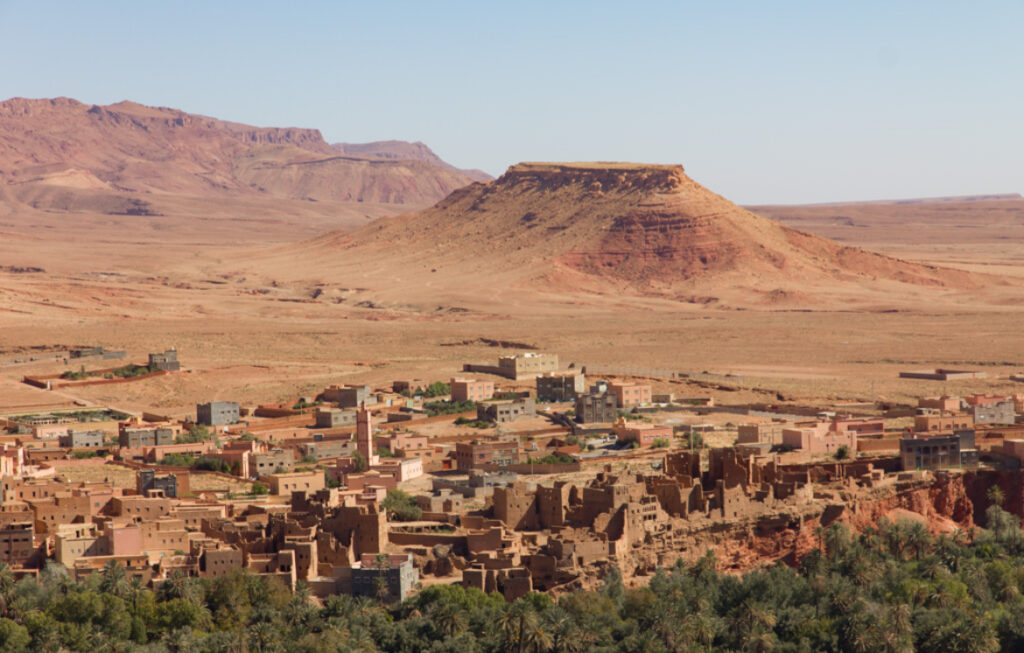
Morocco continues to rank among the cheapest countries to visit in 2026, especially for travelers who want rich culture without high costs. The key to staying on budget? Steer clear of the pushy salesmen trying to sell you overpriced rugs and trinkets! But unless you go shopping every day in the souks where everything is very tourist-priced, you can still travel in Morocco without breaking the bank.
Budget riads and guesthouses are widely available
Local meals and street food are very affordable
Public transport and intercity buses are cheap
You can explore cities like Marrakech or Fez, use maps for navigation, book local tours, and stay connected online while keeping daily expenses low.
🇻🇳 Vietnam
Vietnam is a classic favorite among budget travel destinations. You can live comfortably on a modest daily budget. Vietnam is getting (re)discovered in a major way. It’s now mainly digital nomads singing its praises: visa reforms made long stays easier, while the highly liveable seaside city of Da Nang has put Central Vietnam in the spotlight with its low prices and clean air.
What makes it affordable:
Cheap street food
Budget-friendly hotels
Affordable local transport
Vietnam fits perfectly into any list of the cheapest countries to visit in 2026.
🇷🇼 Rwanda
Rwanda offers a clean, safe, and structured travel experience in Africa.
Why you will love it:
Visa on arrival
Affordable local transport
Stable costs for food and accommodation
It’s one of the most accessible cheap countries for Nigerians right now.
🇪🇬 Egypt
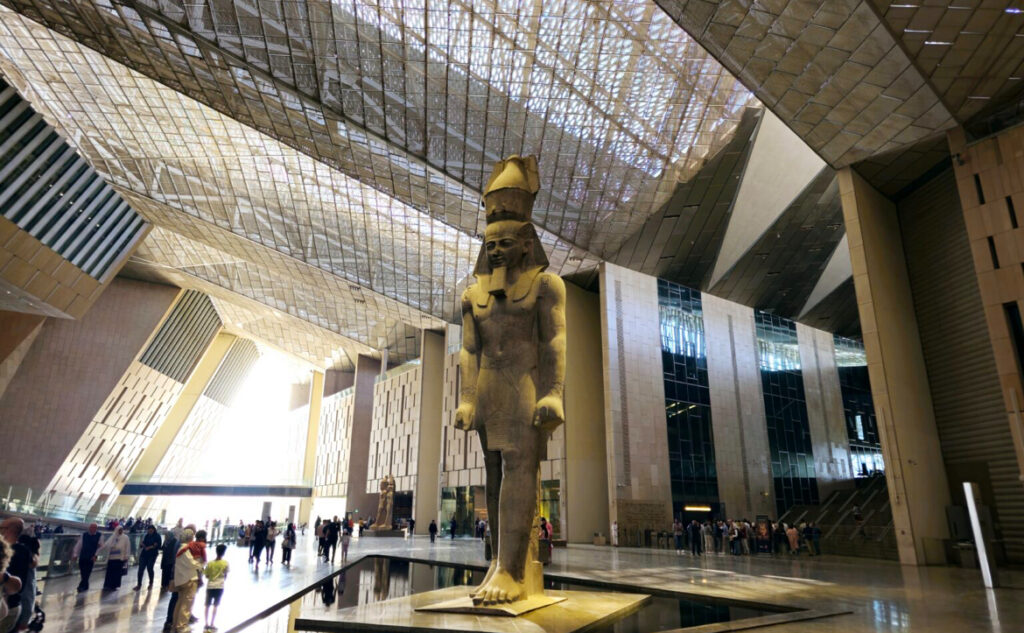
Egypt continues to rank among the cheapest countries to visit in 2026, especially for travelers looking for history, culture, and affordability in one destination. Let’s face it: the Pyramids of Giza will forever be a bucket list item, and now that Egypt is particularly good value perhaps it’s time to tick it off the list. The opening in late 2025 of the GEM said to be the world’s largest archeological museum, gives a new impetus to go.
Budget hotels and guesthouses are widely available
Local food, transport, and attraction entry fees are affordable
Major cities offer good value for money compared to many global destinations
You can explore cities like Cairo or Alexandria, navigate using maps, book tours, and stay connected online while keeping your daily travel expenses low.
🇮🇩 Indonesia
Indonesia remains one of the cheapest countries to visit in 2026, especially for travelers who want great value, diverse experiences, and affordable daily living. While Bali has always been the clear favorite island, it’s increasingly regarded as overtouristed. It’s still a good place to go for an affordable and easy trip, but if you’re seeking more calm and authenticity you might have to look elsewhere.
Why you will love it:
Budget hostels, guesthouses, and short-lets are widely available
Local meals and street food are very cheap
Transport within cities and between islands is cost-friendly
You can explore places like Bali or Yogyakarta, consider Bali’s neighboring islands of Lombok and Java, the spectacular Komodo islands and rural Flores, or go further into Sumatra or Sulawesi, book rides, find affordable stays, and use navigation apps easily while keeping your overall travel costs low.
🇰🇭 Cambodia
Cambodia continues to be a favorite for long-stay budget travelers. A former sleepy escape on the buzzing Southeast Asia backpacker trail, Cambodia is now one of the region’s most exciting gems. Despite the country’s horrors in the past century, friendly locals and animated towns indicate it’s on the upswing. Its enlightening temples, undeveloped islands, and genuine markets often provide a more authentic travel experience.
No trip to Cambodia is complete without visiting the mystical Angkor Wat, despite a day pass throwing a wrench in your budget. However, there is much more to discover than the country’s pride and joy.
Its sun-kissed beaches rival its neighbors, the cuisine is fit for the adventurous foodies, and the history will likely overwhelm your emotions.
Extremely affordable food
Cheap guesthouses and hotels
Low transportation costs
You can explore cities like Phnom Penh or Siem Reap while keeping daily spending very low.
🇦🇱 Albania
Europe doesn’t have to be expensive. Albania proves that. Beyond the viral eye-candy of Ksamil, Albania is blessed with a beautiful Mediterranean coastline but I think the real secrets are its quirky capital, well-preserved Ottoman-era towns, and beautiful Alps.
Albania remains one of the last undiscovered gems of Europe, and it packs a punch with its untouched landscapes and historic sites. From the sprawling capital of Tirana to the intimidating Accursed Mountains, there is an adventure for all interests.
Budget-friendly highlights:
Low-cost accommodation
Cheap public transport
Stunning beaches
Albania stands out as one of the cheapest countries to visit in 2026 within Europe.
🇳🇵 Nepal
Nepal is one of the cheapest adventure-friendly destinations in 2026. The kind-hearted nature of the Nepalese and the wonderful bustle of Kathmandu instantly enchants anyone
Nepal also happens to be one of the world’s cheapest places for mountain trekking, whether guided or independent. There are routes throughout the Himalayas that are very well-supported and have many tea houses where you can eat and sleep.
Very low food and lodging costs
Budget transport options across cities
Affordable local experiences
🇹🇭 Thailand
Thailand remains one of the cheapest countries to visit in 2026, especially for travelers who want great food, vibrant cities, and affordable experiences. Its tropical climate, mouthwatering street food, glistening beaches, and thriving ex-pat community have made it a hub for budget travelers.
What makes it affordable:
Budget hotels, hostels, and apartments are easy to find
Street food and local meals are very affordable
Public transport and domestic travel are cost-friendly
You can move around cities like Bangkok or Chiang Mai, find affordable places to eat, book local experiences, and stay connected online while keeping your daily spending low.
🇬🇭 Ghana
For Nigerians who want international travel without long flights, Ghana is a smart choice. Ghana is a very safe country, and its friendly people make you feel warm and welcome as soon as you enter. Although the Coastal Plains of Ghana make up only a fraction of the whole country, there’s so much to do and see here, including the capital city of Accra.
This coastal city is small but vibrant, with much to do for free! From Skybar in Accra’s tallest tower overlooking the laid-back coastline, a wander around the beating Makola Market, or the bars contributing to its great nightlife scene, Accra really has something for all kinds of travellers. The beaches of Bojo and Labadi provide a beautiful place for relaxing on the sand, or for the more adventurous, there are some great waves to surf.
Visa-free entry
Similar food and culture
Affordable daily expenses
It remains a top pick for affordable travel 2026.
How to Budget Smartly When Visiting Cheap Countries in 2026
Even when visiting the cheapest countries to visit in 2026, planning matters.
Here’s what helps:
Book flights early
Choose apartments over hotels
Eat local food
Use public transport
Avoid tourist traps
These tips apply across all budget travel destinations.
Staying Connected While Traveling on a Budget
Internet access is often overlooked when planning affordable travel 2026, but roaming charges can quietly drain your budget.
Instead of relying on airport SIM cards, many travelers now choose eSIMs for flexibility and cost control. With a travel eSIM, you can:
Activate data before landing
Avoid roaming fees
Stay connected immediately
Platforms like Nexar make it easier for Nigerians to get travel eSIMs without stress. You can explore helpful guides like how eSIMs work for international travel directly on Nexar’s blog.
Cheapest Countries to Visit in 2026 vs. Expensive Tourist Hubs
Choosing the cheapest countries to visit in 2026 doesn’t mean missing out. In fact, you often get:
More authentic experiences
Less crowded attractions
Better value for money
Compared to expensive destinations, these cheap countries allow longer stays and deeper exploration.
Practical Takeaways for Budget Travelers
Before you travel:
Pick from the cheapest countries to visit in 2026
Research visa requirements early
Plan daily spending realistically
Sort connectivity options like data eSIMs in advance
Keep emergency funds
Smart planning turns budget travel destinations into stress-free experiences.
Final Thoughts: Travel Smart in 2026
Travel in 2026 doesn’t have to be expensive. With the right destination choices, you can enjoy meaningful trips without financial pressure. The cheapest countries to visit in 2026 offer culture, comfort, and adventure at a fraction of the cost.
If staying connected matters to you while exploring these destinations, consider setting up your travel eSIM ahead of time through Nexar and focus on enjoying the journey.
At Murtala Muhammed Airport, Ibrahim had everything sorted; passport, visa, hotel booking. What he didn’t plan for was internet access. Minutes after landing in Doha, his Nigerian SIM stopped working. No Google Maps. No WhatsApp. No way to reach his pickup driver. By the time he finally connected to Wi-Fi, he had already spent more on roaming than he planned for food that day.
In this guide, you’ll learn how eSIM for Qatar works. Instead of dealing with roaming charges or unreliable airport SIMs, you can buy a data-only eSIM on Nexar and activate it instantly before you travel.

What Is an eSIM for Qatar and How Does It Work?
An eSIM for Qatar is a digital SIM that gives you mobile data in Qatar without inserting a physical SIM card. Instead of visiting a kiosk or swapping SIMs, you install the eSIM directly on your phone.
Once activated, your travel eSIM connects you to local networks in Qatar, allowing you to browse, chat, navigate, and work online using data only.
According to the GSMA eSIM standard, an eSIM is built directly into your device and can be activated remotely without a physical SIM card.
This is especially useful for Nigerians because:
Roaming charges are expensive
Physical SIM registration can be stressful
Airport SIM prices are often higher
Why Nigerians Prefer an eSIM for Qatar Over Roaming
Using roaming with Nigerian networks can drain your balance in minutes. That’s why many travelers now choose a reliable data-only eSIM instead.
Here’s why it makes more sense:
Predictable costs: You pay once and know exactly how much data you have
Instant connectivity: Your data works as soon as you land
No physical SIM: Your Nigerian SIM stays active for calls and OTPs
Better control: You manage everything from your phone
With a properly activated eSIM for Qatar, you avoid the stress most travelers face abroad.
The Biggest Problem Nigerians Face When Buying an eSIM for Qatar
The issue isn’t awareness, it’s access.
Many global eSIM platforms:
Decline Nigerian cards
Have confusing setup instructions
Offer poor customer support
Don’t explain Qatar eSIM activation clearly
This is where having a platform built for Africans makes all the difference.
How to Activate eSIM for Qatar in Nigeria
Activating an eSIM with Nexar is straightforward and best done before you travel.
Step 1: Confirm Your Device Supports eSIM
Most recent iPhones and Android devices support eSIM. Before you activate an eSIM for Qatar, it’s important to confirm that your phone is on the list of eSIM-compatible devices.
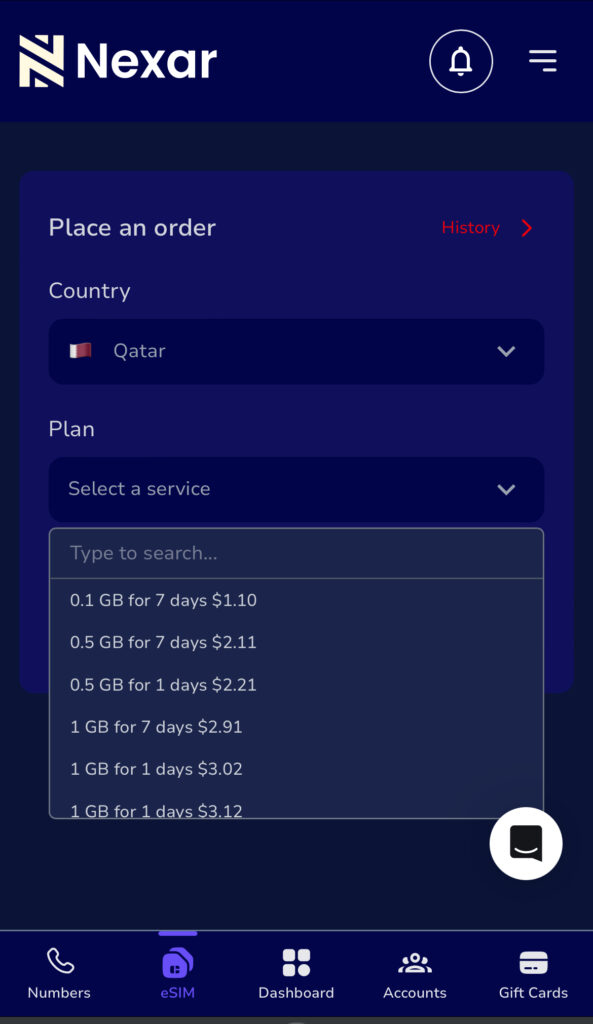
Step 2: Buy your data plan on Nexar
Choose your preferred travel eSIM plan based on how long you’ll stay and how much data you need.
Step 3: Receive Your QR Code
After payment, Nexar sends the eSIM activation QR code to your email instantly.
Step 4: Install the eSIM
Scan the QR code using your phone’s eSIM setup option.
Important: The QR code can only be scanned once.
Step 5: Activate on Arrival
Once in Qatar:
Turn on the eSIM
Enable data roaming
Select the eSIM as your mobile data line
Your eSIM for Qatar connects automatically.
What You Can Do With a Travel eSIM Qatar Plan
Once your travel eSIM is active, you can:
Use Google Maps for navigation
Stay active on WhatsApp, Instagram, and email
Book rides and hotels online
Join Zoom or Teams meetings
Work remotely without interruptions
This makes eSIM for Qatar ideal for freelancers, consultants, and business travelers from Nigeria.
Why Choose Nexar for eSIM for Qatar
Nexar is designed to solve the exact problems Nigerians face when trying to stay connected abroad.
Here’s why Nexar stands out as a reliable data- only eSIM:
Built with Nigerians in mind
Nexar supports local payment methods and understands how Nigerians travel and work.
Instant delivery
Once you buy your eSIM for Qatar, your QR code is sent immediately, no delays.
Simple activation steps
Nexar provides clear instructions so your data-only eSIM activation works on the first try.
Reliable data-only plans
The travel eSIM plans are optimized for WhatsApp, Google Maps, email, work tools, and social media.
Responsive support
If you need help, Nexar support is available and understands local users, not generic chatbot replies.
This makes Nexar a reliable solution, not just another eSIM seller.
Common Mistakes to Avoid When Using eSIM for Qatar
To get the best experience with eSIM for Qatar, avoid these mistakes:
Waiting until arrival to activate
Using unsupported devices
Turning off data roaming for the eSIM line
Buying plans that don’t match your stay duration
Preparing ahead ensures your eSIM for Qatar works smoothly.
Common Questions Nigerians Ask About eSIM for Qatar
Q. Can I activate my eSIM before traveling?
Yes. With Nexar, you can install and activate your eSIM before traveling so it starts working immediately after landing.
Q. Will my Nigerian SIM still work?
Yes. Your physical SIM remains active for calls and OTPs.
Q. Is Nexar’s eSIM data-only?
Yes. Nexar offers data-only eSIMs designed for internet access abroad.
Final Thoughts: Is eSIM for Qatar Worth It?
If you value convenience, cost control, and instant connectivity, eSIM for Qatar is absolutely worth it. For Nigerians traveling to Qatar, it removes uncertainty and keeps you connected from day one.
Instead of struggling with roaming or airport SIMs, activate eSIM for Qatar in Nigeria and travel with peace of mind.
Visit the Nexar website today and activate your travel eSIM before your trip.
Smartwatch adoption in Africa has grown by over 30% in the last two years, driven by fitness tracking, remote work, and on-the-go connectivity. As more people in Nigeria rely on smartwatches for internet-based apps, maps, streaming, and notifications, eSIM supported smartwatches are becoming a practical choice.
Instead of inserting a physical SIM, eSIM technology allows your smartwatch to connect directly to mobile data. This guide breaks down the complete eSIM smartwatch list for Nigeria in 2025, what actually works locally, and how to stay connected using a data-only eSIM from Nexar.
What eSIM Supported Smartwatches Really Mean in Nigeria
Before jumping into the list, it’s important to be clear about one thing.
Most eSIM supported smartwatches in Nigeria do not support traditional calls or SMS on their own. Instead, they rely on mobile data to power:
Internet access
App syncing
GPS and maps
Fitness platforms
Notifications
Streaming and cloud services
This is exactly where data-only eSIMs come in.
According to GSMA’s eSIM overview, eSIM technology allows devices like smartwatches to connect securely to mobile networks without a physical SIM card.
Complete eSIM Supported Smartwatches in Nigeria (2025)
Below is an updated eSIM smartwatch list of models that support embedded SIM technology and can work with mobile data in Nigeria.
Apple eSIM Supported Smartwatches
Apple remains the most consistent brand when it comes to eSIM supported smartwatches.
Apple Watch models with eSIM support:
Apple Watch Series 3 (Cellular)
Apple Watch Series 4
Apple Watch Series 5
Apple Watch Series 6
Apple Watch Series 7
Apple Watch Series 8
Apple Watch Series 9
Apple Watch Ultra
Apple Watch Ultra 2
Apple Watch SE (Cellular versions only)
These watches rely heavily on data connectivity for apps, iCloud syncing, maps, and health tracking.
Samsung Smartwatches with eSIM in Nigeria
Samsung also offers several smartwatches with eSIM Nigeria users can rely on for internet-based features.
Samsung smartwatches use data for Google services, app updates, navigation, and health tracking.
Other eSIM Supported Smartwatches
While Apple and Samsung dominate, a few other brands support eSIM globally (availability may vary in Nigeria):
Huawei Watch 2 Pro (eSIM)
Huawei Watch 3
Huawei Watch 3 Pro
Oppo Watch LTE
For these models, compatibility often depends on software version and regional support.
What You Can Do with eSIM Supported Smartwatches Using Data Only
When people hear “data-only eSIM,” they often assume it limits what a smartwatch can do. In reality, eSIM supported smartwatches can still handle most of the things you actually use your watch for every day as long as they’re connected to mobile data.
Here’s what that looks like in real life:
Browse the internet on the go
With eSIM supported smartwatches, you can stay online even when your phone isn’t nearby. Whether you’re checking updates, syncing apps, or accessing cloud services, mobile data keeps everything running smoothly.
Use maps and GPS without stress
Data-only eSIMs allow eSIM supported smartwatches to power Google Maps or Apple Maps. This is perfect for workouts, walking routes, travel navigation, or finding locations without pulling out your phone.
Sync fitness and health apps in real time
Your fitness data doesn’t have to wait until you’re back home. eSIM supported smartwatches can upload workout stats, heart rate data, and health insights instantly using mobile data.
Stream music and audio online
Going for a run or commute without your phone? No problem. With data access, eSIM supported smartwatches can stream music, podcasts, or audio directly from supported apps.
Receive app notifications anywhere
WhatsApp alerts, email notifications, calendar reminders, and app updates still come through. As long as there’s data, eSIM supported smartwatches keep you connected to what matters.
Use internet-based apps smoothly
Many smartwatch apps rely on the internet, not SMS or calls. Data-only eSIMs let eSIM supported smartwatches handle messaging apps, cloud services, weather updates, and productivity tools without issues.
Track workouts and location accurately
For runners, cyclists, and outdoor users, mobile data improves real-time tracking. eSIM supported smartwatches can record routes, sync performance data, and update stats instantly.
What Data-Only eSIMs Don’t Do (And Why That’s Okay)
It’s important to be clear: eSIM supported smartwatches using data-only eSIMs don’t make traditional calls or send SMS on their own. But for most users in Nigeria, those features are rarely the main reason for using a smartwatch.
The real value comes from internet-powered features, and that’s exactly what data-only eSIMs are designed for.
With a reliable data-only eSIM from Nexar, eSIM supported smartwatches can stay connected to mobile data even when your phone isn’t nearby.
Why Data-Only eSIMs Make Sense in Nigeria
In Nigeria, many users struggle with:
Carrier restrictions
Limited smartwatch cellular plans
Inconsistent SIM availability
A data-only eSIM avoids these issues completely.
You don’t need a physical SIM, and you’re not locked into local carrier limitations. As long as your smartwatch supports eSIM, mobile data is enough for most real-life use cases.
Why Choose Nexar for eSIM Supported Smartwatches
This is where Nexar stands out.
Nexar provides reliable data-only eSIMs that work perfectly with eSIM supported smartwatches in Nigeria.
Here’s why many Nigerians prefer Nexar:
Designed for African users
Fast mobile data activation
No physical SIM needed
Works with compatible eSIM smartwatches
Ideal for apps, fitness tracking, and online tools
Simple setup process
Nexar focuses on what most smartwatch users actually need: stable internet access, not complicated carrier plans.
How to Buy an eSIM on Nexar for Your Smartwatch
Buying an eSIM for your smartwatch on Nexar is simple, even if you’ve never used an eSIM before. Since most eSIM supported smartwatches rely on data-only connectivity, Nexar makes it easy to get online without needing a physical SIM or local network stress.
Here’s how to do it step by step:
1. Check That Your Smartwatch Supports eSIM
Before you buy, confirm that your device is one of the eSIM supported smartwatches available in Nigeria. Most Apple Watches and Samsung Galaxy LTE models support data-only eSIMs when paired correctly with your phone.
This step saves you time and prevents activation issues.
2. Visit the Nexar website
Open any browser of your choice and create an account using your email and verify it. Everything; from purchase to activation happens inside the app.
3. Choose an eSIM Data Plan
Inside the app, select an eSIM data plan that fits your usage. If you plan to use your smartwatch for fitness tracking, notifications, maps, or streaming on the go, a light to mid-range plan usually works well.
Because Nexar offers data-only eSIMs, you don’t pay for calls or SMS you won’t use.
4. Complete Your Payment
Pay using a method that works locally,no international card stress. Nexar is built with Africans in mind, so payments are smooth and straightforward.
5. Install the eSIM on Your Paired Phone
Most eSIM supported smartwatches require installation through the paired smartphone (like an iPhone or Samsung phone). Once you receive your QR code or activation details, install the eSIM on your phone and sync it to your smartwatch.
6. Activate and Start Using Data
After activation, turn on mobile data for your smartwatch. You’re now connected, ready to use your eSIM supported smartwatch for workouts, navigation, app alerts, and online features without relying on Wi-Fi.
Why This Works Well for Smartwatches:
Nexar’s data-only eSIMs are ideal for eSIM supported smartwatches because they focus on what these devices actually need; fast, reliable internet access. No unnecessary extras, no complicated setup.
How to Know If Your Smartwatch Supports eSIM
Before buying or activating an eSIM, check:
Your smartwatch model (LTE or Cellular version only)
Device settings for eSIM or mobile plan options
Manufacturer specifications on eSIM support
Software version (updates may enable eSIM)
If your watch supports eSIM, you can use a data-only eSIM immediately.
Common Misunderstanding About eSIM Smartwatches
A lot of people assume eSIM means full phone replacement. That’s not the case.
Most eSIM supported smartwatches are designed for:
Internet access
Companion use with a phone
Fitness and productivity
Once you understand this, data-only eSIMs become the most practical option.
Final Takeaways
eSIM supported smartwatches are growing fast in Nigeria
Apple and Samsung lead the market
Most eSIM smartwatches rely on data, not calls or SMS
Data-only eSIMs are the most realistic solution
Nexar offers a reliable, Nigeria-focused option
Get Started with Nexar
If you own an eSIM supported smartwatch and want reliable mobile data without stress, get started with Nexar today.
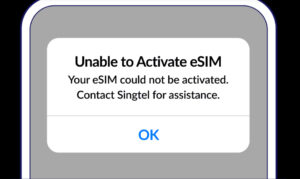
The rise of eSIM technology has made mobile connectivity faster and more convenient, especially for people who use digital services, remote work tools, or need multiple numbers. Yet, many users experience one recurring frustration: eSIM not activating.
If you are in Nigeria and your eSIM refuses to load, keeps showing an error, or gets stuck on the activation screen, you’re not alone. This guide explains the most common causes of eSIM activation problems, why they happen, and proven steps to fix eSIM issues in Nigeria.
Whether you’re using an eSIM for WhatsApp, social media verification, international calls, or a virtual number service like Nexar, this article gives you the clarity you need to get your eSIM working.
What Is an eSIM and Why Activation Problems Happen
An eSIM is a digital SIM embedded in your device. Unlike physical SIM cards, an eSIM doesn’t need swapping or inserting. Instead, you scan a QR code or enter an activation code from your provider.
However, because eSIMs depend on internet connectivity, device compatibility, and network support, activation issues are common. When you experience eSIM not activating, the root cause is usually one of the following:
Device not compatible with the eSIM profile
Network restrictions in Nigeria
Incorrect QR code or activation details
Internet connection too weak to download the eSIM
Old device software
Provider-side outage or delay
The good news is that every issue has a solution.
Common Reasons Your eSIM Is Not Activating in Nigeria
Below are the most frequent causes of eSIM not activating for Nigerian users, along with how to fix each problem.
1. Your Device Is Not eSIM-Compatible
Not all smartphones support eSIM technology. Even within the same brand, only specific models allow digital SIM activation.
How to Fix It:
Check your device compatibility on your provider’s site or the smartphone brand’s official page.
Update your device software.
If using a dual-SIM phone, confirm that the secondary SIM slot supports eSIM.
2. Weak or Unstable Internet Connection
Your eSIM can only download and activate using a strong internet connection. Slow Wi-Fi or mobile data interruptions can cause eSIM activation problems.
How to Fix It:
Switch to a stable Wi-Fi network before scanning your QR code.
Turn off VPN if active, as it can block eSIM provisioning servers.
Restart the activation process with stronger internet.
3. Incorrect or Expired QR Code
If your QR code has been used before, expired, or partially scanned, you’ll likely experience eSIM not activating.
How to Fix It:
Request a fresh QR code from your eSIM provider.
Ensure your camera scans the entire code without obstruction.
Avoid screenshots of low quality.
4. Your Device Software Is Out of Date
Outdated iOS or Android software can block new network profiles.
How to Fix It:
Go to Settings > Software Update and install the latest version.
Restart your phone and retry the eSIM activation.
Ensure your phone storage is not full, as it can prevent configuration downloads.
5. Network Provider Restrictions
Some network providers in Nigeria still have limited eSIM support. If your provider does not support eSIM for your device model, the activation will fail.
How to Fix It:
Confirm your network supports eSIM for your specific phone.
Switch to a provider with stronger eSIM infrastructure.
Contact customer support to check if your line has eSIM enabled.
6. Server Delays or Provider-Side Issues
Sometimes the problem isn’t your device at all. Provider servers can delay activation, especially during peak hours.
How to Fix It:
Wait 5–10 minutes and retry the activation.
Restart your phone and network settings.
Contact your eSIM provider to confirm if their servers are stable.
How to Fix eSIM Issues instantly: Full Step-by-Step Guide
If your eSIM not activating persists, follow this complete troubleshooting checklist:
Ensure your device supports eSIM.
Update to the latest Android or iOS version.
Connect to fast Wi-Fi instead of mobile data.
Turn off VPN before activation.
Scan a fresh QR code from your provider.
Restart your phone after each activation attempt.
Reset network settings (without deleting data).
Confirm your provider’s server is active.
Try activating at a different time if servers are congested.
Contact support for manual provisioning.
Following these steps resolves 90% of eSIM activation problems instantly.
How Nexar Helps You Fix eSIM Problems Faster
If you use eSIMs, virtual numbers, or verification services through Nexar, you get access to:
Immediate support when your eSIM is not activating
High-quality virtual numbers to avoid repeated OTP failures
Nexar ensures a smooth onboarding process so you spend less time troubleshooting and more time connecting.
FAQs About eSIM Not Activating
1. Why is my eSIM not activating on my device?
This usually happens due to compatibility issues, weak internet connection, expired QR code, outdated software, or provider restrictions.
2. How can I fix eSIM activation problems in Nigeria?
Ensure your device is compatible, update your software, use stable Wi-Fi, turn off VPN, and request a fresh QR code from your provider.
3. Why is my phone showing an eSIM activation error?
This error appears when your device cannot load the configuration file. Restart your phone, check your network, and retry the download.
4. Can outdated software cause eSIM activation issues?
Yes. Old iOS or Android software can block eSIM installation. Updating your device often resolves the problem immediately.
5. What should I do if my eSIM is still not activating after trying everything?
Contact your provider’s support team. They can re-provision your eSIM, issue a new QR code, or check for server-related delays.
6. Can I use Nexar eSIM to make local calls?
Nexar eSIM is for data only, so you can’t use it for traditional calls or SMS texts; it’s meant to give you internet access for browsing, maps, and apps when you travel. If you want to make calls or send messages, you can use internet-based apps like WhatsApp, FaceTime, or Skype, which work perfectly over the data connection provided by the eSIM

7. Can I use the eSIM of a foreign country in Nigeria?
No, you cannot. Nexar’s Data-Only eSIM is to help make internet access easy for the users. For example, if you travel to USA, instead of having to worry about getting a sim and connecting to the internet, Nexar eSim is available to make your internet access easy with just a few clicks.
In 2025, global eSIM adoption crossed 320 million active users, with Africa becoming one of the fastest-growing regions. Nigeria alone has seen a 65% increase in eSIM usage among travelers, remote workers, and online entrepreneurs who want faster, cheaper, and more flexible mobile connectivity.
As more Nigerians upgrade to Samsung devices that support eSIM, knowing how to activate eSIM on Samsung has become essential. Whether you’re preparing for travel, switching networks, or trying to avoid high roaming costs, eSIM technology makes everything smoother and far more convenient.
What You Need Before You Activate eSIM on Samsung
Before you begin, here’s what you must have ready:
Confirm your Samsung is eSIM-compatible
Not all Samsung phones support eSIM. If you’re not sure, check the updated list of Nigeria-ready Samsung eSIM devices. Before you activate an eSIM on Samsung, make sure your device actually supports eSIM. You can confirm this by checking Samsung’s official specs or using the global GSMA eSIM device checker
Make sure your phone is carrier-unlocked
If your Samsung is locked to a specific network (like AT&T or Verizon), eSIM activation won’t work.
Have your QR code on another screen
You cannot scan a QR code on the same device you’re activating.
Use a laptop, another phone, or print it out.
Ensure your internet connection is stable
Your Samsung must stay connected during installation.
Even a small interruption can cause failure.
Know that each QR code works only once
Once you scan it, you cannot reuse it or transfer it to another device.
Don’t delete your eSIM after activation
If you remove it, it becomes permanently unusable. This is a common mistake new users make, avoid it.
How to Activate eSIM on Samsung Using a QR Code
This is the easiest and most popular method.
Here’s how to activate eSIM on Samsung using the QR code from Nexar.
Step 1: Check your email for your QR code
Open the email we sent you and check for your QR code
For model-specific screenshots and the exact menu labels you’ll see while scanning the QR code, follow Samsung’s official guide on how to use an eSIM with your samsung phone.
Step 3: Scan your eSIM QR code
Your phone will open the camera.
Point it at the QR code on another screen or on paper.
Step 4: Follow the on-screen prompts
Tap Add or Confirm depending on your Samsung model.
Step 5: Wait for installation to complete
Don’t close the screen or turn off your internet.
Detailed Steps (QR Method)
Step 1:
Go to Settings → Connections
Step 2:
Tap SIM Card Manager
Step 3:
Tap Add mobile plan
Step 4:
Choose Scan carrier QR code
Step 5:
Tap Add/Confirm to save your eSIM profile.
How to Manually Activate eSIM on Samsung (No QR Code)
If your QR code isn’t scanning, or you prefer manual activation, this method is for you.
Perfect for Nigerians traveling for school, work, tourism, or japa.
Affordable and transparent pricing
No hidden charges. Just choose your destination and get your plan.
24/7 Nigerian customer support
You don’t talk to bots, real humans assist you.
Beginner-friendly installation
Even if it’s your first time using an eSIM, Nexar guides you step-by-step.
FAQs About Samsung eSIM Activation in Nigeria
1. Can all Samsung phones use eSIM?
No. Only specific models (S21 and newer + some A-series + Fold + Flip) support eSIM.
2. Do I need Wi-Fi to activate my eSIM on Samsung?
Yes. Your phone must stay connected during setup.
3. What if my QR code is not scanning?
Use the manual activation method instead.
4. Can I use the same QR code on two phones?
No. Each QR code works once only.
5. What happens if I remove my eSIM?
It becomes invalid permanently.
Always avoid deleting your eSIM.
6. Can I pay for Nexar eSIM in Naira?
Yes. Nexar is fully Nigeria-friendly.
Final Thoughts
It is easy to activate eSIM on Samsung in Nigeria as long as you follow the correct steps. Whether you choose QR or manual installation, your eSIM will be ready to use in minutes. To avoid installation errors, first confirm that your Samsung model supports eSIM. You can quickly verify this using our updated Nexar list of eSIM-compatible devices in Nigeria.
And with Nexar, Nigerians get fast delivery, affordable plans, and reliable support tailored to African travelers.
Ready to activate your Samsung eSIM?
Visit the Nexar website and get your eSIM instantly.
Gone are the days when you needed to swap SIM cards or visit a store to change networks. With eSIM technology, staying connected has never been easier. An eSIM (embedded SIM) lets you activate mobile plans digitally, right from your device, no plastic card, no stress.
In Nigeria, the demand for eSIM compatible devices has grown rapidly, especially among remote workers, digital creators, and frequent travelers who want reliable connectivity across borders. Whether you’re using an iPhone, Samsung Galaxy, Google Pixel, or even a smartwatch, eSIM-supported devices help you manage your mobile experience with more freedom and flexibility.
In this guide, you’ll find the latest list of phones that support eSIM in Nigeria, plus compatible tablets, laptops, and smartwatches. You’ll also learn how to check if your device supports eSIM and how to activate your Nexar eSIM in just a few minutes.
1. eSIM Compatible Phones in Nigeria
Here’s a complete breakdown of phones that support eSIM in Nigeria, organized by brand.
1.1 Apple eSIM Phones
If you use an iPhone, chances are high that your device supports eSIM. Here’s the full list of Apple eSIM compatible devices:
iPhone 16, 16 Plus, 16 Pro, 16 Pro Max
iPhone 15, 15 Plus, 15 Pro, 15 Pro Max
iPhone 14, 14 Plus, 14 Pro, 14 Pro Max
iPhone 13, 13 Pro, 13 Pro Max, 13 Mini
iPhone 12, 12 Mini, 12 Pro, 12 Pro Max
iPhone 11, 11 Pro, 11 Pro Max
iPhone XS, XS Max, XR
iPhone SE (2020), iPhone SE (2022)
Note:
iPhones from Mainland China do not support eSIM.
Hong Kong and Macao versions (except iPhone 13 mini, 12 mini, SE 2020, and XS) do not support eSIM.
1.2 Samsung eSIM Phones
Samsung has one of the widest ranges of eSIM supported devices in Nigeria.
Samsung Galaxy S24, S24+, S24 Ultra
Samsung Galaxy S23, S23+, S23 Ultra
Samsung Galaxy S22, S22+, S22 Ultra
Samsung Galaxy S21, S21+, S21 Ultra
Samsung Galaxy S20, S20+
Samsung Galaxy Note 20, Note 20 Ultra
Samsung Galaxy Z Flip 3, 4, 5
Samsung Galaxy Z Fold 2, 3, 4, 5
Note:
Some Samsung devices from Hong Kong or North America may not support eSIM.
For the S21 series, One UI 4 updates can enable eSIM functionality in some regions.
1.3 Google Pixel eSIM Phones
Google’s Pixel phones are among the earliest adopters of eSIM. Here are the supported models:
Google Pixel 9, 9 Pro, 9 Pro Fold
Google Pixel 8, 8 Pro
Google Pixel 7, 7 Pro
Google Pixel 6, 6a, 6 Pro
Google Pixel 5
Google Pixel 4, 4a, 4 XL
Google Pixel 3, 3a, 3 XL
Note:
Pixel phones from certain regions (like Japan, Taiwan, and Australia) may not support eSIM, so double-check your model before purchase.
1.4 Other Phones That Support eSIM
Several other brands have introduced eSIM compatible devices as well:
Yes, even your smartwatch can use an eSIM! These devices allow you to stay connected without needing your phone nearby.
2.1 Apple Watches
Apple Watch Series 3–9
Apple Watch Ultra, Ultra 2
Apple Watch SE (1st & 2nd Gen)2.2
2.2 Samsung Smartwatches
Samsung Gear S2 Classic 3G
Samsung Gear S3 Frontier LTE
Samsung Galaxy Watch LTE
Samsung Galaxy Watch Active2 4G
3. eSIM Compatible Tablets
Tablets are increasingly being built with eSIM support, allowing you to use data without Wi-Fi.
3.1 Apple iPads
iPad Pro 11” (1st Gen or later)
iPad Pro 12.9” (3rd Gen or later)
iPad Air (3rd Gen or later)
iPad (7th Gen or later)
iPad mini (5th Gen or later)
3.2 Samsung Galaxy Tabs
Galaxy Tab S9, S9+, S9 Ultra
Galaxy Tab S9 FE, S9 FE+
3.3 Microsoft Surface Tablets
Microsoft Surface Pro X
Microsoft Surface Go 2–3
Microsoft Surface Pro 7+
4. eSIM Compatible Laptops
If you work remotely or travel frequently, eSIM laptops can keep you connected on the go, no hotspot needed.
Acer
Acer Swift 3, Swift 7
Acer TravelMate P2, P6
ASUS
• ASUS NovaGo TP370QL
• ASUS VivoBook Flip 14
Dell
• Dell Latitude 7210, 7310, 9410, 9510
HP
• HP EliteBook G5, ProBook G5, ZBook G5
• HP Spectre Folio 13
Lenovo
• Lenovo ThinkPad X1 Carbon, X1 Nano
• Lenovo Yoga C630, Flex 5G
How to Check if Your Phone Supports eSIM
It’s super easy to check whether your phone is eSIM-compatible and unlocked. Here’s how to do it:
On iPhones
Go to Settings > General > About.
Scroll down to Carrier Lock: it should say “No SIM restrictions.”
Scroll to Available SIM: if you see an IMEI number, your phone supports eSIM.
On Android (Samsung, etc.)
Go to Settings > Connections > SIM Manager.
If you see an “Add eSIM” option, your phone supports eSIM.
Once you confirm your device is compatible, you can follow this guide on how to set up an eSIM on your phone using Nexar
How to Activate an eSIM on Nexar
Once you’ve confirmed your device supports eSIM, getting started with Nexar takes just a few steps:
Visit the Nexar website on any browser of your choice.
Sign in or create your account.
Choose your eSIM plan based on your location or data needs.
Scan the QR code or install eSIM manually within the app.
Activate, and you’re ready to browse, stream, and call seamlessly.
Nexar eSIMs work instantly and are designed to give you reliable data and call support, especially across multiple African and global destinations.
Why Choose Nexar for Your eSIM Needs
Choosing the right eSIM provider can feel confusing, especially with so many platforms popping up online. But here’s the truth: if you want something simple, reliable, and built specifically for Nigerians, Nexar makes the entire experience easier.
Here’s why:
You get instant activation
With Nexar, you don’t have to deal with delays or complicated setups. Once your device is confirmed to be one of the eSIM compatible devices, you simply scan your QR code and boom you’re connected. It’s fast, clean, and made for people who don’t want wahala.
Nexar works perfectly on top eSIM supported devices
Whether you use an iPhone, Samsung, Google Pixel, or another model, Nexar’s eSIM integrates smoothly. You don’t need to be “techy”, we’ve already optimized everything to work with the most common phones that support eSIM.
You can manage everything from the Nexar app
No more queueing at a store or waiting for customer care. Everything, from buying your plan, viewing usage, topping up, or switching packages happens right inside the app. It gives you full control.
It’s built for Africans, so your challenges were considered
A lot of global eSIM providers don’t really understand the African market but Nexar does. Whether it’s flexible pricing, easy payment options, or support that doesn’t make you wait 48 hours for a reply, Nexar is designed with you in mind.
You get reliable connection whenever you travel
If you’re traveling out of Nigeria and your device is one of the eSIM supported phones, Nexar makes staying connected so easy.
No airport SIM stress, no overpriced roaming. Just switch plans in the app and enjoy.
Customer support that actually responds
Everyone knows how frustrating it is when support ignores you. With Nexar, you can always reach someone quickly, especially for things like activation help, device checks, or troubleshooting.
Final Thoughts
The future of connectivity in Nigeria is 100% digital and eSIMs are leading that evolution. With more eSIM compatible devices being released every year, switching to Nexar means you’ll never have to worry about physical SIM swaps or network restrictions again.
Stay connected. Stay flexible.
Visit the Nexar website today and activate your eSIM in minutes.