Category: Tutorials

  • How to Renew Your GOtv Subscription with Nexar

    How to Renew Your GOtv Subscription with Nexar

    A GOtv subscription always seems to expire at the most inconvenient time. Maybe you’re about to watch a match. Maybe your favourite show is starting. Maybe the kids just settled down to watch cartoons. Whatever the situation is, the screen suddenly goes blank and you see the “E16” error.

    At that moment, your first thought is how to renew your GOtv subscription quickly. Most people start searching for agents, looking for shops that are still open, or calling someone to help them make the payment. This often leads to delays, long queues, and unnecessary stress.

    Renewing manually through physical agents also means dealing with limited working hours, extra charges, or waiting for someone to “help you fix it.” That is why more users are turning to online platforms. It’s faster, cleaner, available at any time, and gives you control over the entire process.

    If you’re trying to figure out where to renew your GOtv subscription in Nigeria without stress, this guide shows you the best options and explains why Nexar is one of the most efficient ways to do it.
    Renew Your GOtv Subscription with Nexar

    Where to Renew Your GOtv Subscription in Nigeria

    You can renew your GOtv subscription from several places in Nigeria. The main options people use are:

    1. Physical GOtv Agents
      These are shops and kiosks where agents process renewals manually. They work, but you may face queues, delays, closing hours, or extra charges.
    2. Bank Mobile Apps and USSD
      Some banks allow you to renew your GOtv subscription through their app or USSD. It’s digital, but the process can sometimes be slow or require several steps.
    3. Nexar
      This is the best and most reliable option if you want to renew your GOtv subscription instantly.
      Nexar is fast, simple, and built for seamless digital payments. It processes renewals in minutes, works round the clock, and gives you a clean dashboard where you can manage everything without waiting for any agent or support. If you want a smooth renewal process without stress, Nexar should be your first choice.

    How to Renew Your GOtv Subscription with Nexar

    You can pay GOtv bills online directly through your Nexar dashboard. The process is designed for convenience, even if it’s your first time using the platform.
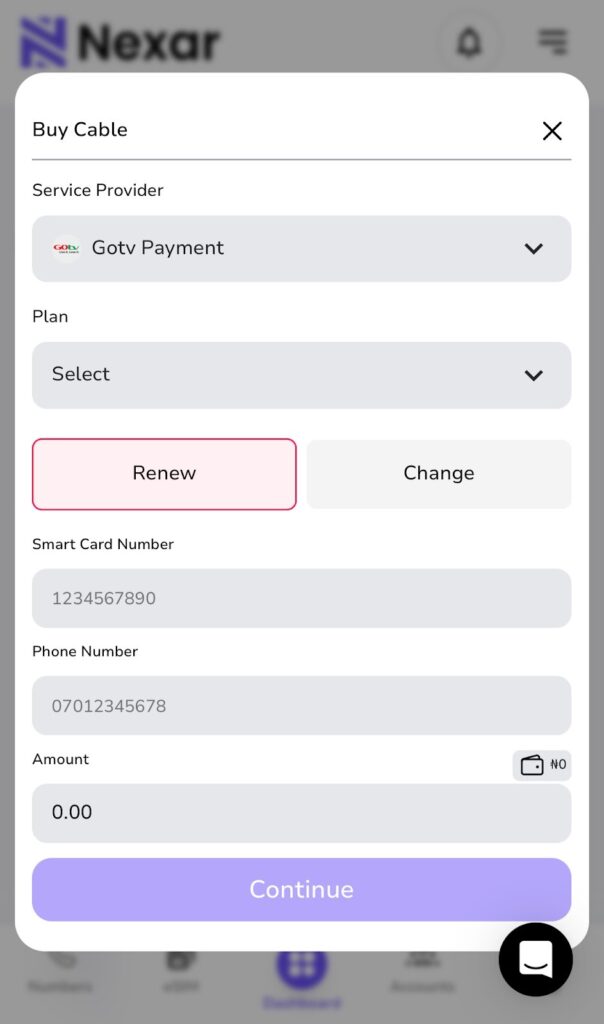
    1. Visit https://app.shawnsms.com/user/dashboard
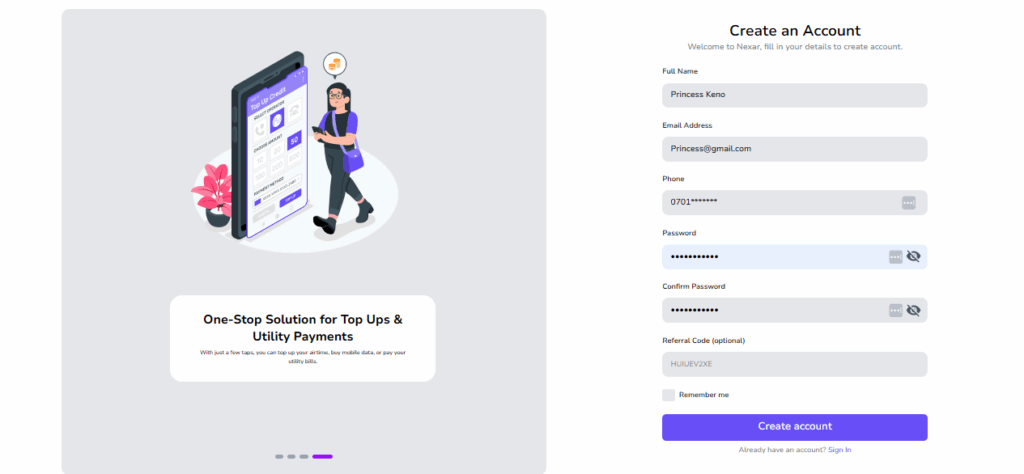
    2. Log in or create an account.
    3. Tap “Buy Cable” and select GOtv.
    4. Enter your IUC or smartcard number.
    5. Choose your desired bouquet.
    6. Complete your payment through your Nexar wallet, debit card, or bank transfer.

    With these steps, your GOtv will be renewed instantly, and you won’t need to clear error codes manually.

    Why You Should Renew Your GOtv Subscription with Nexar

    1. Fast Processing

    Nexar processes GOtv renewals within minutes. Once your payment goes through, your channels come back almost instantly. This helps you avoid long delays or waiting for someone to assist you.

    2. 24/7 Access

    You can renew your GOtv subscription at any time. Early morning, late night, weekends — Nexar works around the clock, so you’re not limited by an agent’s working hours.

    3. Secure and Transparent Transactions

    Every payment generates an automatic receipt. You can always see what you paid for, when you paid, and track all renewals from your dashboard.

    4. Easy-to-Use Dashboard

    Nexar is beginner-friendly. The layout is simple and clear, so even first-time users can complete a renewal without confusion.

    Important Tips for a Smooth GOtv Renewal

    • Keep your decoder turned on: This helps your renewal reflect immediately.
    • Double-check your IUC number: Mistyped numbers may delay activation.
    • Save your transaction receipt: Nexar automatically generates receipts for every successful renewal.
    • Check your balance regularly: Send “BALANCE [your IUC number]” by SMS to 4688 to see your expiry date.
    • Avoid last-minute payments: Renew your GOtv subscription at least a few hours before it expires to prevent service interruptions.

    Thousands of users now prefer to renew GOtv with Nexar because it’s reliable, instant, and simple. The platform combines bill payment, wallet funding, and cable subscription management in one place. Whether you are trying to pay GOtv bills online or renew multiple accounts for family and friends, Nexar handles it all securely.

    With each renewal, Nexar helps you stay connected to your entertainment without the usual stress or delays. No more calling agents or waiting hours for confirmation — just a few clicks, and your GOtv is active again.

    Final Thoughts

    The next time your screen goes blank with the “E16” error, don’t panic. Simply log in to Nexar, renew your GOtv subscription, and your channels will be back in minutes.

    You can always access your account here.

    Nexar’s mission is to make everyday payments — from airtime to TV subscriptions — easier, faster, and accessible to everyone. So go ahead, stay connected, and enjoy uninterrupted entertainment with Nexar.
  • Earn a Lifetime 5% Bonus with Nexar’s Referral Program

    If you’re anything like me, you love finding ways to earn rewards without extra effort. Well, with Nexar, there’s a simple way to do just that and it can keep paying off for life. With Nexar’s referral program, every time someone you invite joins and makes a deposit, you earn a 5% bonus on their deposits. And the best part? It’s for life.

    Here’s how to get started and make the most of it:

    1. Sign in to Nexar

    The first step is easy. Log in to your Nexar account on the website or the app. If you don’t have an account yet, signing up is quick and straightforward. Once you’re in, you’re ready to start sharing and earning.

    2. Find Your Referral Code

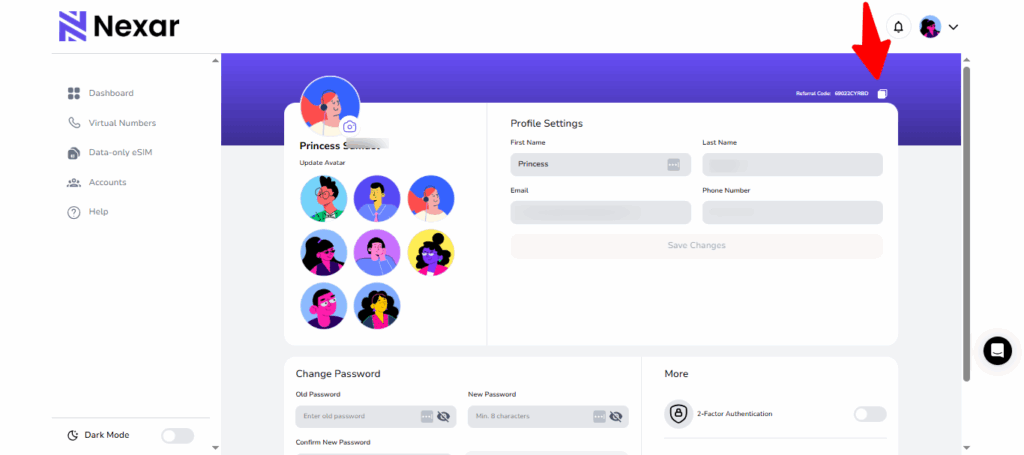
    Your referral code is unique to you.

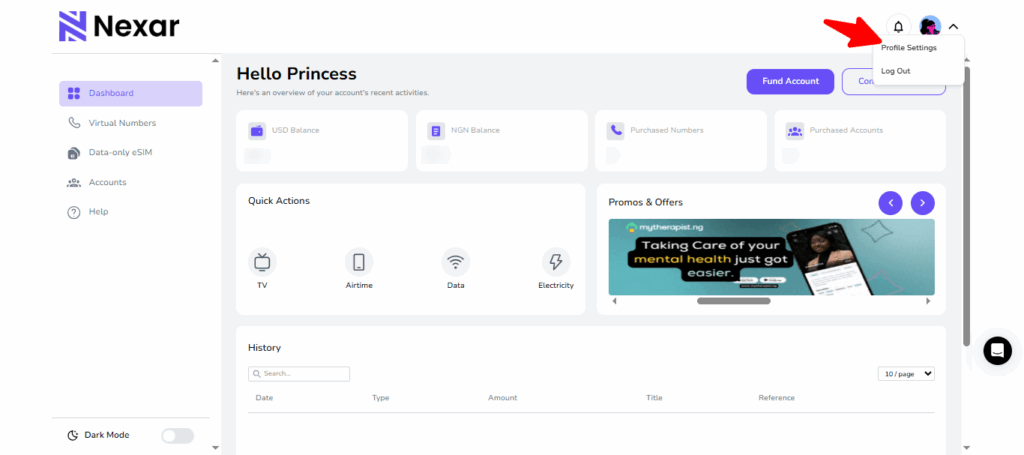
    Tap on your profile settings, and you’ll see your personal code.

    Copy it . This is the key to earning bonuses whenever your friends join.

    3. Share Your Code

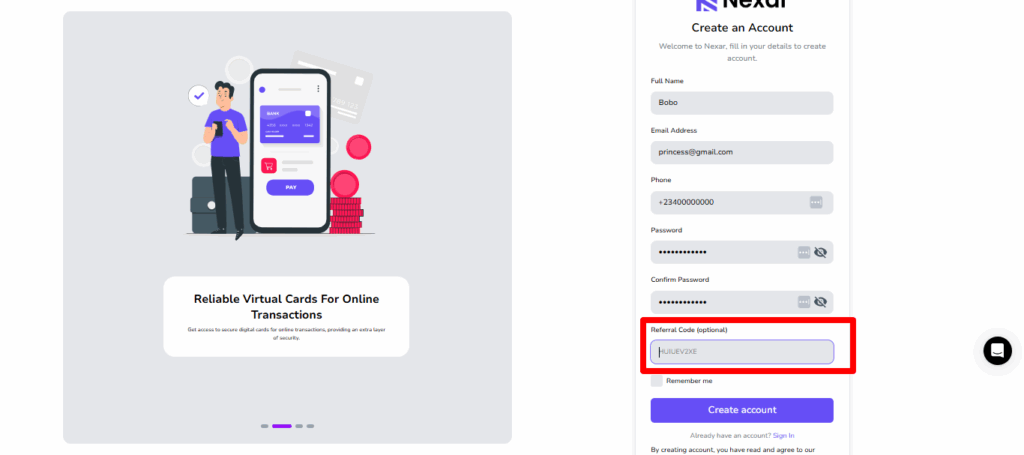
    Now for the fun part. Share your code with friends, family, or anyone who could use a Nexar Virtual Number or any of Nexar’s other services. You can send it via social media, email, or even in a chat. The easier you make it for people to use your code, the faster your bonuses start stacking up.

    Nexar's referral program

    4. Earn for Life

    Every time someone signs up using your referral code and makes a deposit, you earn a 5% bonus on every deposit they make, forever. That means the more friends you refer, the more passive rewards you collect over time.

    Tips to Maximize Your Rewards

    • Share your code with people who are likely to use Nexar regularly.
    • Post your referral code in places where people are actively looking for services like virtual numbers, eSIMs, Giftcards and Social Media Boosting.
    • Encourage your friends to deposit and start using Nexar.

    Nexar’s referral program isn’t just a one-time bonus. It’s a way to earn consistently while helping others discover a tool that’s genuinely useful. The process is simple, the rewards are real, and the impact can last a lifetime.

    So don’t wait. Copy your referral code, share it today, and start stacking those bonuses.

  • How to Pay Bills in Nigeria Instantly on Nexar’s Website and App

    How to Pay Bills in Nigeria Instantly on Nexar’s Website and App

    Paying bills in Nigeria has never been easier —especially with Nexar, the all-in-one digital services platform that helps you handle everything from electricity payments to DSTV subscriptions, airtime, and data, all in one place.

    Whether you’re at home, in the office, or abroad, Nexar lets you pay bills in Nigeria quickly and securely without the stress of queues or failed transactions. In this guide, we’ll walk you through exactly how to use Nexar’s website and mobile app to manage your recurring payments effortlessly.

    Pay Bills in Nigeria

    ⚡ Why Use Nexar to Pay Bills in Nigeria?

    Traditional payment methods can be frustrating — unstable banking apps, delayed confirmation, or even failed payments. Nexar solves these problems by offering a fast, transparent, and wallet-based solution that lets you pay all your bills from one account.

    Here’s what makes Nexar the smarter way to pay bills in Nigeria:

    • Instant Processing: Payments reflect immediately on the provider’s side — no long wait times.
    • Secure Transactions: Every payment goes through your Nexar wallet, keeping your bank details safe.
    • Multiple Services: You can handle everything from electricity bills, DSTV subscriptions, airtime, and data in one dashboard.
    • 24/7 Access: Nexar’s website and app are available anytime, anywhere — even on weekends and public holidays.

    Step-by-Step: How to Pay Bills in Nigeria on Nexar

    Step 1: Create or Log in to Your Nexar Account

    Visit nexarhq.com or open the Nexar app.
    Sign in with your registered email or phone number, or create a new account if you’re a first-time user.

    Step 2: Fund Your Wallet

    Before you can make any payment, you’ll need to fund your Nexar wallet.
    You can do this easily using:

    Once your wallet is funded, you can pay any bill instantly.

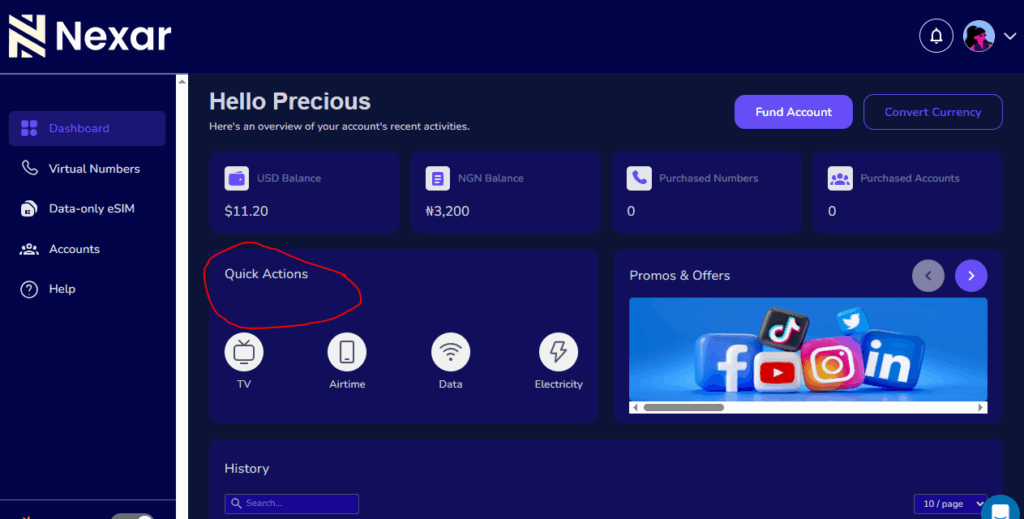
    Step 3: Go to the “Quick Actions” Section

    From your dashboard, select “Quick Actions”. You’ll find a list of categories including:

    • Electricity Bills
    • TV
    • Airtime & Data Top-Up

    Choose the service you want to pay for.

    Step 4: Enter Your Payment Details

    Fill in the required information:

    • For electricity: choose your DISCO provider, input your meter number, and select the amount.
    • For DSTV: enter your smart card number and subscription package.
    • For airtime and data: simply choose your network provider and desired plan.

    Double-check your details before confirming payment.

    Step 5: Confirm and Complete Your Payment

    Click “Pay Now” — Nexar will process your payment instantly.
    You’ll receive both an on-screen confirmation and an email receipt showing your transaction details.

    Congratulations! You’ve just learned how to pay bills in Nigeria the fast and easy way using Nexar.

    Popular Bills You Can Pay on Nexar

    1. Pay Electricity Bills Online

    No more standing in queues or dealing with disconnections. Nexar lets you pay electricity bills online instantly for major providers like Ikeja Electric, Eko Electric, Abuja Electric, Enugu Electric, and more. Just enter your meter details, choose prepaid or postpaid, and your power is restored within minutes.

    1. Pay DSTV Subscription in Nigeria

    Renew your DSTV or GOTV package effortlessly with Nexar. You can pay DSTV subscriptions in Nigeria for any plan — from Compact to Premium — and get instant activation without calling customer service.

    1. Buy Airtime and Data in Nigeria

    Need to stay connected? With Nexar, you can buy airtime and data in Nigeria for MTN, Airtel, Glo, and 9mobile at unbeatable rates. Whether it’s a quick recharge for yourself or a top-up for friends and family, it takes just a few taps.

    Additional Benefits of Paying Bills Through Nexar

    1. All-in-One Dashboard: Manage electricity, cable, internet, and mobile top-ups in one place.
    2. Instant Wallet Deductions: No card errors or bank delays — just smooth, direct payments.
    3. Real-Time Notifications: Get instant receipts and transaction tracking inside your account.
    4. Cross-Border Access: You can fund your wallet and pay bills in Nigeria even while living abroad.
    5. Excellent Customer Support: Nexar’s team is always available to help with failed payments, account verification, or refund issues.

     Expert Tips When Using Nexar to Pay Bills in Nigeria

    • Verify your details: Always double-check meter numbers and smart card IDs before confirming payment.
    • Keep your wallet funded: Top up your Nexar wallet ahead of time to avoid service interruptions.
    • Save your favorites: Nexar lets you save biller profiles for faster future payments.
    • Monitor your history: Use your transaction log to track all payments and download receipts anytime.
    • Contact support early: If you notice any delay, Nexar’s support team is responsive and ready to help 24/7.

    Frequently Asked Questions (FAQs)

    1. How can I pay bills in Nigeria using Nexar?

    You can easily pay bills in Nigeria by logging into your Nexar account via nexarhq.com or the Nexar mobile app. Once logged in, go to the “Bills Payment” section, choose your preferred service (electricity, DSTV, airtime, or data), enter the required details, and confirm payment. Your transaction will be processed instantly, and a digital receipt will be sent to your email.

    2. Can I pay electricity bills online through Nexar?

    Yes! Nexar allows you to pay electricity bills online for major Nigerian electricity distribution companies (DISCOs) such as Ikeja Electric, Eko Electric, Abuja Electric, and more. Simply select your provider, input your meter number, choose prepaid or postpaid, and complete the transaction — power is restored within minutes.

    3. Is it possible to pay for my DSTV subscription in Nigeria with Nexar?

    Absolutely. Nexar makes it easy to pay DSTV subscriptions in Nigeria or renew GOTV and Startimes packages. Just enter your smart card number, select your preferred bouquet, and confirm payment. Your subscription is renewed instantly, saving you the stress of visiting physical payment outlets or dealing with long queues.

    4. Can I buy airtime and data in Nigeria through Nexar?

    Yes, Nexar supports airtime and data purchases in Nigeria for all major networks — MTN, Glo, Airtel, and 9mobile. You can buy for yourself or for others directly from your Nexar wallet, with instant top-up confirmation and the best rates. It’s fast, secure, and available 24/7.

    5. What payment methods can I use to fund my Nexar wallet?

    You can fund your Nexar wallet using several convenient options, including bank transfer, cryptocurrency (USDT or Bitcoin), and Mobile Money (Momo) (coming soon). Once your wallet is funded, you can use it to pay bills in Nigeria or access any of Nexar’s digital services without worrying about failed transactions or card errors.

    Why Nexar Is the Smartest Way to Pay Bills in Nigeria

    Nexar isn’t just another online payment platform because It is built to make everyday life easier for Nigerians and users abroad. With Nexar, you can pay bills in Nigeria, buy airtime, recharge data, fund your wallet with crypto, and even access social media marketing tools — all in one secure account.

    Every transaction is fast, transparent, and verified, giving you peace of mind with every payment. Whether you’re renewing your DSTV subscription, paying electricity bills online, or topping up data, Nexar helps you do it smarter, faster, and more securely.

    👉 Ready to simplify your digital life?
    Visit nexarhq.com today and experience the easiest way to pay bills in Nigeria — anytime, anywhere.

  • How to Fund Your Nexar Wallet for Non-Nigerians (Crypto and MoMo)

    How to Fund Your Nexar Wallet for Non-Nigerians (Crypto and MoMo)

    If you’ve ever tried to pay for a product or service outside your country, you know that sinking feeling when the payment fails and you’re left wondering: “Wait, why isn’t my card working? Funding platforms can feel like a puzzle when you’re in a different country. We know how frustrating that feels and that is why we have made funding easier on Nexar.

    Funding your Nexar wallet is the first step to enjoying seamless access to all of Nexar’s digital services — from purchasing virtual numbers to buying gift cards or running social media promotions. If you’re a non-Nigerian user, this guide walks you through the simplest and most secure ways to fund your wallet, including USDT, Crypto payments and Mobile Money (Momo) options. Whether you’re in Accra, Kampala, or anywhere outside Nigeria, funding your Nexar wallet is straightforward and secure. Let’s get into it.

    Why Do You Need to Fund your Nexar Wallet?

    First of all, why do you need to fund your Nexar wallet?

    The answer is simple. Your Nexar wallet serves as your digital balance across all services. Once funded, you can instantly:

    • Buy gift cards from global brands.
    • Get virtual numbers for verification.
    • Buy e-SIMs for global connectivity.
    • Gain thousands of followers using our boost feature.
    • Recharge airtime or data (VTU).

    It saves time, reduces payment errors, and lets you transact easily without worrying about exchange rates or international restrictions.

    How to Fund Your Nexar Wallet

    Option 1: Fund with USDT  (Available Now)

    For non-Nigerian users, USDT is the easiest method. Here’s how to do it:

    1. Log into your Nexar account
      Visit nexarhq.com and sign in using your registered email or phone number.
    2. Navigate to “Wallet”
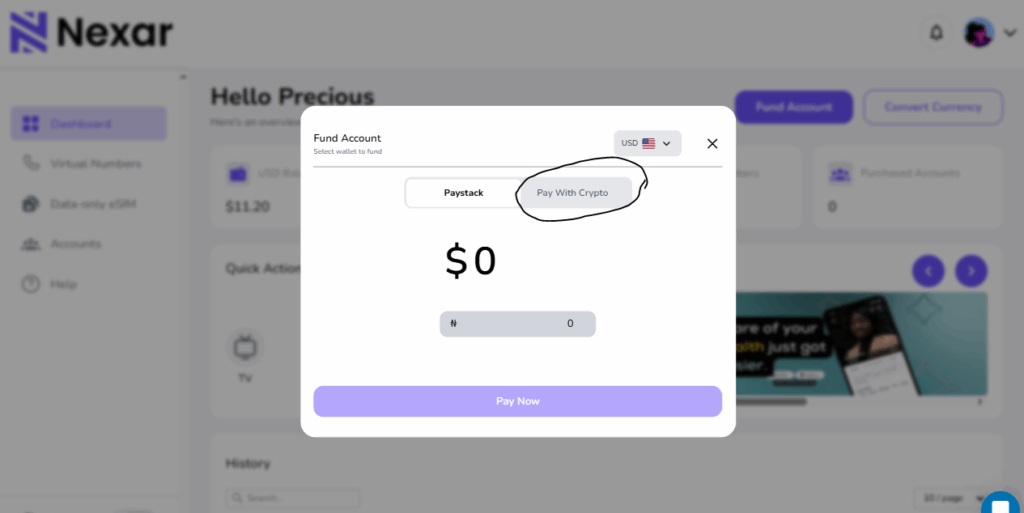
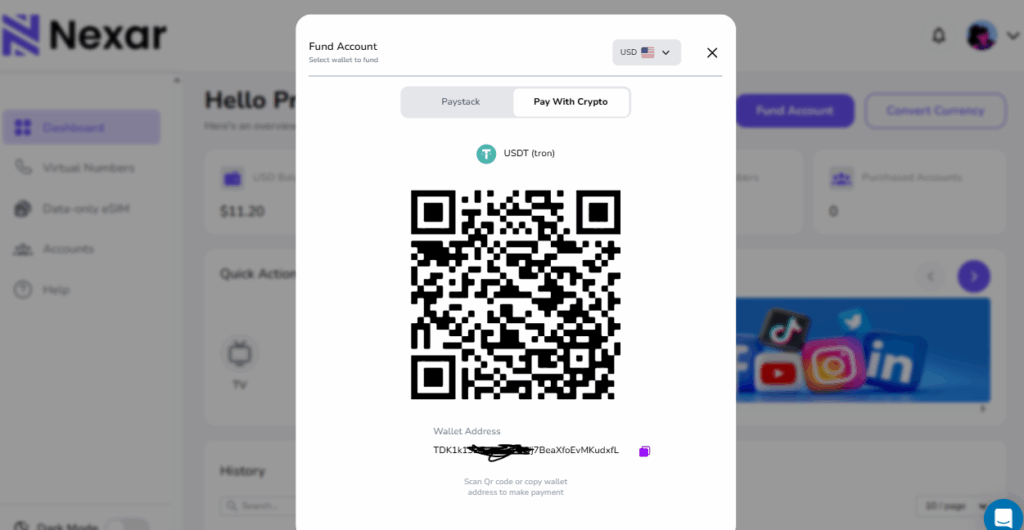
      On your dashboard, click WalletFund Wallet.
    3. Select “Crypto” as your payment method
      Nexar currently supports popular cryptocurrencies like USDT (TRC20)
    Fund Your Nexar Wallet

    4. Scan Code or Copy the wallet address displayed
    Each transaction generates a unique QR code and wallet address. Scan or Copy it carefully to avoid errors.

    1. Send your crypto from your wallet or exchange
      Use your preferred wallet (e.g., Binance, Trust Wallet, OKX) to send the specified amount.
    2. Wait for blockchain confirmation
      Transactions typically confirm within 5–10 minutes. Once verified, your Nexar wallet will reflect the funded amount automatically. In the unlikely event of a delay, your bank will automatically refund your payment within 24 hours.

    Pro Tip: Always send the exact amount displayed on your funding page to avoid network underpayment issues.

    Need a visual guide on how to fund your account? Watch this video>>

    Option 2: Fund with Mobile Money (Momo) – Coming Soon

    For users in Ghana, Uganda, or other African regions, Nexar will soon support Momo payments — making it even easier to fund your wallet in local  currency. You’ll simply:

    • Select Momo under “Fund Wallet”
    • Enter your registered mobile number
    • Confirm payment with your Momo PIN
    • Receive instant wallet credit

    We’ll announce once this feature is live — stay tuned!

    Frequently Asked Questions (FAQs)

    1. Can I fund my Nexar wallet from outside Nigeria?
      Yes! Non-Nigerian users can fund their Nexar wallets easily through cryptocurrency payments such as USDT (TRC20) or Bitcoin. Nexar is also adding Mobile Money (Momo) options soon for even greater convenience.
    2. How long does it take for crypto payments to reflect in my Nexar wallet?
      Most crypto transactions reflect within 5–10 minutes, depending on blockchain confirmation times. If it takes longer, verify your transaction hash (TXID) or contact Nexar support.
    3. Is there a minimum amount required to fund my wallet?
      Yes, there’s usually a small minimum limit (e.g., $5 in crypto) to cover network fees. The exact minimum is displayed on your Nexar “Fund Wallet” page before you confirm the transaction.
    4. What should I do if I send the wrong amount or to the wrong address?
      Double-check all details before sending. If you accidentally send the wrong amount, reach out to Nexar support immediately with your TXID and transaction details for assistance.
    5. Will Nexar support other international payment methods in the future?
      Yes! Nexar plans to introduce more global funding methods such as credit/debit cards and Momo options to make wallet top-ups easier for international users.

    Common Funding Issues and How to Fix Them

    • Funding delay: Check the blockchain explorer if using crypto. Network congestion may cause slight delays.
    • Wrong amount sent: Contact Nexar Support immediately with your transaction hash (TXID).
    • Unverified wallet: Ensure your Nexar profile details are accurate before making your first deposit.

    Why Choose Nexar?

    Nexar simplifies digital transactions for users worldwide — combining speed, reliability, and multiple funding options in one place. Whether you’re buying gift cards, managing SMM campaigns, or using VTU services, your wallet makes every process smooth and secure.

    Final Tip: Bookmark your Nexar wallet dashboard. Once funded, you can explore all Nexar services without worrying about payment interruptions.


    Found this guide helpful? Start funding your Nexar Now.


  • How to Buy iTunes Gift Card in Nigeria: A Simple Guide

    If you’ve ever tried subscribing to Apple Music, buying apps, or getting extra iCloud storage with your Nigerian debit card, you probably know how frustrating it can be. Sometimes the payment goes through, sometimes it doesn’t. Sometimes your bank blocks it for “security reasons.”

    International payments from Nigeria can be tricky. Your card might work perfectly for local transactions but struggle with foreign payments. This isn’t really anyone’s fault. It’s just how international banking works, especially when different payment systems try to communicate with each other.

    That’s why many people turn to iTunes gift cards. It’s the easiest, most reliable way to pay for Apple services without dealing with payment issues.

    In this article, you will learn how to buy iTunes gift card in Nigeria instantly and discover the best options for giftcards purchases.

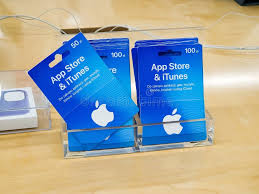
    iTunes Gift Card in Nigeria

    Why You Need an iTunes Gift Card in Nigeria

    Here’s the thing about Apple services. They’re amazing, but paying for them from Nigeria? That’s where things get complicated.

    Your Nigerian debit card works fine for shopping at the mall or paying bills online. But when you try to subscribe to Apple Music or buy an app, your payment either gets declined or you start dealing with confusing bank messages.

    Using an iTunes gift card in Nigeria solves this problem completely. You buy the card once, redeem it on your Apple ID, and then you can spend that credit on anything Apple offers. No more payment failures and no more international transaction fees.

    The iTunes gift card in Nigeria makes your life easier by:

    • Letting you top up your Apple ID directly
    • Making app purchases smooth and instant
    • Giving you a secure way to pay without sharing card details
    • Working as the perfect digital gift for friends and family

    With just one card, you skip all the payment drama and get straight to enjoying Apple services.

    Where to Buy iTunes Gift Card in Nigeria

    There are several online platforms selling iTunes gift cards, but you want to choose carefully. Here are the most trusted options:

    • Nexar – A platform built for digital services in Africa. You can buy iTunes gift cards instantly, pay in naira, and get your code delivered immediately. Plus we have 24/7 support available to help you if you encounter any difficulties.
    • Codashop Nigeria – This is a platform that is known for gaming top-ups and selling Apple vouchers.
    • Nosh App – This is a platform that offers quick digital purchases with decent delivery times.

    Among these options, Nexar stands out because it’s designed specifically for African users, offers competitive rates, and delivers codes instantly.

    Why Nexar is Different

    Here’s what makes Nexar the smarter choice:

    • Instant delivery – Your gift card code arrives immediately after payment. Nexar is known for it’s swift delivery. You don’t need to wait around.
    • Pay in your currency – No need to worry about exchange rates or conversion headaches. If you are in Nigeria, you can pay in Naira. Our platform has a currency conversion feature.
    • Built for Africans – Nexar was built for Africans in mind so we understand the unique payment challenges Africans face.
    • 24/7 support – You have access to support from real people who can help you if anything goes wrong.
    • Fair pricing – Competitive rates without any hidden charges.

    With Nexar, you get convenience, speed, and peace of mind all in one package.

    How to Buy iTunes Gift Card in Nigeria with Nexar

    Buying an iTunes Gift Card on Nexar app is very straightforward:

    • Visit nexar.com and create your account if you don’t have one yet.
    • Go to the Gift Cards section and select iTunes gift card.
    • Choose your amount – $25, $50, $100, or whatever denomination you need.
    • Pay securely using naira or USD. Multiple payment options available.
    • Get your code instantly via email or check your Nexar account dashboard.

    That’s it. The whole thing takes about 5 minutes, and you’re ready to start buying apps, subscribing to services, or downloading music.

    Important Things to Know

    • Match your regions: Make sure your gift card region matches your Apple ID. If you have a US Apple ID, buy US gift cards. If you have a Nigerian Apple ID, get Nigerian cards.
    • Redeem safely: Always use official Apple apps or iTunes to redeem your codes. Never use random websites.
    • Avoid random sellers: Those people selling “cheap” gift cards on Instagram and Twitter? Most of them are scams. Stick to trusted platforms like Nexar.
    • Keep your codes private: Treat gift card codes like cash. Don’t share them or post screenshots online.

    Frequently Asked Questions (FAQs) About iTunes Gift Cards in Nigeria

    How much is a $100 iTunes gift card in Nigeria?

    It typically costs between ₦85,000 to ₦105,000 depending on current exchange rates. Nexar offers competitive and affordable pricing rate.

    Can I use a US iTunes gift card with a Nigerian Apple ID?

    No. Gift cards are region-locked. Your card region must match your Apple ID region for everything to work.

    What if my gift card doesn’t work?

    Contact Nexar support right away. They have a good track record of resolving issues quickly and will replace faulty codes.

    Is Apple gift card available in Nigeria?

    Nexar makes it easy and secure to buy gift cards with naira, so yes, you can get them without any stress.

    Who Should Use iTunes Gift Cards?

    • Freelancers: Pay for productivity apps that help you work better.
    • Students: Subscribe to Apple Music and download educational apps without payment stress.
    • Gamers: Buy premium mobile games and in-app content for iOS gaming.
    • Music lovers: Build your digital music collection and maintain streaming subscriptions.
    • Parents: Give your kids controlled spending power for apps instead of linking your main card.
    • Anyone tired of payment failures: Skip the drama and pay the easy way.

    Final Thoughts

    If you’ve been wondering how to buy iTunes gift card in Nigeria, the answer is simple: Nexar. With instant delivery, secure payment options, and customer support that actually helps, getting your gift card has never been easier.

    International payments don’t have to be complicated. iTunes gift cards give you a straightforward way to access Apple services without fighting with banks or dealing with declined transactions.

    👉 Visit Nexar today to purchase your iTunes gift card in Nigeria and start enjoying Apple services without the stress.


    Need help with your purchase? Nexar’s support team is available 24/7 to assist you with fast, reliable service.

  • DStv Subscription Nigeria: How to Renew Online Easily with Nexar

    DStv Subscription Nigeria: How to Renew Online Easily with Nexar

    Renewing your DStv subscription Nigeria shouldn’t feel like a battle but for many people, it does. Long queues at payment centers, failed transactions, or waiting hours before your viewing is restored can be frustrating. Imagine missing a live football match or your favorite Nollywood series just because of payment delays.
    With Nexar, you don’t have to deal with those problems anymore. You can renew your DStv subscription online in Nigeria in just few minutes, securely and without hidden charges, all from your phone.

    Why DStv Subscription Nigeria Payments Can Be Stressful

    For most Nigerians, paying for DStv can come with challenges like:

    • Unnecessary queues: Payment shops close early and are often overcrowded.
    • Network failures: Bank apps and ATMs sometimes decline transactions.
    • Agent charges: Some agents add extra fees, making your subscription more expensive.
    • Slow processing: You might wait hours before your viewing is restored.
    • Inconvenience: Payments often have to be made during working hours, which clashes with busy schedules.

    These challenges make renewing your DStv subscription Nigeria harder than it needs to be. That’s why switching to Nexar is the smarter move.

    Common Problems Nigerians Face with DStv Subscription Payments

    Let’s look deeper at some issues Nexar solves for Nigerians:

    Failed Payments

    Many users complain about making payments but still seeing an “inactive” decoder. Nexar’s instant verification reduces this risk significantly.

    Agent Delays

    Using middlemen often means waiting hours before your payment reflects. Nexar connects you directly to DStv, cutting out the delay.

    Limited Payment Options

    Some platforms accept only debit cards, leaving out bank transfers or wallet options. Nexar gives you flexible choices.

    The same issues happen with GOtv too, which is why Nexar also makes it easy to renew your GOtv subscription online instantly. Some platforms accept only cards. Nexar lets you choose what works best for you; card, transfer, or wallet

    What You Need Before Renewing Your DStv Subscription Online

    Before you begin, make sure you have these ready:

    • DStv Smartcard/IUC Number → This is the unique number linked to your decoder. You can find it on the card inside your decoder or on your TV screen by pressing the “Menu” button.
    • Internet Access → A stable connection ensures smooth payment.
    • Nexar Account → This gives you access to quick, secure payments from your phone or computer.

    Once you have these, you’re ready to go.

    Step-by-Step Guide: How to Renew DStv Subscription Nigeria Using Nexar

    DStv Subscription Nigeria

    Wondering exactly how to renew a DStv subscription online in Nigeria? Here’s the simple process with Nexar:

    Step 1 – Log in to Nexar

    Open the Nexar app on your phone or visit the Nexar website. If you don’t have an account yet, it takes just a few minutes to sign up with your phone number or email.

    Step 2 – Select TV Bills

    On your Nexar dashboard, tap on “Pay Bills” and select TV Subscription. This option covers both DStv and GOtv payments.

    Step 3 – Enter Your DStv Details

    Type in your Smartcard/IUC number and confirm your details. Select the package you want to renew, such as Compact, Premium, Confam, or Yanga.

    If you’re unsure about packages, you can always check the latest plans on the DStv packages page.

    Step 4 – Make Payment

    Choose your preferred payment method — debit card, bank transfer, or Nexar wallet. With Nexar, all payments are processed securely using bank-level encryption.

    Step 5 – Enjoy Seamless Viewing

    After payment, your subscription renews instantly. Your channels come back within minutes, so you don’t have to miss out on the fun.

    Why Choose Nexar for Your DStv Subscription Nigeria Renewal?

    Unlike other methods, Nexar was designed with Nigerians in mind. Here’s why it’s the best platform for your DStv subscription Nigeria payments:

    • Instant Renewal – Get reconnected in minutes.
    • Secure Payments – Every transaction is protected.
    • No Hidden Fees – You only pay for your package.
    • Multiple Payment Options – Pay your way.
    • 24/7 Access – Anytime, anywhere in Nigeria.

    With Nexar, you’re always in control of your DStv subscription Nigeria.Whether you’re a freelancer working late at night, or a parent trying to keep the kids entertained, Nexar makes renewing your DStv subscription stress free.

    FAQs About DStv Subscription in Nigeria

    • Can I renew my DStv subscription online in Nigeria?

    Yes. With Nexar, you can renew quickly and securely without leaving your home.

    • How do I find my DStv Smartcard number?

    Check the card inserted in your decoder, or press the “Menu” button on your remote to see it on your TV screen.

    • How long does it take after payment?

    With Nexar, reconnection usually happens within minutes.

    • Can I pay for someone else’s DStv?

    Yes, as long as you have their Smartcard/IUC number.

    Absolutely. Nexar uses bank-level encryption and verified payment channels.

    Quick Takeaways

    • You can renew your DStv subscription Nigeria online without stress.
    • All you need is your Smartcard/IUC number, package details, and Nexar.
    • Nexar ensures instant, secure, and reliable payments anytime.
    • Nexar allows you to renew your DStv subscription online in Nigeria in minutes.

    If you’re also trying to grow your online presence, check out our guide on how to grow your TikTok followers organically

    Get Started with Nexar Today

    Stop worrying about missed matches or interrupted shows. With Nexar, you can renew your DStv subscription Nigeria online, instantly and securely.

    Download the Nexar app now and enjoy uninterrupted entertainment.

  • 4 Easy Ways to Pay for an Amazon Prime Subscription in Nigeria

    You have probably heard about Amazon Prime. Friends talk about it all the time, new movies and series keep dropping there, and the music library is endless. Sometimes it feels like you are missing out because everyone is talking about Prime originals, blockbuster films, or exclusive shows. An Amazon Prime Subscription is what gives access to all of that, but for many Nigerians, the real worry is how to pay.

    For a long time, I thought getting an Amazon Prime Subscription in Nigeria would be complicated. Would my bank card even work? How would I pay in dollars? After trying different options, I realized the process is actually simple. In this guide, I’ll walk you through the exact steps to subscribe without stress.

    Amazon Prime Subscription

    Step 1: Create an Amazon Account

    If you are new to Amazon, the first thing you need is an account. Visit primevideo.com and click Sign Up. Select Create an Account and fill in your details.

    You will be asked for your name, email address, and password. This helps Amazon know who you are and how to reach you. Once you finish, Amazon gives you a 7-day free trial. Keep in mind that you must enter payment details before the trial starts.

    Step 2: Choose Your Amazon Prime Plan

    Amazon Prime offers different membership options. In most cases, you will find:

    • Monthly Plan – around $5.99 per month.
    • Annual Plan – billed once a year at a discounted rate.
    • Student Plan – a cheaper option available for students (a valid student email is required).

    Your Amazon Prime Subscription gives you access to thousands of movies, TV shows, Amazon Originals, and even offline downloads. You can watch directly on your browser, on your phone through the Prime Video app, or on smart TVs.

    Step 3: Set Up Your Payment Method in Nigeria

    This is the part most Nigerians worry about. Paying internationally can sometimes be tricky because of bank limits and exchange rates, but here are 4 easy ways to pay for amazon prime subscription in Nigeria.

    • Nigerian Debit or Credit Card
      Many Visa and Mastercard debit or credit cards from Nigerian banks (GTBank, Zenith, Access, UBA, etc.) can work for Amazon. Enter your card details on your Amazon account and allow automatic billing. Sometimes payments fail due to bank restrictions, so it may not be 100% reliable.
    • Domiciliary (USD) Account Card
      If you own a domiciliary account, your bank can issue you a dollar debit card. Fund it with enough dollars to cover the Amazon Prime Subscription and any extra fees. For example, if the subscription is $5.99, ensure you load at least $6.50 to cover bank charges.
    • Amazon Gift Card
      One of the easiest ways will be using an Amazon Gift Card. You will be able to purchase the gift card from Nexar, redeem it on your Amazon account, and use the balance to pay for your subscription. This option will be especially helpful for people who face card issues with Nigerian banks.
    • Virtual Dollar Card
      Several fintech companies in Nigeria issue virtual dollar cards. After creating an account and completing your KYC, you can fund your card with naira which automatically converts to dollars. Add this card to your Amazon account and enjoy smooth payments for your Amazon Prime Subscription.

    Step 4: Complete Your Subscription

    After linking a valid payment method, Amazon will process your payment and activate your Prime membership immediately. You will receive a confirmation email. From that moment, you can log in and start streaming your favorite content without limits.

    Final Thoughts

    Paying for an Amazon Prime Subscription in Nigeria may look confusing at first, but once you know the right steps it becomes straightforward. Whether you use your bank card, a dollar account, a virtual card, or soon an Amazon Gift Card from Nexar, you will always find a way to keep your subscription active.

    At Nexar, we believe everyday digital problems should not hold you back. That is why we are working on solutions like gift cards and virtual tools to make online payments simple for Nigerians and Africans everywhere.

    Now you know the process, go ahead and activate your Amazon Prime Subscription today.


    Frequently Asked Questions (FAQs) about Amazon Prime in Nigeria


    Can I pay for Amazon Prime with a Nigerian debit card?

    Yes. Most Visa and Mastercard debit cards from Nigerian banks work for Amazon Prime. However, payments may sometimes fail because of bank restrictions.

    Can I pay for Amazon Prime in naira?

    Amazon charges in dollars, so you cannot pay directly in naira. Instead, your Nigerian bank converts your naira to dollars at the current exchange rate.

    Is there an Amazon gift card option in Nigeria?

    Yes. You can use Amazon gift cards to pay for Prime. Nexar will soon make it easy to buy and redeem Amazon gift cards directly in Nigeria.

    What is the cheapest way to pay for Amazon Prime in Nigeria?

    Using a virtual dollar card or an Amazon gift card often makes payments smoother and avoids bank issues.

    Does Amazon Prime have a free trial in Nigeria?

    Yes. New users get a 7-day free trial after creating an account and entering their payment details.