Category: Virtual Numbers

  • Common Problems with Virtual Number OTPs and How to Fix Them

    Common Problems with Virtual Number OTPs and How to Fix Them

    If you’ve ever tried signing up for a platform using a virtual number and didn’t get the verification code, you’re not alone. Many users face OTP issues with virtual numbers, especially when registering for apps like WhatsApp, Telegram, Facebook or payment platforms.

    At Nexar, we understand how frustrating it can be when Virtual Number OTPs don’t arrive as expected — so this guide will help you understand why it happens and how to fix it quickly.

    What Are Virtual Number OTPs?
    Virtual Number OTPs (One-Time Passwords) are verification codes sent to virtual numbers during account registration, login, or payment verification. These OTPs confirm your identity and protect your account from unauthorized access.

    With Nexar, users can easily get virtual numbers from different countries to verify apps, create accounts, and manage multiple profiles securely — all without revealing personal numbers.

    However, sometimes Virtual Number OTPs fail to arrive or delay, leading to verification issues. Let’s explore why this happens.

    Common Problems with Virtual Number OTPs

    Here are some of the most frequent reasons your Virtual Number OTPs might not be working properly:

    1. The Platform Has Blocked Virtual Numbers

    Some apps or websites detect and block virtual numbers from receiving OTPs. Platforms like WhatsApp, Telegram, Facebook, PayPal, Tinder, or some banking apps only send codes to local SIM cards.


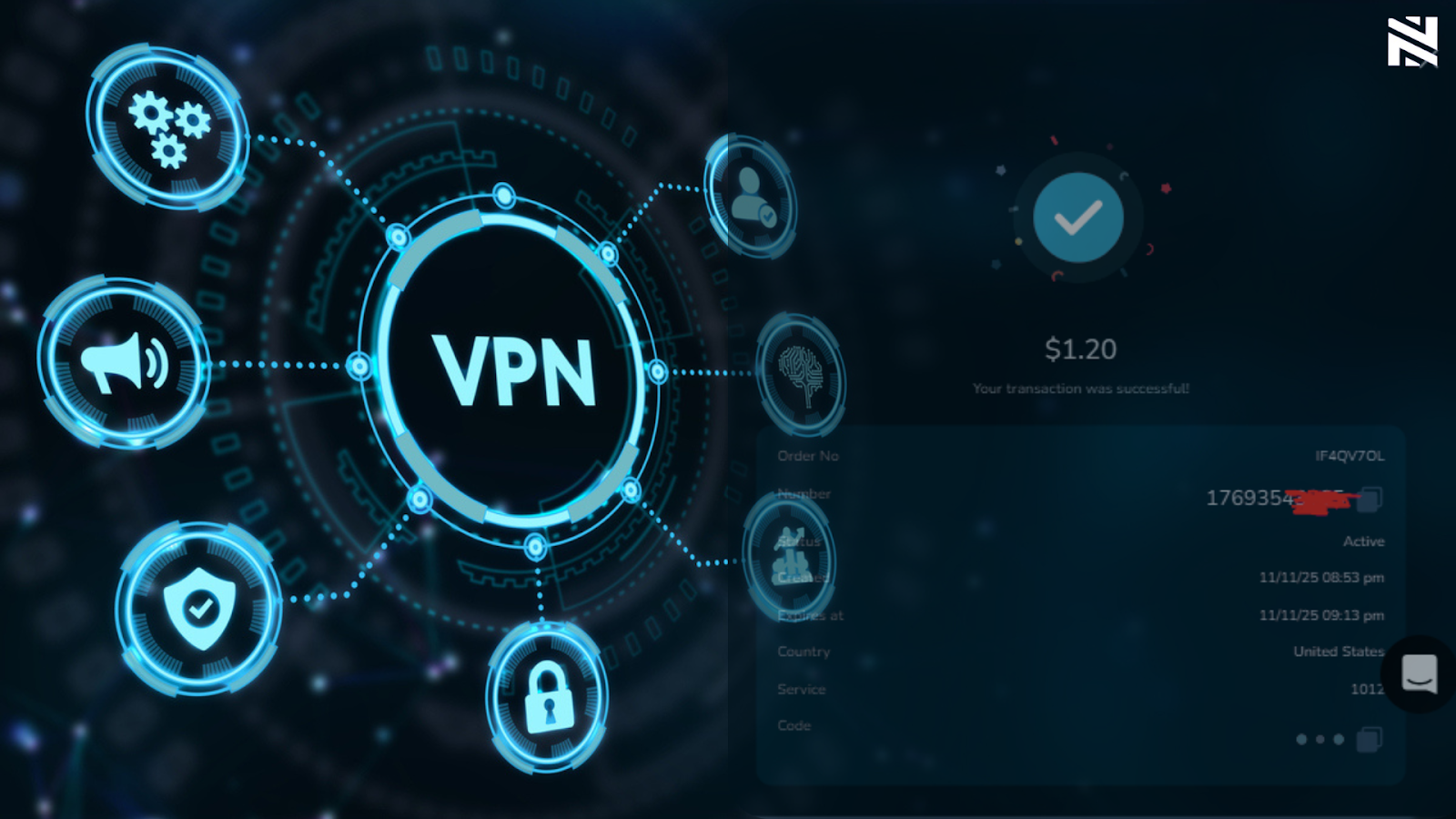
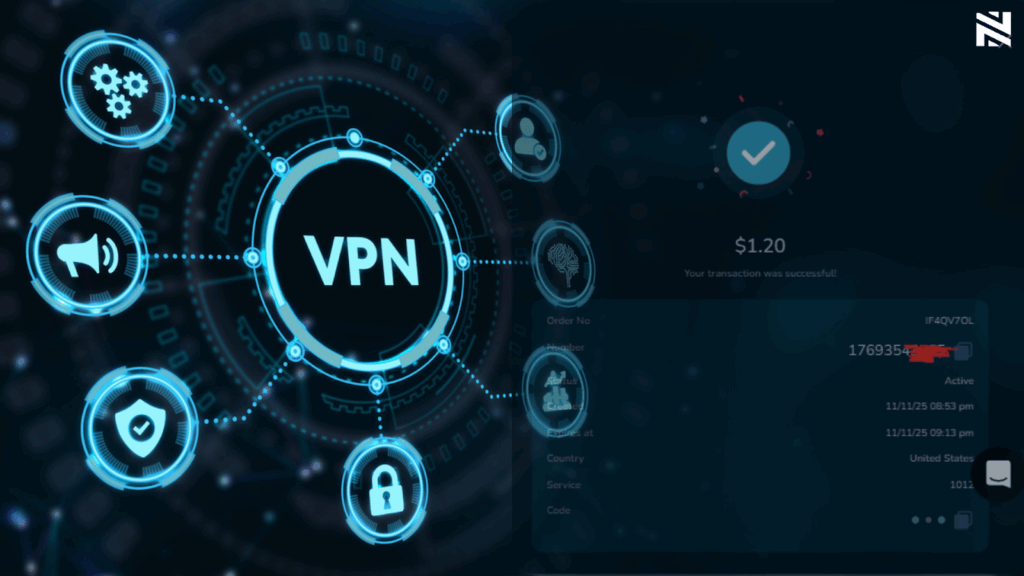
    Fix: Always ensure you’re connected to a strong VPN and check Nexar’s platform to confirm which services each virtual number supports before purchase. Choose a number compatible with your target app.
    2. Network Delays or Server Congestion

    During high-traffic periods, messages can take longer to arrive. This often makes users think their virtual number is not receiving OTP, when in reality it’s just delayed.


    Fix: Wait for 1–2 minutes, then refresh the Virtual number page. If the code still doesn’t appear, do not panic. Each number that doesn’t get a verification code gets an automatic refund after the count down. 

    In a case where the user still doesn’t get the automated refund, The user can contact the Nexar Customer Support team, always available on the live chat on the website as shown in the image below. 

    After which the Customer Support will provide a guide on how to request for the refund.

    NOTE that the refund is sent to your Nexar Wallet.

    3. Expired or Deactivated Virtual Number

    Each virtual number has a limited active period. If the number expires before the OTP arrives, you’ll never receive it.


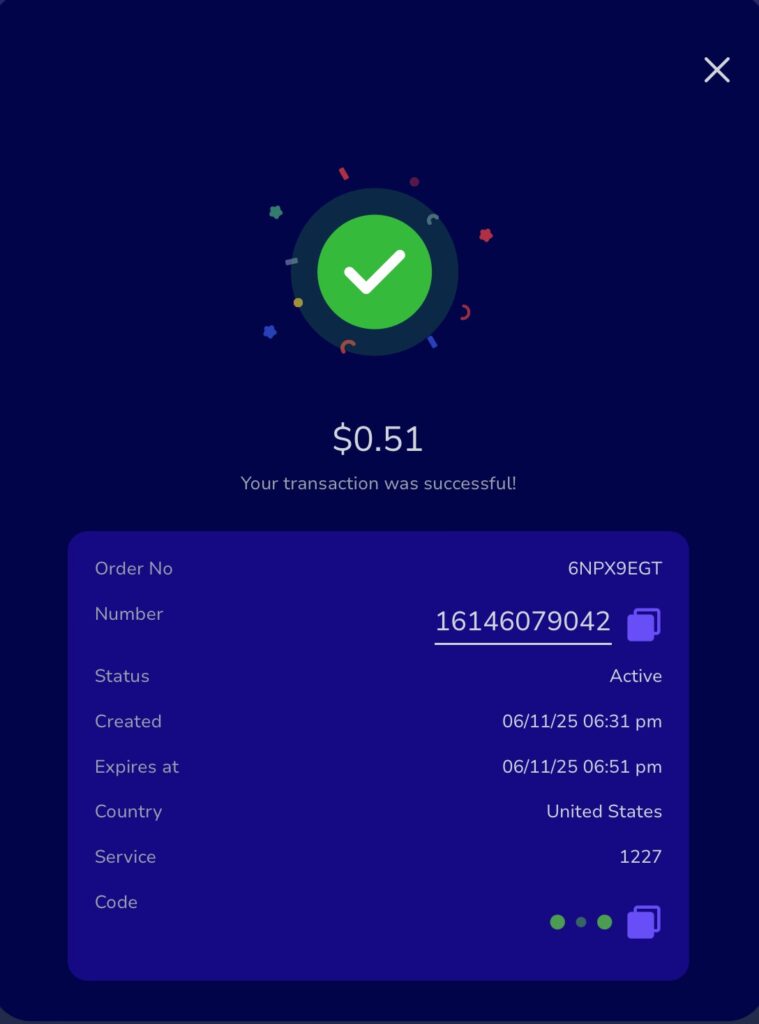
    Fix: Always check the expiry time of your number on Nexar before requesting OTPs. Renew or replace expired numbers promptly.

    4. Wrong Country Code or Format

    Sometimes OTPs fail because the number is entered incorrectly or with the wrong format.


    Fix: Always copy your Nexar virtual number exactly as displayed — including the “+” and correct country code. A simple typo can prevent delivery.

    5. Temporary Restrictions on the Sender’s Side

    Some apps temporarily block OTP messages due to unusual login attempts or automated systems. This is a very common cause of the delay in sending OTP.


    Fix: Try again later or clear your cache before reattempting. If the problem persists, contact Nexar’s support team for a replacement number or alternate region. The Nexar Support will help you evaluate the cause and provide the most suitable solutions.

    How to Fix OTP Issues with Virtual Numbers

    If your virtual number is not receiving OTP, follow these tested solutions:

    1. Double-check you’re using the right platform and compatible app.
    2. Refresh the OTP inbox.
    3. Ensure you’re connected to a strong VPN (This is very important and essential for masking your IP Address and mimicking the IP Address of the country whose number your getting)
    Virtual Number OTPs
    1. 🕒 Wait a few minutes in case of network delay.
    2. 🧾 Confirm your number hasn’t expired on your order detail.
    3. 💬 Contact Nexar Support. Our team can quickly verify and resolve OTP issues with virtual numbers for you.

    At Nexar, our goal is to make your Virtual Number OTPs experience smooth, reliable, and secure.

    Why Nexar Is the Best Platform for Virtual Number OTPs

    Nexar provides real, verified, and active virtual numbers from multiple countries, ideal for app verification, business use, and digital account management.
    Here’s what makes Nexar different:

    • Global coverage across multiple regions.
    • Instant activation and fast OTP delivery.
    • Secure dashboard for managing all your numbers.
    • 24/7 customer support to fix any Virtual Number OTPs problems instantly.

    Whether you’re verifying social accounts or registering for international apps, Nexar’s virtual numbers are built for reliability and ease of use.

    👉 Visit nexarhq.com today to start using Nexar’s verified virtual numbers and enjoy fast, dependable Virtual Number OTPs every time.

    FAQs — Common Problems with Virtual Number OTPs

    1. Why is my virtual number not receiving OTP?

    There are several reasons your virtual number is not receiving OTP — including app restrictions, expired numbers, or incorrect formats. Always ensure you’re using a compatible number on Nexar and confirm it’s active before requesting an OTP.

    2. How long does it take to receive Virtual Number OTPs?

    Most Virtual Number OTPs arrive within seconds. However, during network congestion or high-demand periods, it can take up to 2 minutes. If it delays longer, refresh your inbox or try another number.

    3. Can I use Virtual Number OTPs for banking apps or PayPal?

    Some platforms, especially banking and financial apps, don’t support Virtual Number OTPs for security reasons. It’s best to use verified numbers from Nexar’s list of supported platforms for seamless OTP delivery.

    4. Can I Request for code twice with the Virtual Numbers?

    No. In most cases, NO is the simplest answer. This is because the Virtual Numbers are OTP numbers which makes it impossible to request for code twice with the same number. 

    But in some cases, you can request for code twice. This is because some numbers (only a few) allow the user to request for verification code only twice.. Hence the reason why Nexar has the resend option.

    5. Are Virtual Number OTPs safe on Nexar?

    Yes — all Virtual Number OTPs on Nexar are secure. Nexar ensures that each number is active, private, and protected against unauthorized access. You can safely use them for app verifications, social accounts, and business registrations.

    6. Do I really need to connect to a VPN?

    Yes you do. Most User’s IP Addresses have been flagged, and they have no clue. A strong VPN is needed for smooth and swift account creation and stability. What does a VPN do? you might ask. A strong VPN helps a user mask their IP Address with strong anonymity and Mimics the IP address of the country you connect it to.

    7. How do I know if my VPN is strong?

    There are a few websites that help check the strength, anonymity and disguise level of a VPN. One of which is whoer.net.  Most importantly, you need to understand that all free VPNs are weak VPN, their disguise is usually very low and they can be easily detected by platforms or sites with strong encryption and security.

    Virtual Number OTPs make online verification faster and more private, but small mistakes or app restrictions can cause delays. With Nexar, you get reliable, fast, and supported virtual numbers that deliver OTPs instantly, every time.

    👉 Visit nexarhq.com today to get started and fix any virtual number OTP problems easily.
  • Reusable Virtual Numbers for Verification: How to Resend OTPs from Any Country (2025 Guide)

    The world keeps getting more digital, and one thing that has not changed is the constant need for OTPs. Almost everything needs verification today. Creating a new social media account, logging into WhatsApp, signing into Gmail, opening a fintech app, and even some websites you browse casually. Every platform wants to make sure it is really you.

    For most people, this is not a problem until their network fails or an OTP refuses to show up. Sometimes your SIM card has issues. Sometimes your number gets blocked by certain platforms. Sometimes you are trying to verify an account with a number from a different country, and nothing works.

    This is why a new approach is becoming popular. Reusable Virtual Numbers for Verification. They make OTP management easier, cheaper, and more flexible. Instead of buying a new number for every verification, you can reuse the same line for the same platform as many times as you need.

    In this guide, we will break everything down. You will understand what reusable virtual numbers are, why they matter, how the resend feature works, and how to resend OTP virtual number codes from any country. You will also see how Nexar makes this accessible to users in Africa and beyond.

    Think of this as your full 2025 user guide for a smoother verification experience.

    What Are Reusable Virtual Numbers for Verification

    To understand how they work, let’s keep it simple.

    Reusable Virtual Numbers for Verification are virtual phone numbers that remain active after your first OTP. Instead of disappearing immediately after receiving one code, they stay available and allow you to request the same verification code again and again for the same platform.

    This means if you verified your WhatsApp today and WhatsApp asks for another OTP next month, you do not need to buy a new number. You simply resend the code using the same virtual number.

    This is different from disposable or one-time virtual numbers that expire the moment you receive your first OTP.

    A reusable number gives you more:

    • Control
    • Flexibility
    • Convenience
    • Long term access

    You remain connected to your digital accounts without thinking about new purchases every time.

    This is the reason Reusable Virtual Numbers for Verification are becoming the better alternative for users who manage several accounts, travel a lot, or switch devices often.

    Why Reusable Virtual Numbers Are a Game Changer in 2025

    The digital world has changed a lot, especially in Africa. More workplaces are remote. More apps require authentication. More people communicate online than ever before.

    When you mix all of this with country restrictions, network delays, and platform-specific OTP issues, virtual numbers become more than a luxury. They become a reliable tool.

    Here are the main reasons reusable numbers matter.

    1. They Save You Money Long Term

    A disposable number is like buying a bottle of water every single time you are thirsty. After one sip, it becomes useless. You have to buy another one.

    Reusable Virtual Numbers for Verification are like owning a water dispenser. You use it as often as you want, and it stays with you.

    Instead of paying every time WhatsApp logs you out or Twitter asks for confirmation, you keep your number and resend the code without extra cost.

    This is exactly why the phrase resend OTP virtual number is becoming popular. People want to verify without spending again.

    2. You Stay in Control of Your Accounts

    One of the biggest problems with one-time virtual numbers is that you cannot return to them when you need them again.

    If an app logs you out or tries to confirm your identity, there is nothing you can do. The number you used before is gone.

    But with Reusable Virtual Numbers for Verification, you stay connected. You can always access your OTP. You can always retrieve new codes. You can always verify again.

    This makes account management easier especially for:

    • Social media managers
    • Freelancers
    • Remote workers
    • Influencers
    • Businesses
    • People managing multiple online accounts

    Account security becomes cleaner and more reliable when you have a reusable number.

    3. You Can Receive OTPs From Anywhere in the World

    This is one of the biggest advantages. You could be in Nigeria today, Ghana next month, and South Africa later. You can still verify your accounts with the same reusable number.

    A reusable number removes location limits. It removes country network restrictions. It removes the stress of needing a local SIM.

    This is what makes Reusable Virtual Numbers for Verification stand out. They support global access.

    A user in Kenya can verify an app that only supports US numbers.
    A user in Nigeria can verify a platform that prefers UK lines.
    A traveler can log into their accounts even when their SIM is off.

    With reusable numbers, verification happens smoothly anywhere you are.

    4. You Avoid SIM-Related Problems

    Real SIM cards come with real problems. You may experience:

    • Lost SIMs
    • Stolen phones
    • Network failure
    • Unregistered lines
    • Issues with roaming
    • International blocking

    If any of these happen, you cannot receive your OTP. Your account becomes locked. You panic. You start looking for alternatives.

    This is where reusable numbers shine. They stay online. They stay secure. They stay available.

    You open your Nexar dashboard and resend your OTP with no stress.

    5. They Support Modern Digital Behaviour

    People do not use digital platforms the way they used to. Many users have:

    2 WhatsApp accounts
    3 freelance profiles
    4 social media brands
    5 emails
    6 fintech apps

    All of these need verification. A system that requires a new number every time is not practical.

    Reusable Virtual Numbers for Verification fit into how people use the internet in 2025. They support flexibility and continuous access.

    How Reusable Virtual Numbers Work on Nexar

    Nexar introduced reusable numbers to give users more control. The feature is simple, but powerful.

    When you buy a virtual number for verification, the number stays active. If the platform asks for another code, you do not need to buy again.

    Instead, you go to your dashboard, open the number, and click Resend. A new OTP appears instantly.

    It is important to understand the core rule:

    Reusable does not mean universal.
    You can reuse the number for the same platform, not across different ones.

    So if you bought a number for WhatsApp, you can resend the OTP for WhatsApp anytime.
    But you cannot take that same number and use it for Facebook or Telegram.

    This keeps the system secure. It also keeps platforms safe from abuse.

    Step by Step: How to Resend OTP Virtual Number Codes on Nexar

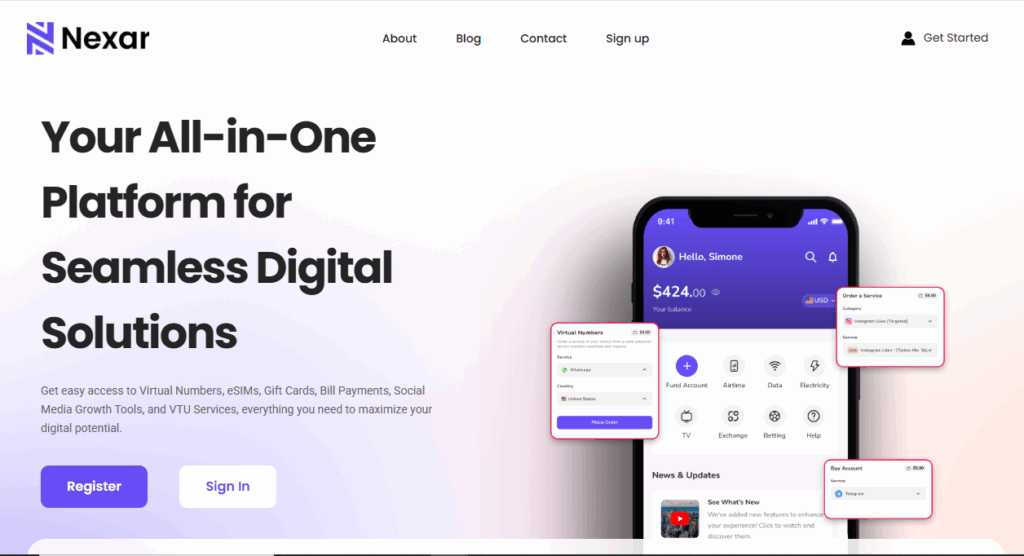
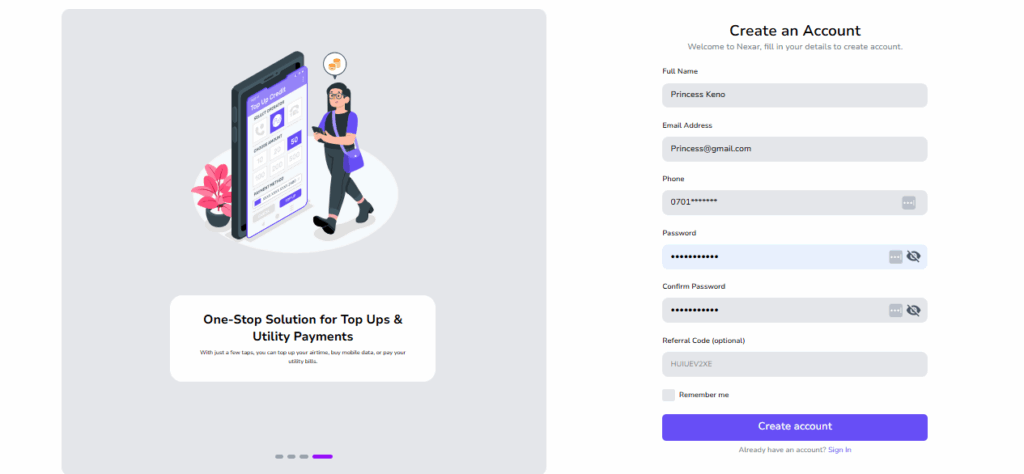
    1. Go to Nexarhq.com and sign up if you haven’t.
    Reusable Virtual Numbers for Verification

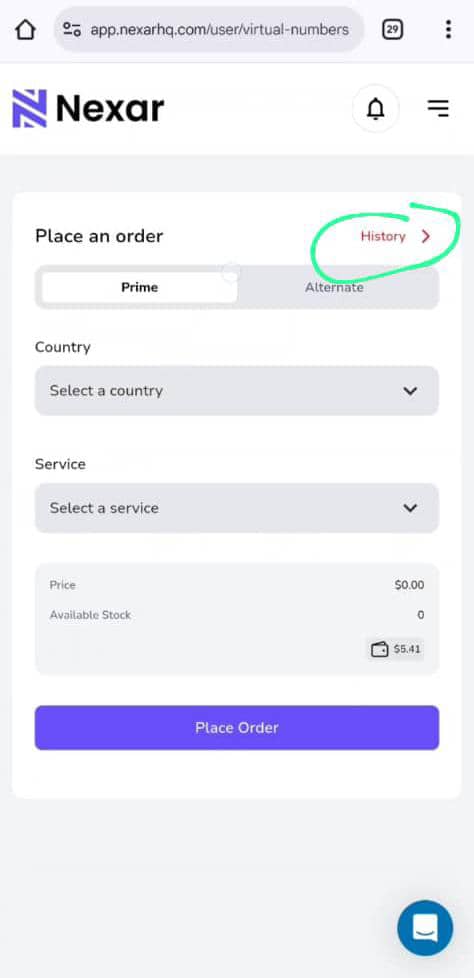
    2. Click on Virtual Numbers and click History.

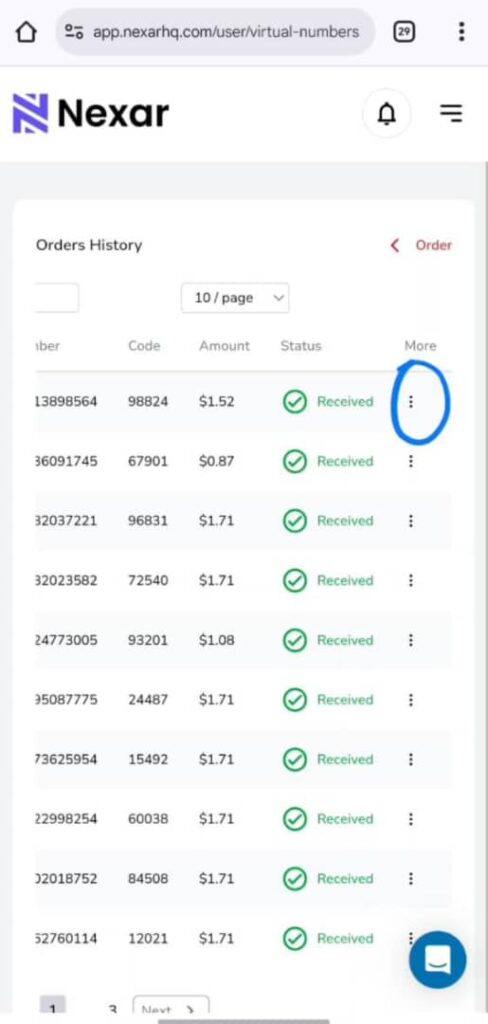
    3. Click on the specific virtual number you want, then scroll to the end and click on the three dots (⋮)

    Resend Feature

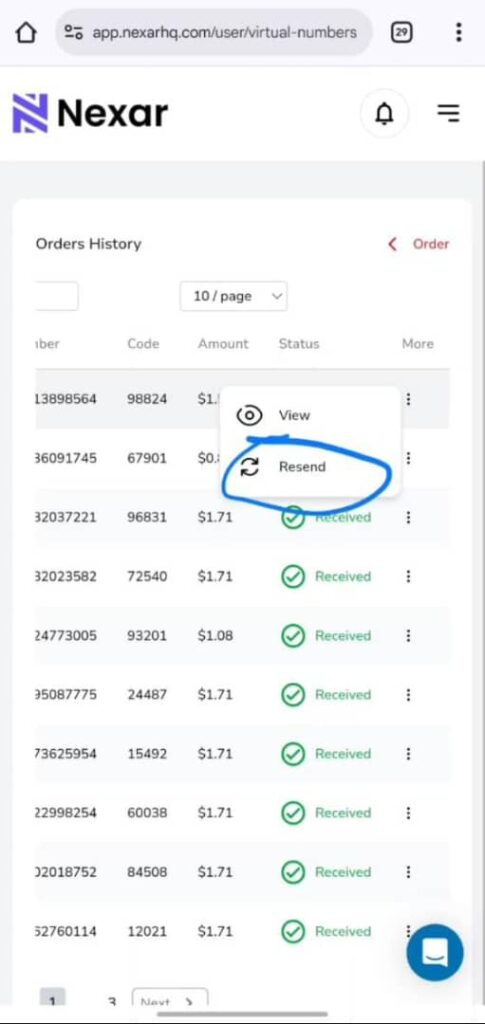
    4. You’ll see two options — View or Resend.

    5. Click Resend and you’ll receive a new code in the app as usual.

    For a step-by-step visual guide, you can also watch our YouTube tutorial that walks you through the process.

    You can resend from Nigeria, Kenya, Ghana, the UK, the US, Canada, or any country. Your virtual number is not linked to your physical location. That is what makes Reusable Virtual Numbers for Verification so powerful.

    How Reusable Virtual Numbers Help Africans Access Global Apps

    A lot of African users struggle to access certain platforms because local networks are not supported. Some apps place restrictions on Nigerian SIM cards. Some do not support Ghanaian lines. Some refuse to send OTPs to certain African countries entirely.

    A reusable number solves this problem. You pick a country that the platform accepts, and you verify easily.

    This is life changing for people who want to:

    • Open US or UK based apps
    • Register for international platforms
    • Access online tools
    • Manage cross border businesses
    • Work with foreign clients

    Reusable Virtual Numbers for Verification make digital access easier across Africa.

    When Should You Use Reusable Virtual Numbers for Verification

    They are perfect for any situation where you need ongoing access.

    Use them when you:

    • Travel often
    • Manage multiple accounts
    • Switch devices regularly
    • Use sensitive platforms
    • Want a number that stays consistent
    • Want international verification access

    They make digital identity easier to maintain.

    Tips to Use Reusable Virtual Numbers Safely

    • Always use the number for the same platform
    • Make sure you save the country and the platform you used
    • Do not share your virtual number with strangers
    • Keep your Nexar login secure
    • Check your dashboard regularly

    Following these simple steps keeps your account safe.

    Frequently Asked Questions

    1. Can I resend a code multiple times?

    Yes. That is the entire purpose of Reusable Virtual Numbers for Verification.

    2. Can I use the same number for Telegram and WhatsApp?

    No. Reusable does not mean multi platform.

    3. Does it work from any country?

    Yes. Your OTP will arrive no matter where you are.

    4. Is there an extra cost for resending codes?

    No. Resending is free.

    5. Can I use the number for future logins?

    Yes. As long as the number remains active, it will work.

    Final Thoughts

    Verification is becoming more important every year. The need for safety, privacy, and reliable access keeps growing. Disposable numbers helped at first, but they no longer match how people use the internet today.

    This is why Reusable Virtual Numbers for Verification are the new standard. They let you stay connected to your accounts, resend verification codes easily, and avoid the stress of constant purchases.

    Whether you travel a lot, manage multiple accounts, or simply want a smoother OTP experience, reusable virtual numbers give you the control you need.

    Nexar has made this even easier for Africans and global users by offering a secure system that supports any country and delivers OTPs instantly.

    Your number stays with you.
    Your access stays open.
    Your verification becomes simple.

    If you want to simplify your digital life in 2025, reusable numbers are the way forward.

  • 5 Signs You’re Using an Unreliable Virtual Number Provider

    The world of virtual numbers has grown quickly. More people use them for Twitter, WhatsApp Business, Facebook, Gmail, TikTok, and other platforms. Businesses use them for customer support. Freelancers use them to manage clients. People who want privacy use them to keep their personal line safe.

    But the truth is this. Not every provider out there is real or trustworthy. Some platforms cut corners. Some reuse numbers. Some disappear when you need support. Some sell numbers that do not work for the platforms they claim.

    This is why choosing the right service is important. A fake virtual number can cost you your account, money, and even your identity. The safest thing you can do is learn how to spot an unreliable virtual number provider before you make a payment.

    In this article, we’ll talk about the real signs that show when a service is not safe. If you have ever wondered how to know if a virtual number provider is fake, this will guide you clearly. By the end, you’ll understand the difference between a trusted brand like Nexar and a fake virtual number provider pretending to be legit.

    Let’s break everything down.

    Why You Should Care About Spotting an Unreliable Virtual Number Provider

    Many people think all virtual numbers are the same. You pay for a number and receive SMS codes. Simple. But that is not how it works in reality. A number that is not clean can get your account banned. A provider that is dishonest can steal your money. A recycled number can expose your data.

    An unreliable virtual number provider can put you at risk in ways you do not expect. If you are using virtual numbers for work, verification, privacy, or business, then safety matters. It matters a lot.

    Using the wrong provider can lead to:

    • Failed verification
    • Locked accounts
    • Data leaks
    • Scams
    • Payment loss

    Choosing right protects your time and your peace of mind.

    Now let’s look at the 5 signs that show a provider cannot be trusted.

    1. The Numbers Do Not Work for the Platforms They Claim

    This is the biggest sign of an unreliable virtual number provider. A good provider will tell you clearly which platforms their numbers support. A fake one will say the numbers work everywhere even though they do not.

    For example, some providers claim their numbers work for:

    • Twitter
    • WhatsApp Business
    • Facebook
    • TikTok
    • Google
    • Instagram

    But when you try to verify your account, nothing happens. The SMS never arrives. Or the platform rejects the number immediately.

    This is the first red flag that tells you how to know if a virtual number provider is fake. If the provider promises everything but delivers nothing, stay away.

    A trusted provider like Nexar offers platform specific numbers. This means if you buy a number for Twitter, it works for Twitter. If you buy a number for WhatsApp Business, it works for WhatsApp Business. No guesswork. No stress.

    A fake virtual number cannot guarantee this.

    2. The Provider Reuses Numbers or Gives You Numbers That Were Used Before

    A clean virtual number is important. When a number has been used before, it becomes a risk. Some cheap services take numbers that other people have used and recycle them. They claim they are fresh even though they are not.

    This is one of the strongest signs of an unreliable virtual number provider.

    If a number has been used before, you may experience:

    • Logged out accounts
    • Verification errors
    • Account bans
    • Security warnings
    • Previous owner’s notifications

    Imagine buying a number and seeing someone else’s messages in your inbox. That is one of the clearest ways to know when a fake virtual number provider is trying to trick you.

    Nexar gives you clean and verified numbers. You receive a fresh line that is ready for your use. You can also request codes again and again from your Nexar number on the Nexar app or website, which means your number is permanent!

    A real provider will never reuse a number.
    An unreliable virtual number provider will do it all the time to save money.

    3. No Customer Support or Slow Customer Support

    A virtual number service without support is a danger. When something goes wrong, you need a real person to help you. If the provider disappears once you make payment, that is the behavior of a fake virtual number provider.

    Support shows that the company cares about customer experience. A provider that delays replies or gives no reply at all is not reliable. If you cannot reach them by email, chat, or social media, that is a red flag.

    This is one way to know if a virtual number provider is fake.
    A trusted brand will guide you through the setup process. They will help you when a platform changes rules. They will assist you when you have questions. Support is part of the service.

    An unreliable virtual number provider hides. They only want your payment, not your satisfaction.

    Nexar offers clear guides, quick responses, and a support team ready to fix issues. Support is part of why users trust them.

    4. No Transparency About Pricing, Validity, or Country of the Number

    If a provider does not tell you:

    • The country of the number
    • The duration of the number
    • The supported platforms
    • The exact price
    • Whether the number is renewable

    Then something is wrong.

    Lack of transparency is one of the most common signs of an unreliable virtual number provider. They keep details hidden so they can change them later. They can suddenly increase prices. They can give you a number from a random country. They can reduce your validity without warning.

    This is also how scammers operate.

    A real provider shows everything clearly. You know the country. You know the price. You know how long the number lasts. You know the platform it supports.

    If you ever find yourself guessing what you paid for, you are dealing with a fake virtual number provider.

    Nexar is transparent about:

    • Country options
    • Price
    • Validity period
    • Platform compatibility

    This is what a trustworthy provider looks like.

    5. The Website Looks Suspicious or Lacks Basic Security Features

    This is a strong sign of an unreliable virtual number provider. The website does not look safe. You might see strange popups, spelling mistakes, broken links, or unclear information. Sometimes the payment gateway looks unsecured.

    A fake website is designed to collect your money quickly. They do not invest in their platform. They do not invest in safety. They do not want longevity. They are only there to trick people who do not know what to look for.

    Look for these warning signs:

    • No SSL lock on the browser
    • No real contact details
    • No clear company information
    • Poor design
    • Suspicious payment portal

    If a website looks unsafe, it is telling you to walk away.
    A real provider will always protect your information and your money.

    Nexar uses secure payment systems, clear design, and transparent onboarding. This is how you identify a credible service.

    How to Know if a Virtual Number Provider Is Fake

    Let’s bring it all together in simple terms. When you want to figure out how to know if a virtual number provider is fake, ask yourself these questions:

    • Does the website look trustworthy?
    • Are they transparent about supported platforms?
    • Does the number work immediately?
    • Is support available when needed?
    • Do they recycle numbers or sell clean ones?
    • Is pricing clear?
    • Are reviews real?

    If any of these answers feel wrong, stop and rethink your purchase.

    A fake virtual number provider makes big promises and delivers nothing.
    An unreliable virtual number provider hides important details, reuses numbers, or avoids responsibility.

    A trusted provider like Nexar does none of these things.

    Why You Should Choose Proven Providers Like Nexar Instead

    Using Nexar comes with real benefits that protect your account and your peace of mind. Here’s why:

    • You get clean verified numbers
    • You receive your code instantly
    • You can choose numbers from any country
    • You can select the platform you want
    • You get proper customer support
    • You avoid recycled or unsafe lines
    • You get a smooth dashboard
    • You get transparent pricing

    Nexar gives you structure. It gives you a system you can depend on.

    When you use a trusted provider, you save yourself from:

    • Losing accounts
    • Failed verifications
    • Security risks
    • Random bans
    • Payment scams

    A stable service gives you long term peace.

    How to Buy a Reliable Virtual Number from Nexar

    The steps are simple.

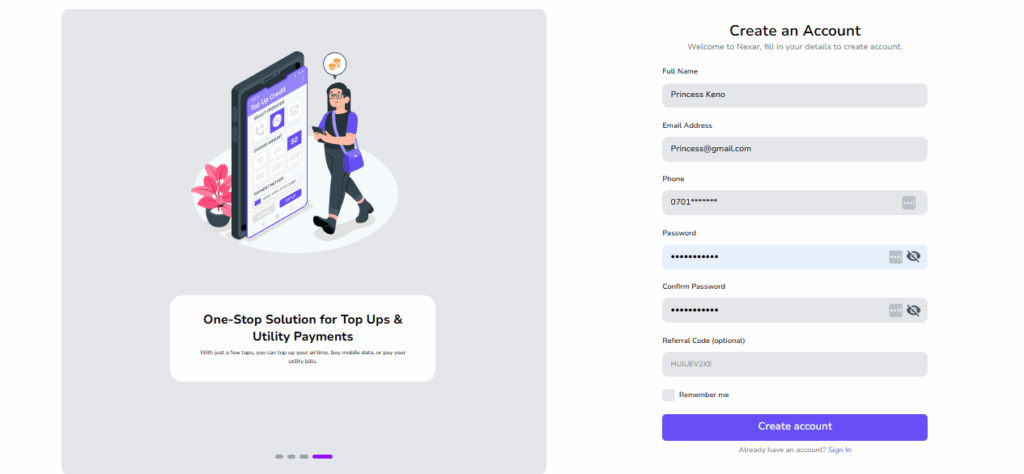
    Step 1: Go to Nexarhq.com

    UK number in Nigeria


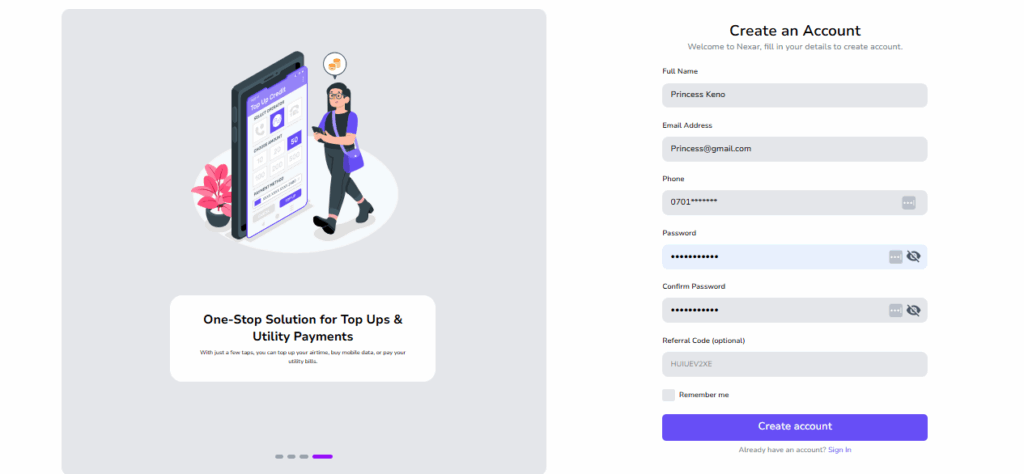
    Step 2: Create an account

    Unreliable virtual number provider


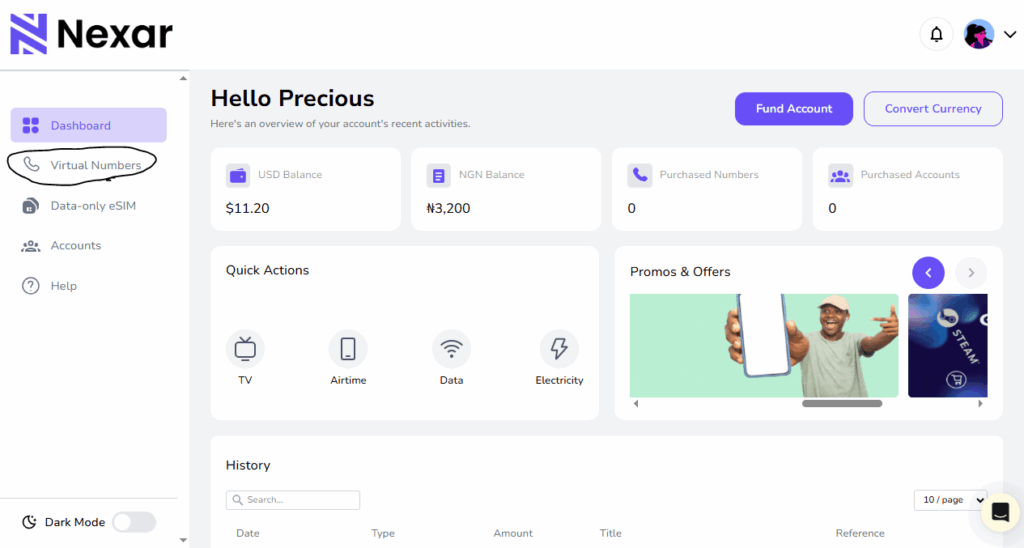
    Step 3: Select Virtual Number from your dashboard


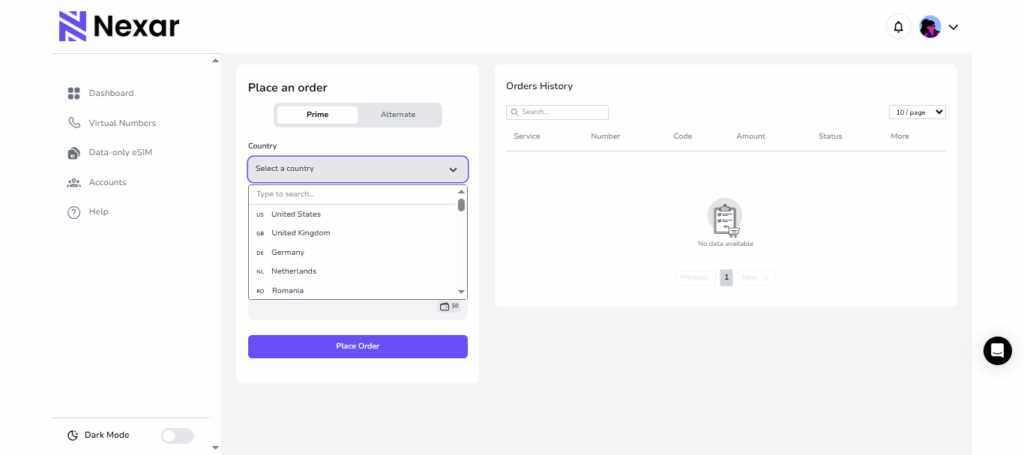
    Step 4: Choose the country you want


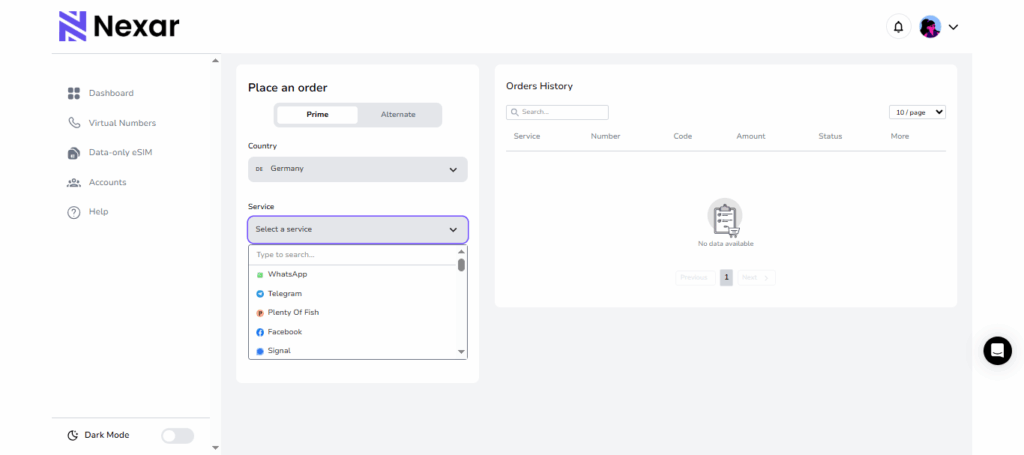
    Step 5: Choose the platform you need


    Step 6: Make your payment


    Step 7: Receive your number instantly


    Step 8: Use it to verify your account right away

    It takes a few minutes. Then your code appears in your inbox with no stress.

    Final Thoughts

    The rise of fake services makes it important to know how to spot an unreliable virtual number provider. When a provider hides information, reuses numbers, fails to deliver codes, or disappears after you pay, it is a sign that something is not right. Choosing a trusted platform like Nexar helps you avoid all the problems that come with a fake virtual number provider. You get clean numbers, instant verification, and clear transparency. It gives you control, privacy, and a simple setup process.

    The safest thing you can do is pay attention to these signs. Once you understand how to know if a virtual number provider is fake, you become more confident in your choices and avoid unnecessary risks.

    If you want reliability, clean numbers, and instant setup, Nexar is the smarter option.

  • Best VPNs for Virtual Numbers: Why You Need Them and How They Protect You

    In today’s digital world, online privacy and security have become more important than ever. If you use virtual numbers for verification, account creation, or business purposes, you’ve probably encountered restrictions or OTP delivery issues caused by location-based blocks. That’s where VPNs (Virtual Private Networks) come in.

    Using the best VPNs for virtual numbers helps you stay anonymous, bypass regional restrictions, and protect your data from unwanted tracking or interception. In this article, we’ll explain why a VPN for virtual number use is essential, how it enhances your security, and which VPNs work best in 2025.

    What Is a VPN and How Does It Work?

    A VPN (Virtual Private Network) encrypts your internet connection and routes it through a secure server in another location. This hides your real IP address and makes it appear as if you’re browsing from another country.

    When using virtual numbers, especially for OTP verification or online registrations, a VPN helps ensure that your connection is private and less likely to trigger blocks from region-restricted services.

    By using one of the best VPNs for virtual numbers, you can:

    • Access virtual numbers from any location.
    • Avoid being flagged for suspicious activity.
    • Protect your account and identity while verifying services.

    Why You Need a VPN for Virtual Numbers

    Best VPNs for Virtual Numbers

    There are several important reasons to use a VPN for virtual number management, especially if you rely on platforms like Nexar for secure, global communication and verifications:

    1. Bypass Geo-Restrictions

    Some apps or websites limit the use of virtual numbers based on country. A VPN allows you to appear as if you’re connecting from a different region, ensuring smooth access and OTP delivery.

    2. Protect Your Identity

    A VPN encrypts your data and masks your IP address. This helps protect virtual number with VPN technology, making it nearly impossible for hackers or trackers to trace your digital footprint.

    3. Prevent OTP Blocks

    Certain platforms block OTPs when they detect foreign IPs or proxies. By using the best VPNs for virtual numbers, you reduce the chance of blocked or delayed verification messages.

    4. Secure Public Connections

    If you often use public Wi-Fi while verifying accounts, you’re at risk of interception. VPNs create an encrypted tunnel that keeps your OTPs and account data private.

    5. Maintain Consistent Connection

    Some users experience dropped OTPs due to unstable connections. A VPN can stabilize your connection by routing it through optimized servers for better performance.

    Best VPN for Virtual Numbers in 2025

    There are many VPNs out there that are strong and reliable, but at Nexar, we recommend these 2 VPNs because they’re free and they work excellently.

    1. IPVanish VPN

    IPVanish is a VPN service that provides online privacy and security by encrypting your internet traffic and masking your IP address. Its key advantages include a no-logs policy verified by independent audits, strong encryption, and a large network of servers. It also offers features like unlimited simultaneous connections, fast speeds, a kill switch, and 24/7 customer support. If you’re looking for a VPN that properly hides your IP address and mimics the IP address of a different country, IPVanish is the most recommended VPN.  

    2. Octohide

    Octohide is a VPN built to keep you safe and invisible online. It protects your browsing by encrypting your traffic and giving you a new IP address so websites can’t trace your real location. One thing people like about Octohide is how clean and straightforward it is. You get strong encryption, a strict no-logs policy, and a wide range of global servers you can switch to anytime.

    It also supports unlimited devices, so you can use one account across your phone, laptop, tablet, or even your home router. The connection speed is stable, the kill switch protects you if your network drops, and their support team is available whenever you get stuck. If you want a VPN that hides your IP properly and makes it seem like you’re browsing from another country, Octohide is a solid and reliable choice.

    Besides IPVanish and Octohide, other VPNs recommended are  NordVPN, Octohide VPN, PIA VPN, Proton VPN and CyberGhost VPN.

    How VPNs Protect Virtual Numbers

    When you protect a virtual number with VPN, you’re not just hiding your IP — you’re building a secure digital shield. VPNs use AES-256 encryption (the same level used by banks) to secure your data, making it unreadable to anyone trying to intercept it.

    Here’s how they safeguard your activities:

    • Encrypt communication between your device and the network.
    • Prevent tracking from ISPs or third-party services.
    • Secure OTP transmissions from apps and websites.
    • Reduce account suspension risks caused by mismatched IPs.

    This makes VPNs an essential tool for users who rely on virtual numbers for social media verifications, business accounts, and cross-border communications.

    How to Use a VPN with Virtual Numbers

    Follow these steps to get started safely:

    1. Choose a trusted provider — Pick from the best VPNs for virtual numbers listed above.
    2. Install the app on your device and log in.
    3. Select a country server that matches your Nexar virtual number’s origin.
    4. Connect and confirm IP — Once connected, visit your Nexar dashboard.
    5. Verify or receive OTPs securely without restrictions or delays.

    By following these steps, you ensure that your virtual numbers remain protected and fully functional.

    Why Nexar Recommends Using VPNs with Virtual Numbers

    At Nexar, we prioritize security, privacy, and reliability for all users. We recommend pairing our virtual number services with one of the best VPNs for virtual numbers to guarantee safe OTP delivery, reduced risk of blocks, and enhanced anonymity.

    Using a VPN adds an extra layer of protection — ensuring your virtual number experience is smooth, private, and secure.

    👉 Visit nexarhq.com to explore safe and verified virtual numbers, ideal for social apps, business accounts, and secure communication.

    FAQs

    1. Why do I need a VPN for virtual numbers?

    A VPN for virtual number ensures your connection is encrypted, private, and region-flexible. It helps bypass app restrictions and guarantees smoother OTP delivery.

    2. What are the best VPNs for virtual numbers in 2025?

    Some of the best VPNs for virtual numbers include IPVanish VPN, Octohide VPN, PIA VPN, NordVPN, ProtonVPN, and CyberGhost. These VPNs provide strong encryption and stable global servers.

    3. Can a VPN help if my virtual number isn’t receiving OTPs?

    Yes. Using one of the best VPNs for virtual numbers can help fix OTP delivery problems caused by regional IP restrictions or blocked traffic routes.

    4. How does a VPN protect virtual numbers from hackers?

    When you protect virtual number with VPN, your data is encrypted and routed through secure servers, making it unreadable to hackers, ISPs, or trackers trying to access your information.

    5. Is it safe to use a VPN for virtual number verifications on Nexar?

    Absolutely. Nexar supports privacy-focused practices. Using a VPN for virtual number verifications adds an extra layer of protection and ensures your account activities remain private and secure.

    Final Thought


    Choosing one of the best VPNs for virtual numbers isn’t just about accessing blocked OTPs — it’s about protecting your identity, maintaining anonymity, and ensuring safe digital communication. Combine a secure VPN with Nexar’s trusted virtual number services for the best experience in 2025 and beyond.

    👉 Get started now at nexarhq.com to enjoy safe, global, and private virtual communications.

  • How to Buy a UK Number in Nigeria: 5 Easy Steps

    Have you ever been excited to sign up for an international platform, only to realize your Nigerian number doesn’t work? It’s even worse when you’re trying to verify an account that is important for your work or business. A lot of Nigerians face this problem every day. Many global platforms treat Nigerian numbers differently, and that’s why more people now rely on a UK number in Nigeria.

    The good news is you don’t need to travel or buy a UK SIM before you can get a working UK line. Everything can be done from your phone in a few minutes.

    This guide will show you how to get a UK number in Nigeria, why so many people use it, and how you can set it up easily with Nexar. Let’s get into it.

    Why Nigerians Are Getting UK Virtual Numbers

    People buy a UK number in Nigeria for different reasons. Some do it for work. Some do it for business. Some do it just to avoid verification headaches. Once you understand the benefits, you’ll see why it makes sense.

    1. You work on global platforms

    Many freelance platforms see UK numbers as more stable. A UK number in Nigeria helps you create accounts faster, recover accounts easily, and avoid unnecessary flags. It also makes your profile look more trustworthy.

    2. You run a business with foreign clients

    If you sell products or services to people in the UK or Europe, a UK line builds instant trust. The moment potential clients see a familiar UK code, they treat your business as more professional. Having a UK virtual number in Nigeria gives you that advantage.

    3. You want the smoothest verification possible

    Some apps, especially fintech tools, treat UK numbers with less resistance. When you set up a UK number in Nigeria, registering or verifying your accounts becomes faster. Platforms like PayPal, Wise, Revolut, banking apps, and advertising platforms respond better to UK lines.

    4. You avoid physical SIM cards

    A virtual number skips the stress of looking for a physical SIM or spending money on roaming. With Nexar, your UK number in Nigeria is OTP-ready, secure, and easy to manage.

    All these reasons explain why the demand for UK virtual numbers in Nigeria keeps rising.

    How to Get a UK Number in Nigeria (Full Step-by-Step Guide)

    Here’s how to set up your UK number in Nigeria using Nexar.

    1. Visit nexarhq.com

    Open your browser and go to Nexar’s website or download the app. The interface is simple, and you don’t need any tech skills.

    UK number in Nigeria

    2. Create your account

    You can sign up with your email or Nigerian phone number. The process is quick, and you can access your dashboard immediately.

    3. Choose UK Virtual Number

    On your dashboard, click Virtual Numbers and select UK. You’ll see different plans made specifically for users in Nigeria. Pick the plan that works for you. This is the moment you officially begin getting your UK number in Nigeria.

    4. Pay with local methods

    Nexar allows you to pay in Naira. You don’t need a foreign card or international billing. Whether it’s bank transfer or card payment, everything works smoothly.

    If you are using Nexar from another country, read this article to find out our other available payment options.

    5. Activate and use your number

    Once you complete payment, your UK number in Nigeria becomes active. You can use it immediately to verify apps, open new accounts, or switch numbers on existing platforms.

    What Makes Nexar Better for Getting a UK Number?

    There are many apps claiming to offer foreign lines, but not all of them actually work well in Nigeria. Some don’t accept Nigerian cards. Some require VPN before you can even log in. Some numbers don’t work for verification.

    Nexar was created to remove all that stress and give Africans a more direct solution.

    1. Works perfectly for Nigerians

    You don’t need to struggle with exchange rates, foreign billing, or payment errors. When you buy your UK number in Nigeria through Nexar, everything is already optimized for local use.

    2. You can access many countries

    If you need more than one country, you can get them all in one place. This is helpful if you run a business, create multiple accounts, or manage clients. One account can hold your UK, US, or any other virtual number.

    3. Your number stays reliable

    Some foreign apps deactivate your line for no reason. Nexar keeps your UK number in Nigeria active, safe, and protected. Nexar numbers are reusable.

    4. Transparent pricing

    No surprises. No hidden fees. Just simple plans that anyone in Nigeria can use.

    If you want a UK number in Nigeria that actually works, Nexar is one of the best options.

    What You Can Do With a UK Number in Nigeria

    When you start using your UK number in Nigeria, here’s what becomes easier for you:

    • Sign up for banking and payment apps
    • Verify platforms that don’t accept Nigerian numbers
    • Talk to foreign clients without looking unprofessional
    • Protect your Nigerian line and keep it personal
    • Avoid verification mistakes when switching devices

    A UK virtual number in Nigeria gives you access to tools that would normally be unavailable.

    Frequently Asked Questions About Getting a UK Number in Nigeria

    1. Do I need a VPN for my UK number?

    Yes. A VPN helps sync your IP with the country of your virtual number. This makes verification smoother on most platforms. IPvanish and Octohide work well.

    2. Can I use my UK number for WhatsApp?

    Yes. You can register the line on WhatsApp or WhatsApp Business. We recommend WhatsApp Messenger for better stability.

    3. Is it legal to get a UK number in Nigeria?

    Yes. Getting a UK number in Nigeria is completely legal. Virtual numbers are allowed for both personal and business use.

    4. Can I receive calls or SMS?

    No. Nexar numbers are OTP-only. They work for verification, not calls.

    5. How much does it cost?

    Nexar virtual numbers are very afforadable. Typically $1 -$1.5.

    Sign up to Nexar to see the current rates.

    Final Thoughts

    A UK number in Nigeria unlocks opportunities that a regular Nigerian line can’t. It helps you sign up for platforms easily, build trust with international clients, and keep your online accounts safe. With Nexar, you can get your UK number instantly and start using it within minutes.

    Also read: How to Get a US Number in Nigeria in 5 Easy Steps.

  • How to Farm Crypto Airdrops Using Virtual Numbers

    If you’ve been in the crypto space for a while, you must have heard of crypto airdrop farming. It is one of the easiest ways to earn crypto without spending a dime. It’s a process where blockchain projects distribute free tokens to users for completing simple online or on-chain actions like following accounts, joining Telegram groups, or testing platforms.

    But there’s one challenge: most airdrops require account verification, and using just one account limits how many campaigns you can join. Also, to farm crypto airdrops successfully, you need multiple verified accounts across platforms like Telegram, Discord, and X. You can’t use one regular phone number to create accounts across these platforms. That’s why you need a virtual number from Nexar.

    With Nexar virtual numbers, you can create multiple verified accounts safely, scale your participation, and maximize your rewards. If you are wondering how it works, we’ll be covering that in this article. Let’s get started.

    What Does It Mean to Farm Crypto Airdrops?

    To farm crypto airdrops simply means participating in multiple airdrop campaigns to earn as many free tokens as possible. These tokens are often given to early users or active community members to encourage engagement before a project officially launches.

    Once distributed, the tokens can usually be swapped, traded, or held for future profit, especially when the project gains traction. Many airdrop farmers treat this as a side hustle, building consistent income by strategically joining different campaigns and maintaining multiple verified accounts.

    Why People Farm Crypto Airdrops

    Let’s be honest: everyone loves free money. That’s pretty much what makes people Farm Crypto Airdrops. You don’t need to be a full-time trader or have a ton of capital; you just need time, consistency, and a little bit of strategy. Some people have made hundreds (and sometimes thousands) of dollars from simple tasks like retweeting a post, testing a new blockchain app, or interacting with a project’s smart contract.

    For example, when the Arbitrum airdrop launched, some early users earned over $10,000 just by being active on the network. Even crypto influencers like Miles Deutscher and Ivan on Tech have talked about how profitable it can be to Farm Crypto Airdrops if you know what you’re doing. But with the hype growing, competition has become intense. Projects now attract millions of applicants, and not everyone gets a share of the reward.

    That’s why many airdrop farmers are stepping up their game by using virtual numbers to manage multiple verified accounts and stay eligible for different projects. Think of it like having a few extra hands helping you farm. With a virtual number, you can:

    • Verify multiple wallets or profiles easily
    • Join regional or community-specific airdrop campaigns
    • Protect your personal number from spam or platform bans

    In short, people Farm Crypto Airdrops because it’s one of the easiest ways to grow your crypto portfolio without risking your money. But as the space gets more competitive, using smart tools like virtual numbers can help you stay ahead and maybe even land the next big airdrop.

    Using One Account Could Be Holding You Back

    Most airdrop tasks involve platforms like Telegram, Discord, X (Twitter), and Instagram, which require phone number verification. Using your personal number across multiple accounts can:

    1. Trigger verification issues or bans:

    Let’s say you’re joining 10 Telegram airdrop groups in one day. By the 5th or 6th group, Telegram might start thinking you’re a bot. Boom — your account gets restricted or banned. Platforms like Discord and X also run automated checks, and once your number is flagged, it’s hard to recover.

    • You lose access to verified groups and messages
    • You might have to re-verify your wallet or social tasks
    • And worst of all, you miss out on the airdrop rewards you worked for

    When you’re trying to Farm Crypto Airdrops consistently, a ban can set you back for weeks.

    2. Limit how many projects you can join:

    Most airdrop programs only allow one verified account per phone number. So if you’re using your personal number for everything, you can’t create extra verified profiles to test different projects.
    For example, some farmers open multiple wallets and accounts to increase their odds of qualifying. But with one number, you’re locked in which means no flexibility and no scaling. To Farm Crypto Airdrops effectively, you need to spread your chances across different campaigns.

    3. Expose your personal information:

    Every time you drop your real number on a signup form or bot, you’re trusting strangers with your data. And in the crypto world, that’s risky. Some shady projects sell user data or use it for spam campaigns. You might start getting random texts about “airdrops” that don’t even exist.

    • It exposes your real identity and location
    • It opens you up to phishing attempts
    • It clutters your phone with unwanted messages

    The more you Farm Crypto Airdrops, the more you’re at risk if you’re not protecting your privacy.

    4. Mix your personal and crypto activities:

    Nothing is more chaotic than seeing Telegram messages from your family right next to a flood of airdrop alerts. You could easily miss something important, like a verification code or wallet update. Keeping your personal and crypto spaces separate helps you stay organized.
    It also looks more professional when your crypto life runs on a clean, dedicated setup instead of your personal number tied to group chats and memes

    That’s why smart airdrop farmers don’t risk it. They use virtual numbers to scale safely, stay private, and Farm Crypto Airdrops without hitting the limits of one account.

    Are Virtual Numbers Safe for Airdrop Farming?

    Yes, when you use trusted providers like Nexar. Nexar virtual numbers are sourced from verified partners and ensure secure one-time password (OTP) delivery. Your data stays private, and your messages are not stored or shared.

    This means you can manage multiple accounts safely without worrying about bans, leaks, or compromised verifications.

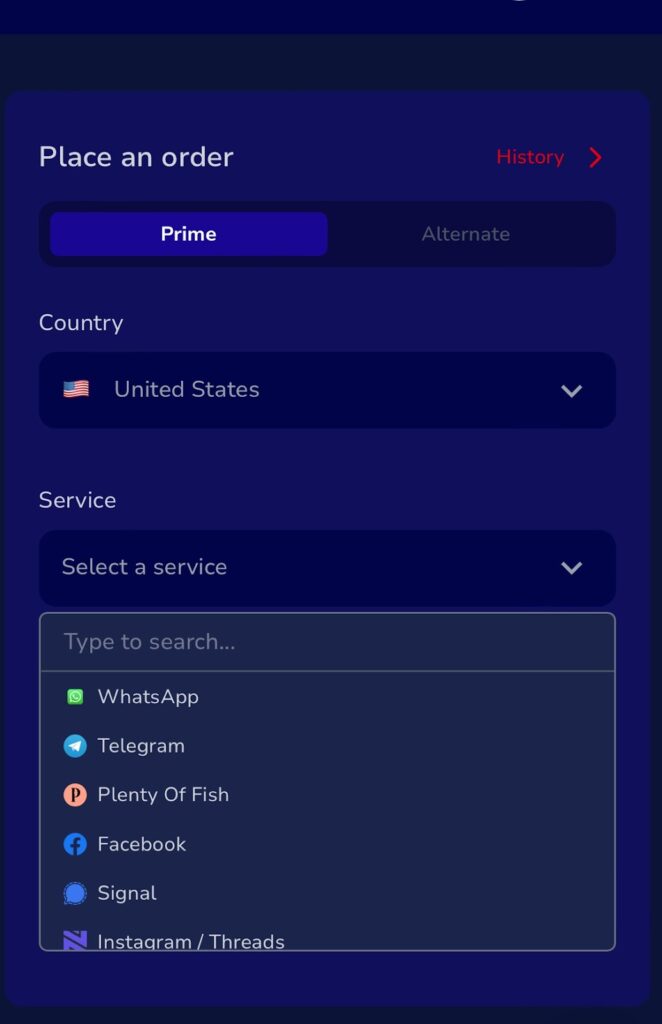
    How to Get a Nexar Virtual Number for Crypto Airdrop Farming Verification

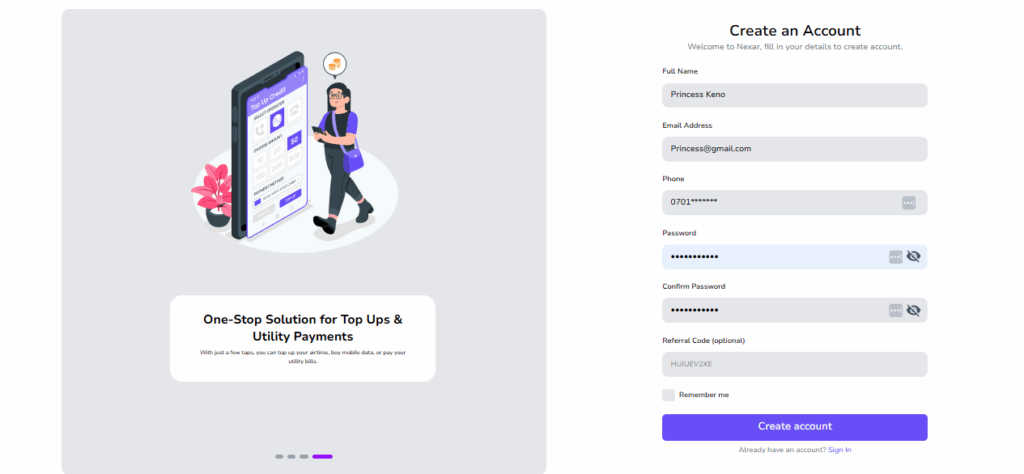
    1. Download the Nexar app from the Play Store or App Store, or sign up on the Nexar website.
    Farm crypto airdrops
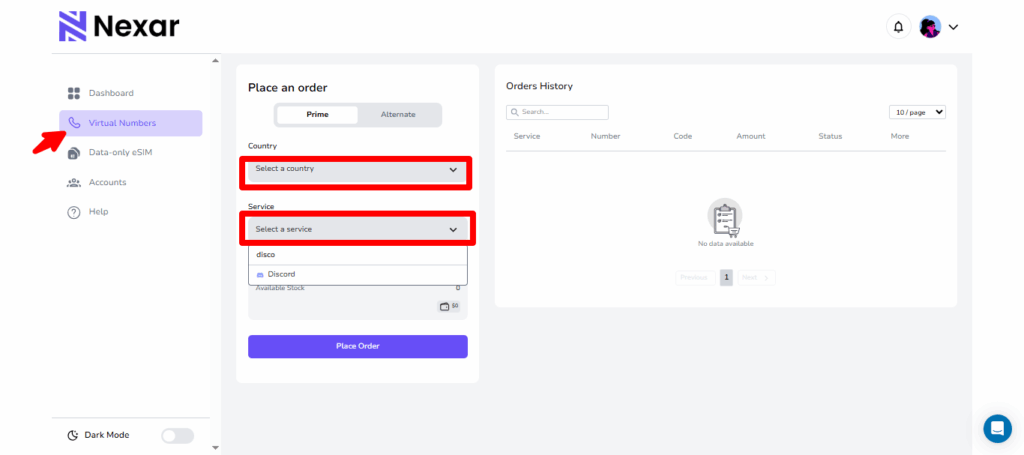
    2. Click on Virtual Numbers.
    3. Select your country of choice.
    4. Under Service, choose the app name (e.g., Telegram, Discord, X, etc.)
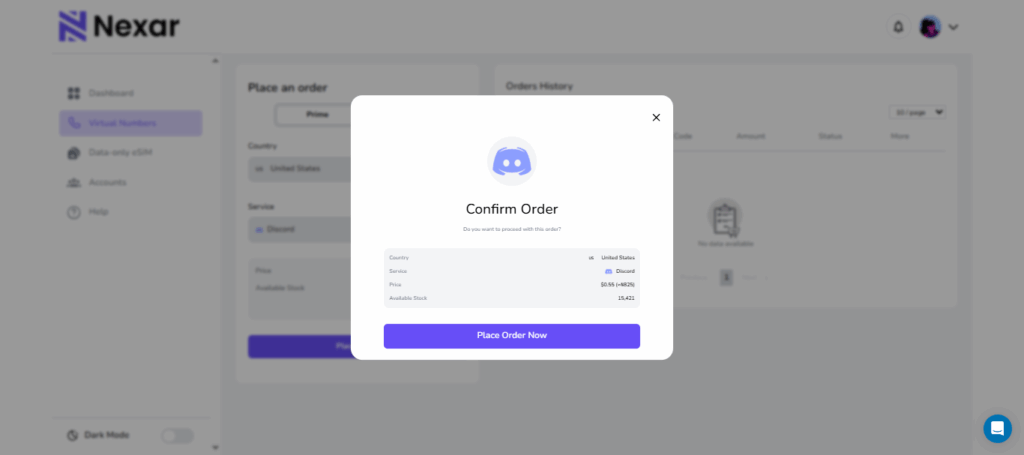
    5. Place your order.
    6. Copy the virtual number and enter it on the site for verification.
    7. Go back to your Nexar app to copy the OTP code and complete your setup.
    8. Start farming crypto airdrops and track your token rewards.

    Yes, it’s that easy! No extra set up or stress.

    Key Takeaways

    Airdrop Farming Explained:
    Farming crypto airdrops means earning free tokens by completing simple tasks like testing apps, joining Telegram groups, or following projects on X.

    Why Should You Avoid Using Your Personal Number?
    Using one number across multiple platforms can cause bans, leak your personal info, and limit how many airdrops you can join.

    How Nexar Virtual Numbers Help:
    They let you verify multiple accounts safely, access region-locked airdrops, and keep your real number private.

    Supported Platforms:
    You can use Nexar virtual numbers for Telegram, Discord, X (Twitter), and most crypto project sites that require phone verification (Check the Nexar app to see which ones are available).

    Getting Your Nexar Number:
    Download the Nexar app or visit the website → Tap the number icon → Choose your country → Select the service (like Telegram) → Place your order → Copy your OTP from the app and verify.

    Final Thoughts

    Airdrop farming remains one of the most accessible ways to earn free crypto, but success depends on consistency and scalability. Using virtual numbers from Nexar helps you manage multiple verified accounts, access more projects, and protect your privacy while doing it.

    With Nexar, you don’t just join airdrops; you farm smarter, scale faster, and earn more.

    To Get Started, visit Nexarhq.com now.

  • Nexar Becomes the First Platform to Offer Reusable Virtual Numbers

    When we rebranded from Shawn SMS to Nexar in May, it wasn’t just a name change. It was because we saw a need for more. We realized how many Africans struggle to access global digital resources, and we wanted to bridge that gap. So instead of offering only virtual numbers, we expanded to become your one-stop platform for all digital resources.

    Now, with eSIMs, gift cards, and social media boosting services, Nexar gives you the tools to stay connected, shop globally, and grow online — all in one place.

    And guess what? We just made your experience even better!

    This feature gives you the ability to resend verification codes and reuse virtual numbers without needing to purchase a new one every time. It’s a move that reflects our commitment to giving you more value, flexibility, and control over your online experiences.

    What Is a Reusable Virtual Number?

    A reusable virtual number is a virtual number that can be used multiple times to receive verification codes, authenticate accounts, or complete sign-ups across different platforms. Unlike traditional one-time-use numbers, reusable virtual numbers remain active and can be reassigned for future verifications.

    Before now, you could only receive a code from Nexar for a particular number once, but this innovation gives you more control over your online activities, allowing you to verify new accounts, manage multiple services, and stay connected without constantly purchasing new numbers.

    How the Resend Feature Works on Nexar

    It’s important to note that reusable doesn’t mean universal. You can reuse a virtual number for the same platform, but not across different ones.

    For example, if you used a number for WhatsApp verification, you can resend the code again for WhatsApp. But you can’t reuse that same number for Telegram or Facebook.

    This rule ensures the security of both users and platforms while keeping the system efficient.

    Step-by-Step: How to Use the Resend Feature

    1. Go to Nexarhq.com and sign up if you haven’t.
    Reusable virtual numbers

    2. Click on Virtual Numbers and click History.

    3. Click on the specific virtual number you want, then scroll to the end and click on the three dots (⋮)

    Resend Feature

    4. You’ll see two options — View or Resend.

    5. Click Resend and you’ll receive a new code in the app as usual.

    For a step-by-step visual guide, you can also watch our YouTube tutorial that walks you through the process.

    Difference Between Disposable and Reusable Virtual Numbers

    We have created a table to differentiate the previous virtual number model and the new one, for better understanding.

    FeatureDisposable Virtual NumberReusable Virtual Number
    UsageOne-time onlyMultiple times on same platform
    CostRequires new purchase each timeReuse at no extra cost
    FlexibilityLimitedHigh
    AvailabilityDeactivated after one useRemains active
    Ideal forOne-off verificationsContinuous account access

    Frequently Asked Questions (FAQs)

    1. Can I Receive a Code Twice from a Virtual Number?

    Yes, you can! That’s the entire point of Nexar’s reusable virtual number feature.

    If you ever need to verify your account again — say, WhatsApp asks for another confirmation. You don’t need to buy a new number. Just use the resend feature, and you’ll receive the code again instantly.

    This small but powerful improvement is changing how users interact with online platforms and manage digital identities.

    2. Can I use one number for all platforms?
    No. You can reuse your number for the same platform only, not across multiple ones.

    3. How do I resend a verification code?
    Go to NexarHQ → Virtual Numbers → History → Select number → Three dots (⋮) → Resend.

    4. Is there an extra cost for using the resend feature?
    No. You can resend for free.

    5. Where can I learn more?
    Visit Nexarhq.com or check our YouTube tutorial.

  • Verify Google Voice with Nexar Virtual Number: 5 Simple Steps

    If you want to enjoy the flexibility of Google Voice but don’t have a U.S. carrier number, you can still get started easily with Nexar. Many people face challenges during the sign-up process because Google requires a U.S.-based phone number for verification. With Nexar, you can get a Google Voice virtual number that works perfectly for verification, letting you create and use your account without stress.

    Verify Google Voice

    This guide walks you through how to verify Google Voice in just 5 simple steps using a Nexar virtual number. Let’s get started.

    Why You Need to Verify Google Voice

    Google Voice is a free service that lets you call, text, and manage voicemail across devices using a single number. But before you can use it, you must verify Google Voice with a valid number. This process confirms that you’re a real user, protects your account from spam, and enables features like call forwarding and recovery options.

    Without verification, you won’t be able to claim or use a Google Voice number. That’s where Nexar comes in providing you with a ready-to-use U.S. number designed for verification.

    How to Verify Google Voice in 5 Simple Steps

    Google voice virtual number

    Here’s how to complete the process with ease:

    1. Create or Sign in to Your Google Account

      Go to Google Voice or open the app and sign in with your Google account. If you don’t have one yet, create a new Google account first.
    2. Select a Google Voice Number

      Search by city or area code to choose the Google Voice number you want. Select once you’ve decided.
    3. Enter Your Nexar Virtual Number

      When prompted to verify, input the Google Voice virtual number you purchased from Nexar. This ensures you’ll receive the verification code successfully.
    4. Receive the Verification Code

      Google will send a 6-digit code to your Nexar number via SMS or call. Log into your Nexar account, check the dashboard, and copy the code.
    5. Complete the Verification

      Paste the 6-digit code back into Google Voice and click Verify. That’s it! You’ve now linked your Google Voice account with your Nexar number.

    Simple Tips for a Smooth Verification

    • Always use a U.S.-based virtual number from Nexar for reliable results.

    • Don’t share your Google Voice verification code with anyone.

    • If a number doesn’t work on the first try, request another one from Nexar and repeat the process.

    • Make sure you’re connected to the internet with a stable browser or app session.

    Why Should You Nexar for Google Voice Verification

    • Quick and reliable verification.

    • Protects your real number and privacy.

    • Works perfectly for setting up multiple accounts if needed.

    • Affordable and secure alternative to using personal SIM cards.

    Frequently Asked Questions (FAQs)

    1. Can I verify Google Voice outside the U.S.?

    Yes, but you’ll need a U.S. number and often a VPN. Nexar provides the virtual number required for this process.

    2. Can I use one Nexar number for multiple Google Voice accounts?

    No, each Google Voice account requires a unique number for verification.

    3. What happens if I lose my verification code?

    Simply request a new Nexar number and repeat the verification steps.

    4. Is using a Nexar virtual number safe?

    Absolutely. Nexar uses real carrier-backed numbers, making them secure and reliable for Google Voice verification.

    Important Notes for Creating a Google Voice Account

    • Don’t use the Google Voice app – it won’t work.
    • Weak VPNs like PIA or Windscribe will fail.
    • Make sure you’re using your browser and a very strong VPN like IPVanish.

    We only provide the number and code. We’re not responsible for registration issues and no refunds if the code is received.

    Need help? Watch this tutorial:

    Watch on YouTube


    If you found this guide helpful, you definitely need to check out our guide on how to use Nexar Virtual numbers for Gmail Verification. Read it here.

  • How to Get a Free Virtual Number for OTP in Nigeria (From 180+ Countries)

    If you’ve ever tried signing up for a platform in Nigeria and got stuck because you didn’t want to use your personal phone number, then you already understand the frustration. Maybe you just need a quick way to verify an account, test an app, or manage multiple accounts without mixing everything together. The good news? You can actually use a free virtual number for OTP to bypass all of that.

    In this guide, you’ll learn exactly how to get one, why people use them, the risks involved, and why sometimes paying for a secure option like Nexar is worth it.

    What is a virtual number and does it work?

    A virtual number is basically a phone number that isn’t tied to a physical SIM card. Instead, it works over the internet, allowing you to receive calls or SMS without needing a standard mobile line. Think of it like a digital layer of communication that sits on top of traditional networks.

    When you sign up for apps, websites, or online services, you’re often asked to verify your identity through OTP (One-Time Password). OTP is a short code, usually sent via SMS, that confirms you are the owner of the number you provided. Without OTP verification, many platforms simply won’t let you in.

    So when you combine these two concepts, a free virtual number for OTP allows you to receive those verification messages online without using your personal SIM. That’s why these numbers have become so popular in Nigeria, especially as more people try to manage multiple online accounts.

    Why you need a free virtual number for OTP in Nigeria

    There are so many reasons you might want a free virtual number for OTP instead of always relying on your main phone number.

    • Privacy protection: Maybe you don’t want your personal number floating around on multiple apps and websites. A virtual number keeps your real line private.
    • Temporary signups: If you’re testing out an app or signing up for a one-off promo, a virtual number saves you from cluttering your inbox with spam.
    • Testing digital products: Developers, marketers, and even business owners often need temporary numbers to test sign-up flows or see how OTP delivery works across platforms.
    • Separating accounts: If you manage personal and work accounts, a virtual number can help you separate them easily.
    • WhatsApp Business: Many people search for a free virtual number for Whatsapp because they want to run a second WhatsApp account for business without using their main line.
    • Multiple Telegram accounts: Since Telegram allows different numbers for separate accounts, a virtual number helps you keep things organized.

    In Nigeria where data privacy isn’t always guaranteed and scams are common, using a virtual number can feel like a shield between your real identity and the internet.

    Websites to get a free virtual number for OTP and how to get them

    Now, let’s get into the practical part. Where can you actually find a free virtual number for OTP verification?

    There are several online platforms that provide free numbers. Some popular ones include:

    • Receive SMS Online: Offers temporary numbers you can use to receive OTPs. You just pick a number from the list, copy it, and check the messages section for your OTP.
    • SMS24.me: Another site with multiple country options. You can refresh the page to see if your OTP has arrived.
    • FreePhoneNum.com: This is focused on US and Canadian numbers but can work for certain services that accept international numbers.
    • ReceiveFreeSMS.com: Provides a list of numbers that anyone can use at the same time, which makes it quick but also risky.

    How it works is simple:

    1. Visit one of these sites.
    2. Pick a number from the available list.
    3. Enter that number on the app or site where you need verification.
    4. Wait for the OTP to show up in the shared inbox.
    5. Copy it and complete your sign-up.

    It’s that easy, but keep in mind, these numbers are public. Anyone can see the messages, which is why you shouldn’t use them for sensitive accounts.

    Free vs Paid Virtual Numbers

    At first glance, using a free virtual number for OTP verification looks perfect. You don’t spend money and you get access instantly. But here’s the catch: free comes with serious trade-offs. Here’s a comparison between both:

    • Reliability: Free services may not always deliver OTPs on time. Some platforms even block free numbers entirely. Paid services like Nexar guarantee faster delivery because they maintain real partnerships with carriers.
    • Permanence: With free sites, numbers change frequently. You might use a number today and find it gone tomorrow. With Nexar, your paid number stays yours. We have a resend feature where you can request for codes again from numbers you’ve bought previously.
    • Delivery speed: OTPs on free sites can delay for minutes or sometimes never arrive at all. Paid services prioritize OTP delivery so you don’t get stuck.
    • Support: Free platforms don’t have customer support. If your OTP doesn’t come through, that’s it. Paid providers like Nexar offer support to help troubleshoot issues.

    So yes, free numbers can work in the short term. But for business, long-term projects, or accounts you can’t afford to lose, it’s safer to choose a paid service. Nexar, for example, offers affordable virtual numbers designed for Nigerians who want stability and reliability.

    Risks and downsides to using free virtual numbers

    Before you rush to pick any free virtual number in OTP sites, you should understand the risks. These are not private lines, and that makes them very risky for important accounts.

    • Message delays: Your OTP might arrive late, causing you to lose access or fail signup.
    • Reuse by others: Since numbers are public, multiple people may use the same number at once, leading to account mix-ups.
    • Leaked numbers: Because messages are visible to everyone, your OTP can be copied by someone else.
    • Account lockouts: Some apps flag free numbers and ban them, meaning you lose your account access.
    • Service bans: Platforms like WhatsApp or Telegram often block numbers from free services.

    Here’s a practical tip: never use a free number for banking apps, payment services, or anything that contains sensitive personal data. It’s not worth the risk. Free numbers are best for temporary accounts you don’t mind losing.

    How to Get an Affordable Virtual Number for OTP from Nexar

    If you want reliability without breaking the bank, Nexar is a smart choice. Nexar gives you affordable virtual numbers that are built for long-term use in Nigeria.

    Here’s why Nexar stands out:

    • You get a dedicated number that belongs only to you.
    • OTP delivery is fast and secure, so you don’t waste time refreshing inboxes.
    • Our virtual numbers are reusable. You can request a code again from a number you b
    • Affordable pricing makes it accessible even if you’re just starting out.

    TO GET STARTEED:

    1. Open nexarhq.com on your web browser

    Free virtual number for OTP

    2. Create Your Account

    3. Select Virtual Number

    Select the country and service you want.

    4. Place your order and pay.

    5. Copy the number and enter it into the app you’re verifying.

    6. Get your OTP instantly in Nexar.

    Conclusion

    Getting a free virtual number for OTP can be very useful when you need quick access for temporary sign-ups, testing, or keeping your personal number safe. But as you’ve seen, free comes with risks: delayed messages, lack of privacy, and no guarantee that your account will remain secure.

    If your goal is short-term convenience, free sites can work. But if you’re thinking long-term, especially for important accounts like WhatsApp Business or Telegram, it’s better to go with a reliable provider like Nexar. Paid doesn’t just mean money; it means peace of mind, privacy, and consistency. Click here to get started.

    Frequently Asked Question

    Q1: Can I get a free virtual number for Whatapp?
    Yes, you can, but keep in mind that virtual numbers are often flagged by WhatsApp Business. We suggest you stick to Whatsapp messenger as Whatsapp business gets banned easily. But by connecting to a strong VPN and following WhatsApp’s TOS, you should be good.

    Q2: Are free virtual numbers in OTP verification safe?
    They are safe only for low-stake accounts like testing platforms or temporary sign-ups. Never use them for banking, email, or personal accounts.

    Q3: Why didn’t my OTP arrive on a free virtual number?
    Free services are unreliable. Sometimes the number is overloaded or blocked by the platform you’re signing up for.

    Q4: How much does a virtual number from Nexar cost?
    Nexar offers very affordable packages tailored for Nigerians. Pricing depends on your needs, but it’s significantly cheaper than losing access to an important account.

    Q5: Can I keep one number permanently with Nexar?
    You can always request codes for a number you’ve bought. Our virtual numbers are reusable.